SAMO E2E Testing — how to learn, write, test
What? Why? Who?
The idea in one sentence: write a test as a plain-language story, let a real browser act it out against a real SAMO backend, and let the test data create and clean up after itself — so every test stays readable, realistic, and repeatable.
What — What is it?
A ready-made end-to-end testing stack for SAMO. It combines two proven open-source tools with our own SAMO data layer into one workflow, each owning one part of the story:
- Gherkin / Cucumber — describes each test as a short story anyone can read: Given prepare 1 employee, When I open the detail, Then the info section is shown.
- Playwright — acts that story out in a real browser, clicking through the application exactly the way a user would.
- The factory-bot — prepares the data the story needs and removes it again afterwards, by calling the very same SAMO API the application itself uses.
The principle that ties it together: no mocks, no stubs, no fake database. Every test runs against a real, running SAMO instance, so a passing test proves the application genuinely works — not just that a fake returned the expected answer.
Why — Why it matters
- Tests everyone can read. A scenario is plain language, not code, so analysts, customers, and developers all read the same thing. Acceptance criteria are written once and run as-is.
- Every test brings its own data. The factory-bot creates exactly what a scenario needs and deletes it when the scenario ends — over the same API the application uses. No shared fixtures, no leftover state, no "it failed yesterday and passed today".
- Real behaviour, real confidence. Because everything runs against the real backend, green means the feature actually works end to end — through the UI, the API, and the data layer.
- Fast feedback, even in parallel. Self-contained data lets many scenarios run at the same time without colliding, turning a suite that would take hours into minutes.
- A report for every run. Each run produces an HTML report; a failed scenario attaches a screenshot, a video, and an interactive Playwright trace you can replay click-by-click — so you diagnose it without re-running anything.
- Starts from a template. Partners fork ready-made starter templates and grow them into a suite tailored to their own SAMO deployment — with no vendor lock-in, just Cucumber, Playwright, and TypeScript.
Who — Who is it for?
- Partners integrating SAMO who need regression confidence on every deployment of their installation.
- QA engineers who want to write tests in a readable language while keeping the full power of real automation.
- Developers who want a green-or-red verdict on a change in minutes, not half a day of manual clicking.
- Product owners and analysts who want to read — and comment on — acceptance scenarios without having to understand code.
How it works
Three things glued together. Cucumber / Gherkin describes each test as a short story in plain English (Given prepare 1 employee, When open detail, Then info detail is displayed). Playwright drives a real Chromium browser through that story against the SAMO UI. A factory-bot creates the backend data the story needs and deletes it again after — over the same LIDS/LAS HTTP API the application uses.
Because the scenarios are written in plain language, they double as living documentation: the same .feature files describe how the application is supposed to behave and are executed as tests. The specification can never quietly drift away from the product — if the behaviour changes, the scenario fails until it is updated, so the documentation stays true by construction.
The factory-bot is the piece that distinguishes this stack from a generic Cucumber + Playwright setup. Each scenario starts with its own clean dataset that nothing else has touched, scenarios run in parallel without colliding, and the backend stays clean even when a test fails halfway through.
Every run produces an HTML report (reports/index.html) listing each step in each scenario with timings. Failing scenarios attach a full-page screenshot, a video of the run, and a Playwright trace — the trace is an interactive replay of every DOM mutation, network request, and console message, so you can step through a failure exactly as it happened without re-running the test.
Key terms & tools
If any of these are unfamiliar, skim the linked introduction before diving deeper. This document assumes you know what each one is:
- Cucumber — the BDD framework that maps each Gherkin step to a function and runs them in order. We use Cucumber-JS.
- Gherkin — the natural-language syntax for
Given … When … Then …scenarios that Cucumber parses. Gherkin reference. - Playwright — the browser-automation library that drives a real Chromium against the SAMO UI. playwright.dev — especially Locators and the Trace viewer.
- BDD (Behavior-Driven Development) — a collaborative approach to writing executable specifications in plain language. Intro at school.cucumber.io.
- Faker — generates realistic dummy data (names, emails, addresses, …) inside factory templates. fakerjs.dev.
Architecture at a glance
┌──────────────────────────────────────────────────────────┐
│              @samo-tools/samo-factory-bot                │  upstream library
│   LASFactory · SecurityManagerFactory · UserService…     │  API client, metadata,
│   FeatureInstance · RollbackManager · codelist helpers   │  rollback, codelists
└──────────────────────────┬───────────────────────────────┘
                           │ extends
        ┌──────────────────┴──────────────────┐
        ▼                                     ▼
┌────────────────────────────┐    ┌────────────────────────────┐
│ samo-template-factory-bot  │    │ samo-demo-factory-bot      │
│ STARTER scaffold           │    │ SAMO Demo data layer       │
│ !partners fork this!       │    │ ~50 templates, DO NOT fork │
└────────────────────────────┘    └────────────────────────────┘
                                                 │
                           ┌─────────────────────┴────────────────────────┐
                           │           imports a factory-bot              │
                           ▼                                              ▼
              ┌────────────────────────────┐         ┌──────────────────────────┐
              │ e2e-samo-template          │         │ e2e-samo                 │
              │ STARTER scaffold           │         │ Reference E2E suite for  │
              │ !partners fork this!       │         │ SAMO Demo, DO NOT fork   │
              │ @smoke + @login + 3 demo   │         │ ~20 feature files        │
              └────────────────────────────┘         └──────────────────────────┘
                           │
                           ▼ partners build:
              ┌─────────────────────────────────────────────────────┐
              │ samo-<yourorg>-factory-bot   +   e2e-<yourorg>      │
              │ (your forks, published / deployed against your SAMO)│
              └─────────────────────────────────────────────────────┘
Key principle: partners fork the two starter templates (samo-template-factory-bot, e2e-samo-template). They use samo-demo-factory-bot and e2e-samo as pattern libraries to copy structural ideas from, never as fork bases — those carry SAMO Demo-specific feature types and codelists.
The five repositories
samo-factory-bot— upstream npm library: API client, metadata fetch, rollback engine, codelist cache. Authoritative API reference. Use as a dependency.samo-template-factory-bot— starter scaffold for factory-bots. Ships one example template + 3 commented patterns + a rename/register/publish checklist. Fork as starter.samo-demo-factory-bot— SAMO Demo data layer with ~50 templates (employee, building, hydrant, parcels, electrical infrastructure). Reference and pattern library. Copy patterns from; do not fork.e2e-samo-template— starter scaffold for E2E suites. Cucumber + Playwright wiring,@smoke(credentials-free),@login, and one factory-bot demo scenario. Fork as starter.e2e-samo— reference E2E suite for SAMO Demo (~20 feature files). Houses the fullPARTNER_GUIDE.md. Copy patterns from; do not fork.
Prerequisites
Software
| Tool | Minimum version | Where to get it |
|---|---|---|
| Node.js | LTS | nodejs.org |
| npm | ships with Node.js | comes with Node.js — verify with npm -v |
| Git | any recent | git-scm.com |
| Code editor | VS Code is what most of the team uses | code.visualstudio.com |
💡 On Windows, the commands in this guide are tested in Git Bash (installed with Git for Windows). We cannot guarantee that everything works in PowerShell.
SAMO npm registry
npm install pulls the @samo-tools/* packages from the samo-npm registry. Add the following to the .npmrc file in your home directory:
always-auth=true
registry=http://nexus/repository/samo-npm/
A running SAMO environment
You need a SAMO instance that the tests can connect to. That means:
- A reachable HTTPS URL (for example
https://your-sandbox.samo-kube.internal/). - Valid credentials (a dev user and a test user).
- The LIDS, UserService, and Codelist endpoints exposed by the SAMO backend.
Access to the five repositories
You will need git clone access to:
samo-factory-bot(if you plan to read or contribute to core changes; most partners just consume it as an npm package).samo-demo-factory-botsamo-template-factory-bot(you fork this to create your own factory bot).e2e-samoe2e-samo-template(you fork this to create your own test suite).
The npm packages are hosted on a samo-npm registry — ask your SAMO contact for credentials if you cannot reach it.
Recommended VS Code extensions
When editing this repo in VS Code, install the following extensions — they give syntax highlighting, step-definition jump-to, and inline test runners for the three tools this stack is built on:
- Vitest Explorer — test runner UI in the sidebar.
- Cucumber (Official) — Gherkin syntax highlighting, autocomplete, and Ctrl+Click navigation from
.featuresteps to their TypeScript step definitions. - Playwright Test for VSCode — run/debug individual Playwright tests from the editor, record selectors, and inspect traces.
Five-minute check (use Git Bash)
- Clone the
e2e-samo-templateandsamo-template-factory-botrepositories. - In
e2e-samo-templaterunnpm installandnpx playwright install. - In
samo-template-factory-botrunnpm install. - Confirm the installation succeeded.
- In
e2e-samo-templaterunnpm run testLocal. The test will fail, but the browser must open.
Known issues
- Playwright browser missing. Run
npx playwright install chromium. - Command not found (e.g.
npmornodenot recognized after install). Reopen the terminal so it picks up the updatedPATH; if that doesn't help, restart the computer. - SSL / certificate errors. Add
strict-ssl=falseto your.npmrcfile. - Shell. Use Git Bash for the workshop — do not use PowerShell.
- Cleanup. After testing, remove the entries you added to
.npmrc(or delete the file entirely if you didn't have one before).
Adoption — four phases
Adoption is split into four phases. The first two are the core path everyone follows; the last two are optional and build on top:
- Phase A — Clone and customize the E2E suite. Get the
e2e-samo-templatesuite running against your sandbox, prove the wiring with the smoke ladder, then write your first Gherkin scenarios and step definitions. - Phase B — Clone the factory-bot template. Add the factory-bot so scenarios create their test data directly via the backend API (and roll it back automatically) instead of clicking through the UI — shorter, faster, deterministic tests.
- Phase C — Wire into CI (optional). Run the suite automatically in GitLab CI, using the reference deploy → test → destroy pattern on a per-MR Kubernetes namespace.
- Phase D — AI-first development with Claude Code (optional). Drive test creation with an AI coding assistant via the
.claude/agents and the/e2e-test-cycleloop — only after you can read and review the generated code yourself.
📖 How to read these phases. Clone the starter repos and learn against them first — write your scenarios, register your templates, watch the tests go green. Fork (rename, publish under your org name) only once that work is stable. The "Forking and publishing…" callouts at the end of Phases A and B explain the rename step when you get there.
Phase A — Clone and customize the E2E suite
-
Clone
e2e-samo-template. -
Commnads
npm installandnpx playwright installwas already runned (the second one downloads the Chromium binary — skipping it is the #1 cause of "the browser doesn't open" in step 4). -
Configure
.envfor your SAMO sandbox (URLs + credentials) — see.env.examplefor the required variables. -
Run the smoke ladder — three runs in order, each proves the layer below it is wired correctly. If one fails, fix it before moving on:
npm run testTag @smoke— credential-free wiring check. Proves Cucumber, Playwright, and the browser are talking.npm run testTag @login— runs the login scenarios. Proves your.envURL and credentials are correct.npm run testLocal— runs the full bundled suite, including one factory-bot demo scenario. Proves the factory-bot can reach the backend API.
After each run,
reports/index.htmlopens with a per-scenario breakdown.
Creating your own tests 🚀
Once the bundled scenarios pass, you can start writing your own:
-
Create a
*.featurefile that holds the scenarios for the feature you're testing. -
Create a matching step-definitions file. Keep one step file per feature file where practical, and write each step so it can be reused across scenarios — the same step in many places prevents duplication.
-
Record raw actions interactively with Playwright codegen, and use the recorded code as a starting point for your step implementations. The command must be pasted directly into your shell (it cannot be run via npm scripts):
npx playwright codegen 'https://example.com/#cockpit/login' --ignore-https-errorsWhat this does:
codegenopens a real Chromium window pointed at the URL you pass, together with a second Playwright Inspector window. As you click, type, and navigate in the browser, Playwright watches what you do and writes the matching Playwright code live in the Inspector — picking a locator for each element. When you're done, you copy that generated code out and adapt it into your step definitions; it gives you the selectors and API calls without having to hand-write them.Codegen only records the browser interactions — it has no idea about your backend data. You still prepare data through the factory-bot and structure the result into reusable Gherkin steps; treat the generated code as a draft of the UI actions, not a finished test.
-
Keep scenarios independent. Each scenario must set up its own initial state (via
BackgroundorGivensteps) and must not rely on the outcome of any other scenario. This is what makes tests reliable, runnable in any order, and safe to parallelise — without it you get flaky, hard-to-debug suites.
Exercise: Employees scenario
ℹ️ Forward reference — don't get stuck on it. Near the end of this exercise we'll point at
samo-factory-botas the answer to a cleanup problem. You haven't seen it yet — that's Phase B's topic. For now, treat it as a black box: a helper that creates entities directly via the backend API and deletes them after the test finishes. The exercise stands on its own without knowing the details.🔧 URLs and credentials in the snippets below are our internal sandbox (
dynamic-app-e2e-test.samo-kube.assecosk.local). When working through the exercise on your own SAMO instance, substitute the URL and credentials already in your.env.
Start by looking at login.feature, which contains the login scenarios. The step implementations live in login.ts and navigation.ts. It's a good starting point for understanding how Playwright and Cucumber work together.
🎯 Your goal. Build a scenario that creates a new entity and verifies its detail page contains a specific section (e.g. related list).
You have two options:
- Write the steps and their implementation by hand — requires some prior knowledge of Cucumber and Playwright.
- Record the test with
npx playwright codegen— Playwright captures your actions and generates the code for you.
The naive approach is to take the recorded code, drop it into a single step, and call that one step from the feature file. It would look something like this:
Then('employes info detail contain related list', async function (this: CustomWorld) {
    // Fill password and login instead "****"
    const page = this.page!;
    await page.goto(
        'https://dynamic-app-e2e-test.samo-kube.assecosk.local/samo/a/demo/c/demo-dynamic-client/#cockpit/login'
    );
    await page.getByRole('textbox', { name: 'User name' }).click();
    await page.getByRole('textbox', { name: 'User name' }).fill('****');
    await page.getByRole('textbox', { name: 'Password' }).click();
    await page.getByRole('textbox', { name: 'Password' }).fill('****');
    await page.getByRole('button', { name: 'LOG IN' }).click();
    await page.locator('#cockpit-common-bs-components').getByText('Common Components').click();
    await page.getByText('Employees').click();
    await page.getByRole('button', { name: 'Activity Cart' }).click();
    await page.getByRole('textbox', { name: 'Personal number' }).click();
    await page.getByRole('textbox', { name: 'Personal number' }).fill('54321');
    await page.getByRole('button', { name: 'Create', exact: true }).click();
    await expect(page.getByText('Qualification 0')).toBeVisible();
});
  Scenario: Open employes info detail and check if has related list section
    Given employes info detail contain related list
This approach will technically work, but it's very hard to debug — there's only one step, so when something breaks you have no idea where in the flow it failed. It also violates BDD and Gherkin conventions: the locator scope is far too wide, and even a small change in test data can break the whole test.
The fix is to split the single large step into several smaller, reusable ones. The scenario becomes more readable, more flexible, and far easier to debug:
  Scenario: Check that employes info detail have related list section
    Given the user is logged into SAMO
    And open section "Common Components" and subsection "Employees"
    And open the dialog to create a new entity
    And fill the information in the dialog with:
      | Personal number |
      |           12345 |
    And confirm the action "CREATE" in the dialog
    Then info detail contain "related-entity-list" section with title "Qualification"
This scenario is much clearer. Anyone reading it can immediately see what happens during the test. When the test fails, you can pinpoint the exact step that broke — which makes debugging dramatically easier. However, there is still a disadvantage in that the data remains in the environment, cluttering up the database. The answer to this problem are samo-factory-bot library.
Compare these two scenarios in the generated reports.
Try implementing the steps yourself first, or peek at the existing implementations in the *.ts files for reference.
💡 Want to customise the suite for your own project? Fork
e2e-samo-templatease2e-<yourorg>— see the "Forking and publishing your own suite" pattern below (the same idea applies to the factory-bot in Phase B).
Phase B — Clone the factory-bot template
- Clone
samo-template-factory-bot. - Read the
README.mdof the project and skim the source — files contain inline comments explaining the structure. Also read theREADME.mdofsamo-factory-botto understand the base concept (API client, metadata, rollback). - Run
npm install. - Configure
.envfor your SAMO sandbox (URLs + credentials) — see.env.examplefor the required variables. - Run
npm test. The bundled tests should pass against your environment.
The key file is src/models/las-template-factory.ts — it holds template definitions whose attribute values are generated with Faker. Each template should have its own test in the tests/ folder.
💡 While developing locally, you can wire your clone into
e2e-<yourorg>vianpm link— no publishing required. See "Forking and publishing your own factory-bot" below for the ship-it path.
How to create your own template
Register a new template by calling registerTemplate(name, featureType, attributes) in las-template-factory.ts:
name— the template name you'll reference from Gherkin scenarios.featureType— the real feature type code in your SAMO backend (e.g.ft_org_customer).attributes— an object mapping attribute names to value generators (typically Faker calls).
The easiest way to discover which attributes and values to put in a template is to create the entity manually in your environment and watch the network traffic in browser DevTools. Find the request that creates the entity and copy the required attributes into your template.
Then write a test that creates an entity from your template to confirm it works. Remember that the test both creates the data and automatically rolls it back afterwards — that is the essential concept and the main advantage of the factory-bot.
Using a template in a scenario
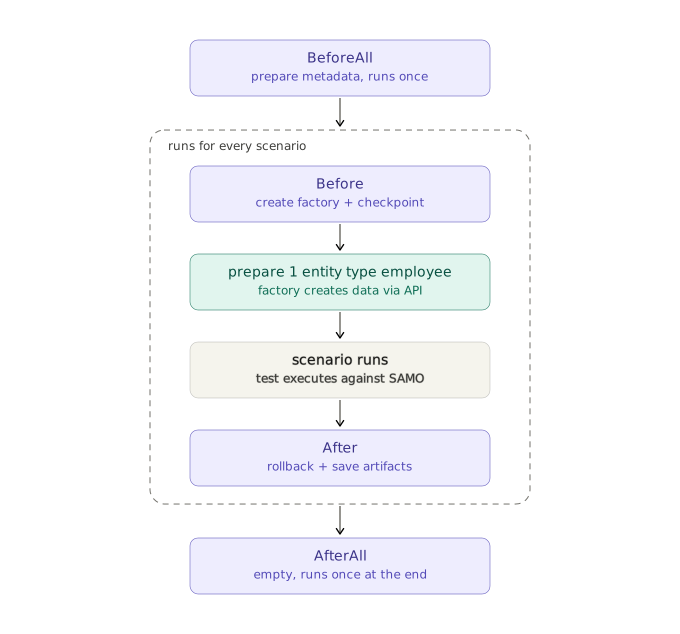
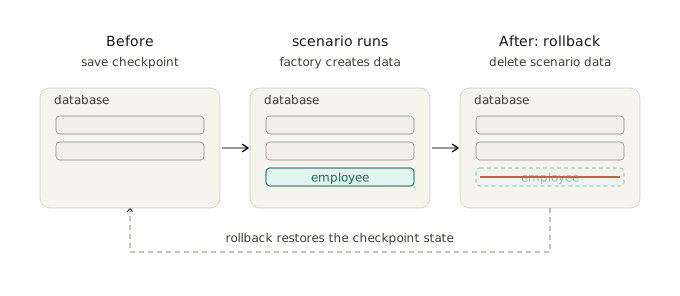
The e2e-samo-template suite already ships with the factory-bot wired in — the magic happens in hooks.ts. The Before hook runs before every scenario: it initialises the factory and creates a rollback checkpoint. The After hook runs after every scenario: it saves the report and rolls back to that checkpoint, which deletes every entity the scenario produced.
For a working example, look at employees.feature, which uses the step prepare 1 entity type "employee" — here employee is the name of a registered template.
In the previous exercise we built the scenario "Check that employes info detail have related list section". The block that manually clicks through the create dialog:
    And open the dialog to create a new entity
    And fill the information in the dialog with:
      | Personal number |
      |           12345 |
    And confirm the action "CREATE" in the dialog
can be replaced with a single factory-driven step:
Given prepare 1 entity type "employee"
Why this is better:
- Shorter scenarios — fewer steps, better readability, and you avoid cluttering the scenario with setup that isn't the point of the test.
- Faster — a direct API request is dramatically faster than clicking through a create dialog in the UI.
- Automatic rollback — you don't have to worry about cleanup. Whatever the scenario creates is also deleted, so tests stay deterministic and isolated.
Lifecycle of an E2E test with the factory-bot
BeforeAll runs once at the start of the run to prepare metadata. Then every scenario runs through the same self-contained cycle: the Before hook creates the factory and a rollback checkpoint, the prepare … entity step lets the factory create your test data through a fast API call, the scenario executes against SAMO, and the After hook rolls everything back — deleting all data the scenario produced and saving artifacts. Each scenario therefore starts from a clean, isolated database. Finally AfterAll runs once at the end of the run.
What "rollback" actually does — and what it doesn't: the factory does not snapshot the database or dump and restore it. Instead, every time it creates something through the API, it remembers how to undo that one creation — it registers a delete callback for exactly the entity it just made (and for its attachments, if any). These undo actions pile up on a stack, and the checkpoint taken in the Before hook simply marks where the current scenario's actions begin. When the After hook rolls back, the factory replays those undo callbacks in reverse order (last created, first deleted), firing a DELETE request for each entity it created. The net effect is as if the scenario's data had never existed — but it is achieved by deleting precisely what the factory made, not by reverting the whole database. Anything the factory didn't create is never tracked and never touched.
Forking and publishing your own factory-bot 📦
Once your templates are stable and you want to ship the factory-bot under your own org name (and stop pretending to be @samo-tools/samo-template-factory-bot), do the rename and publish in one go:
- Fork
samo-template-factory-botassamo-<yourorg>-factory-bot. - Rename the package in
package.json: updatename,description,repository, andpublishConfig.registryto point at your org. Rename the main factory classLASTemplateFactory→LAS<YourOrg>Factory(and update its imports and tests). - Register the templates for your backend's feature types (carry over the work you did during the clone phase).
- Build, publish, and swap the dependency. Run
npm run build && npm publishto push to your registry, then ine2e-<yourorg>replace@samo-tools/samo-template-factory-botwith@yourorg/samo-<yourorg>-factory-botinpackage.jsonand in the imports infeatures/support/{factory,hooks}.ts.
⚠️ The rename in step 2 breaks the dependency in
e2e-<yourorg>until you also do step 4 — plan the two changes as a single coordinated commit pair.
Phase C — Wire into CI (optional)
The starter templates ship a GitLab CI config with secret detection, Prettier, and lint already wired in. Add an e2e-test job once you have a deployed backend, or build your own pipeline. The reference pattern (deploy → test → destroy on a per-MR Kubernetes namespace) is in e2e-samo/.gitlab-ci.yml.
Phase D — AI-first development with Claude Code (optional)
⚠️ Don't start here. Work through Phases A and B by hand first. The AI loop generates Gherkin + Playwright code quickly — but if you can't yet read it and spot violations of BDD/Cucumber/Playwright conventions, it will move you forward in directions that look right and aren't. The AI agents and the cycle are still under active development. They can produce broken code, miss conventions of our test libraries, or violate well-known BDD, Playwright, Cucumber, and Gherkin patterns. Always review the generated code before committing.
ℹ️ Lives only in the
e2e-samorepository. The AI tooling (.claude/folder, slash commands, agents) is in this reference suite —e2e-samo-templateand partner forks do not ship it. To use it in your owne2e-<yourorg>, copy.claude/,AGENTS.md, andCLAUDE.mdover and adapt to your project.
The repository is set up to be driven by an AI coding assistant (we use Claude Code, but the same files work for Codex, Cursor, and others). Two entry-point files brief the AI on the project, and a .claude/ folder ships the agents, skills, and shared knowledge that make the loop work.
Entry points:
AGENTS.md— canonical project manual: structure, build commands, coding style, env, gherkin quality scripts. Read by any AI assistant at session start.CLAUDE.md— Claude-Code-specific orchestration: which subagents to use, communication rules, the team-knowledge promotion flow. ReferencesAGENTS.mdso the two files don't duplicate.
.claude/ folder:
.claude/skills/— reusable playbooks invoked via slash commands. The headline one is/e2e-test-cycle [component](e2e-test-cycle) — a bounded retry loop that generates → runs → fixes → optimises → verifies an E2E test, with git checkpoint and rollback support. Other skills cover conventions, debugging, optimisation, and Playwright patterns..claude/agents/— three specialised subagents the cycle dispatches to:e2e-test-writer— creates or fixes Gherkin scenarios and step definitions.e2e-test-runner— runs the test, parses output, diagnoses failures.e2e-code-reviewer— reviews the current branch for BDD/quality issues.
.claude/rules/samo-e2e-knowledge.md— human-curated team knowledge: component gotchas, failure patterns, optimisation tradeoffs. Auto-loaded into every session that touches E2E files..claude/agent-memory/— per-agent notepads, also committed to git. Each subagent writes its own observations during runs; team-valuable insights are promoted into team rules at the end of the cycle.
Both tiers of knowledge are in git, so git pull gives teammates not just code but also the AI's accumulated tactical knowledge about your suite.
The typical loop:
you: /e2e-test-cycle <component>
       │
       ▼
e2e-test-writer  → generates feature + step defs
       │
       ▼
e2e-test-runner  → runs, parses, fixes (bounded retries)
       │
       ▼
e2e-test-optimizer → trims redundancy
       │
       ▼
verify + promote insights → team rules
You can interrupt with Esc at any time and take over manually. Even without the full cycle, you can call individual agents (e.g. ask e2e-code-reviewer to review your branch before commit).
Practical example
End-to-end: register a template, use it in a Gherkin scenario, roll it back.
1. Register a template in your factory-bot
In samo-<yourorg>-factory-bot/src/models/las-<yourorg>-factory.ts:
import { LASFactory } from '@samo-tools/samo-factory-bot';
import { faker } from '@faker-js/faker';

export class LASOrgFactory extends LASFactory {
    static async init(apiUrl: string, auth: string, metadata?: MetadataAllResponse) {
        const instance = new LASOrgFactory(apiUrl, metadata, auth);
        await instance.registerTemplates();
        return instance;
    }

    async registerTemplates() {
        this.registerTemplate('customer', 'ft_org_customer', {
            at_customer_name: () => faker.company.name(),
            at_customer_vat_id: () => faker.finance.accountNumber(9),
            at_customer_email: ({ attr }) =>
                faker.internet.email({ company: attr.at_customer_name as string }),
        });
    }
}
Build and publish: npm run build && npm publish.
2. Use it in a Gherkin scenario
In e2e-<yourorg>/features/scenarios/customers.feature:
@acmeCustomers
Feature: Customer detail

    Background:
        Given the user samo is logged into SAMO

    Scenario: Open a customer from the list
        Given prepare 1 entity type "customer" with attributes:
            | at_customer_name | Acme-{SCENARIO_UNIQUE_ID} |
        And open section "Customers" and subsection "All customers"
        And add to the end of URL "!search=at_customer_name:Acme-{SCENARIO_UNIQUE_ID}"
        When open 1 entity from list
        Then info detail was displayed
Most step definitions you need (prepare N entity type …, open section … and subsection …, add to the end of URL …, open N entity from list, info detail was displayed) ship reusable in the starter.
🧩 What is
{SCENARIO_UNIQUE_ID}? It's a placeholder that the test framework (Cucumber'sCustomWorldinfeatures/support/world.ts) substitutes at runtime with a short unique value per scenario instance — typically a 6–8 character random suffix. So the literalAcme-{SCENARIO_UNIQUE_ID}becomes something likeAcme-a3f2b1in one run andAcme-7d9e4cin another.Why it matters: when scenarios run in parallel (cucumber.json defaults to
parallel 3), two scenarios creating an entity calledAcmewould collide on a unique-name constraint and one would fail. The placeholder guarantees that every parallel scenario sees a name nothing else has ever used. Use it in any attribute, URL filter, or label that must be unique across the test run.
3. Checkpoint and rollback (already wired in the starter)
In features/support/hooks.ts (shipped, no edits needed beyond the import swap):
Before(async function (this: CustomWorld, scenario) {
    this.factory = await LASOrgFactory.init(getLidsUrl(), getSamoAuth(), CustomWorld.allMetadata);
    this.factory.checkpoint();
    await this.createPage();
});

After(async function (this: CustomWorld) {
    if (this.factory) {
        await this.factory.rollbackSequentially(1);
    }
    await this.closeBrowser();
});
checkpoint() marks the rollback boundary at the start of every scenario; rollbackSequentially(1) deletes every entity created since that mark, in reverse creation order. Sequential is the default — safer for linked records, predictable failure, kinder to the backend than rollbackAll() (parallel). See PARTNER_GUIDE §9.4 for the full rationale.
4. Run & Report
npm run testLocal
A Chromium window opens and steps through every scenario in your suite. To run only a single tag while iterating, use npm run testTag @acmeCustomers.
After the run, reports/index.html opens an interactive HTML report rendered by multiple-cucumber-html-reporter: pass/fail summary per feature, per-scenario step breakdown with durations, embedded screenshots on failure, and download links for the video and Playwright trace. Drag the trace .zip onto trace.playwright.dev (or run npx playwright show-trace …) for a full interactive replay of the failed scenario.
Troubleshooting
A handful of issues catch most newcomers. If you hit something not listed here, ping your SAMO contact or open an issue in the relevant repo.
npm run testLocalopens nothing / the Chromium binary is missing. You skippednpx playwright install. Run it once afternpm install.npm testfails withunable to verify the first certificate/ TLS error. Your sandbox uses a self-signed certificate. The starter tests already setNODE_TLS_REJECT_UNAUTHORIZED=0inbeforeAll; if you're calling the factory from your own script, set the same env var. Never do this in production code.- Test passes but every created entity has the same name / value. You used a bare
faker.x()instead of() => faker.x()in the template. Bare faker calls are evaluated once at registration; wrap them in a function so they re-run percreate. See AGENTS.md → "Lazy vs eager". - Playwright codegen opens a blank page / login redirect loops. Pass
--ignore-https-errorstonpx playwright codegen— the SAMO sandbox certificate isn't trusted by Chromium's default profile. prepare 1 entity type "..."step fails with "template not registered". The name in the Gherkin step must exactly match the first argument ofregisterTemplate(...). If you're linking your factory-bot locally, rebuild it (npm run build) and re-link before re-running the suite.- Rollback leaves data behind. Something was created outside the factory (e.g. a direct HTTP call, or
createLinkDocumentwhich intentionally bypasses rollback tracking). Anything that doesn't go throughfactory.create(...)is not tracked — register a_with_<x>template variant that useshooks.after_createinstead. - Scenarios pass alone but fail when run in parallel. Two scenarios are reading or writing data by the same name. Use the
{SCENARIO_UNIQUE_ID}placeholder in attribute values that need to be unique across scenarios — see the e2e-samo library. - Backend returns 404 for
/api/rest/metadata/all. The upstreamsamo-factory-bothardcodes SAMO LIDS/LAS paths. If your backend uses a different base path or convention, factory-bot won't work as-is — fork upstream or write a custom data-preparation layer.
Summary — what we covered
Working through this guide, you have seen the whole picture of SAMO E2E testing:
- The principle — a test is a plain-language story (Gherkin), acted out in a real browser (Playwright), against a real SAMO backend, with the data created and cleaned up by the factory-bot. No mocks; a green test means the feature genuinely works, and the scenarios double as living documentation.
- The repositories — an upstream library (
samo-factory-bot), two starter templates you fork (samo-template-factory-bot,e2e-samo-template), and two reference suites you copy patterns from but never fork (samo-demo-factory-bot,e2e-samo). - Phase A — the E2E suite — clone
e2e-samo-template, prove the wiring with the smoke ladder (@smoke → @login → testLocal), then write your own scenarios and reusable step definitions, usingplaywright codegento bootstrap the UI actions. - Phase B — the factory-bot — clone
samo-template-factory-bot, register templates for your own feature types, and replace manual UI setup with a singleprepare … entitystep. You saw the full hook lifecycle and how rollback works — by replaying per-entity undo callbacks, not by snapshotting the database. - Phases C & D (optional) — wire the suite into GitLab CI (deploy → test → destroy), and drive test creation with the Claude Code agents once you can review the generated code yourself.
The takeaway: start by learning against the starter repos until your tests go green, then fork and publish under your own org name once the work is stable. From there, every scenario you add is readable by your whole team, runs in parallel without collisions, and leaves the backend exactly as it found it.
Where to go next
Workshop participants asking specific questions should consult:
| Topic | Document |
|---|---|
Upstream API reference (LASFactory, hooks, checkpoints, codelists) | samo-factory-bot/README.md |
| Starter scaffold for a factory-bot (rename/publish checklist) | samo-template-factory-bot/README.md |
| Pattern library (~50 demo templates, 5 reusable patterns) | samo-demo-factory-bot/README.md |
| Starter E2E suite (smoke ladder, adoption phases, FAQ) | e2e-samo-template/README.md |
| AI-tool context (when working with the repos via Claude Code, Codex, etc.) | The AGENTS.md file at the root of each repository |