SAMO Metadata
Metadata Overview
SAMO is a platform controlled by metadata. The SAMO metadata contains a detailed definition of data (so-called project) which a particular system instance works with. The metadata, hence, can be referred to as “data describing the data”. The metadata is stored, transferred and managed in the system in the form of XML and JSON documents.
The standard platform core metadata is defined by these xml files:
-
model.xml – This is the main metadata file that contains most important metadata. The file includes definition of feature types, their attributes, categories, codelists and other.
-
presentation.xml – Contains feature presentation metadata. Defines project default symbology, feature info, feature context, reports and symbol masking.
-
thematization.xml – Defines the dynamic symbology of feature types. The definition is based on OpenGIS Symbology Encoding (SE) standard.
-
resource.xml – Defines project-based SAMO resources, i.e. line style definitions, symbol fonts and icons.
-
option.xml – Defines optional system functionality, i.e. copying features, deriving borders, displayable attributes, external WMS backdrops, topological tracing tasks and global plot definitions.
There is one spatial metadata file, that is included into standard platform core, but this configuration is intended only for LIDS Edit / Explorer:
- tool.xml – Contains definition of project specific toolbars used in LIDS Edit and LIDS Explorer clients.
Besides standard platform core metadata files, there is a set of optional extended metadata files. Some of them are common and some of them are intended only for specific platform component. One place for storing such extension configuration is in the folder extensions of SAMO Application Server filesystem.
The list of common extensions:
-
bulk-update.xml – Definition of bulk update tasks. They enable bulk insert or update of SAMO data.
-
cross-section.xml – Cross-sections metadata. Cross-sections are optional SAMO module used to document the order of facilities in a route.
-
telco.xml – Telco metadata. Telco is optional SAMO module used to document connectivity of fibres in a cable.
-
database-hints.xml – Enables SAMO Application Server optimization by tuning its communication with Oracle database.
-
ext-dimension.xml – SAMO Application Dimensions metadata. Application Dimensions are optional SAMO module for advanced dimensioning. This functionality is an extension of standard MicroStation dimensioning.
-
parallel-da.xml – Parallel Displayable Attributes metadata. It is an optional SAMO module that enables interactive user-friendly placement of displayable attributes to the set of parallel lines.
-
siasMetadata.xml – Defines integration of SAMO Application Server with Smallworld GIS or more precisely with Smallworld Internet Application Server (SIAS).
-
wfs-connector.xml – Defines integration of SAMO Application Server with external WFS server.
-
ext-data-checks.xml – Extended Data Checks.
-
db-procedures.xml – Custom Database Procedures.
-
relation-constraints.xml – Relation constraints definition.
-
generate-detail.xml – SAMO generated details plugin.
-
spatial-deriving.xml – Spatial deriving definition.
-
multi-crs.xml – Coordinate systems definition.
-
cross-section-schema-com.xml – Cross-Section schema COM generation.
-
cross-section-schema-ele.xml – Cross-Section schema ELE generation.
-
pw-connector.xml – ProjectWise Connector parameters.
-
map-service.xml – Map services.
-
profile.xml – Longitudinal Profile.
-
custom-browse.xml – Data browsing customization.
The list of component extensions:
LIDS Edit / Explorer
-
explorer.xml - specific configuration for LIDS Edit / Explorer.
-
free-form.xml – LIDS Explorer free forms.
SAMO Mobile / LIDS Mobile / Mobile Workforce
-
mobile.xml – LIDS Mobile client configuration.
-
mobile-workforce.xml - Mobile Workforce client configuration.
-
samo-mobile.xml - SAMO Mobile client configuration.
-
light-forms.xml - Form definitions for mobile clients.
-
protocols.xml - Protocols definition form mobile clients.
LIDS Browser
- browser.xml – not used anymore. Old LIDS Browser metadata. Defined the simplification of usually complex SAMO model for presentation in a simple client – LIDS Browser. This application was replaced by new generation SAMO Browser in version 9.
SAMO Browser
New generation of map browser web client. Specific metadata configuration is stored in json files. See SAMO Browse.
SAMO Dynamic App
Specific metadata configuration is stored in json files. See SAMO Dynamic App.
⚠️ Warning: SAMO AS Administration Console is not able to effectively work with metadata files above ca. 15 MB. It is not possible to upload & validate such metadata using console. The system can work with such metadata, only the console is not able to process it.
Metadata Accessibility
All the xml metadata files are managed by SAMO application server. It can be accessed by the SAMO Administration Console. The SAMO Administration Console offers function for viewing current metadata, validate and upload any of the xml metadata files.
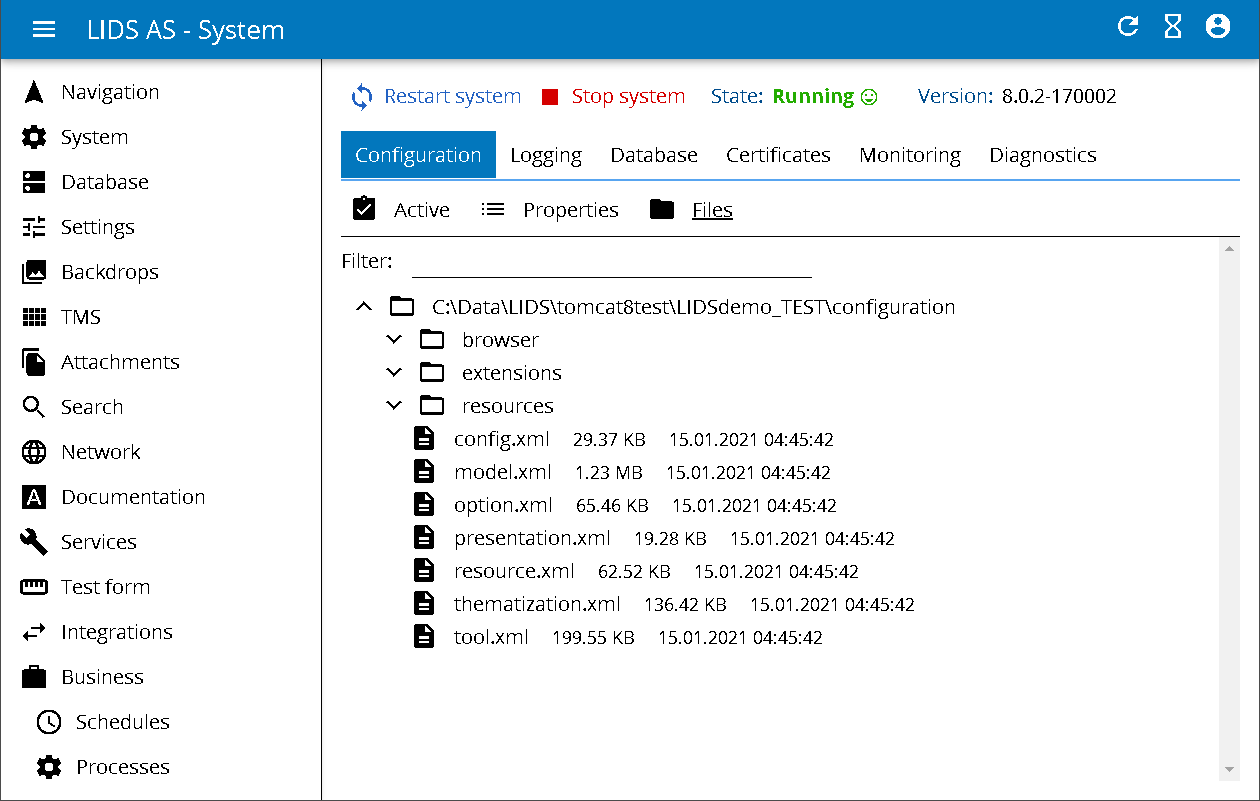
The metadata can be accessed in the System / Configuration / Files page of SAMO Administration Console:
Metadata Schemas
All XML SAMO metadata files have a fixed structure defined by an XML Schema (XSD) file. The schemas define the exact structure of the XML, enable validation, and contain documentation of XML elements. Usually it is not necessary to read the schema files directly — the LIDS Metadata Reference provides the same information in a human-readable HTML form generated from the schemas.
The core schemas and their corresponding metadata files:
| Schema file | Metadata file |
|---|---|
modelBase.xsd | model.xml |
modelPresentation.xsd | presentation.xml |
modelThematization.xsd | thematization.xml |
modelTool.xsd | tool.xml |
modelResource.xsd | resource.xml |
modelOption.xsd | option.xml |
modelCommon.xsd | common definitions shared across schemas |
Additional schemas are available for the various extensions. The full set of schemas can be browsed in either of the following locations.
Schema availability
Running LIDS Application Server instance
Each LIDS Application Server exposes the schemas at the /schemas/ endpoint:
http://<server>:<port>/as/schemas/<schema-file>.xsd
Example:
http://my-server:8080/as/schemas/modelBase.xsd
Distributed EAR archive
The schemas are bundled in the distributed EAR archive at:
lids-ear-<version>-JSE.ear
└── lids-as.war
      └── schemas\
Example:
lids-ear-9.25.5-225005-JSE.ear\lids-as.war\schemas\