TAI
Level: Advanced
Keywords: address search, TAI, address suggestions
The result: implementation of form component for filling address with suggestions
TAI (Territorial Address Information) is specialized component which provides sophisticated as-you-type completion (suggestions) for finding some address or place. It consists from backend (samo-tai-server) and frontend (samo-tai-form) part. Backend part was designed as a separate microservice which can be used by multiple projects. Drawback of this decision is quite complicated process of configurion. Probably it will become a part of LIDS AS in the future. But for now you have to have samo-tai-server running somewhere.
Samo-tai-server
The easiest way is run samo-tai-server as a docker container by adding it to the docker-compose.yml:
    tai-service:
        image: docker.asseco-ce.com/samo/server/samo-tai-server:${tai_service_version}
        restart: always
        environment:
         - ENV_CONFIGURATION=${env_configuration_old}
         - TAI_SERVER_CONFIGURATION_DIR=tai
         - ADMIN_CREDENTIALS=username:password
        depends_on:
         - elasticsearch
        ports:
         - "${tai_server_http_port}:8080"
        volumes:
         - ${project_dir:-./}:/usr/local/project
         - ${metadata_dir:-./metadata}:/usr/local/metadata
Apart from this, setup of environment properties is also required.
- You need to add
tai.urlparameter to your server and local properties - In the
.envproperties file you need to specifytai_service_versionandtai_server_http_port - Since the TAI currently uses the old environment configuration setup, it also requires its own .env file (see the example below) and a reference in
.envproperties.
tai.url=http://tai-service:8080
tai.url=http://project.example:8080
    tai_server_http_port=8080
    env_configuration_old=/usr/local/project/samo-training.env
    tai_service_version=samo-tai-server-0.0.11
    ####################################################################
    # Only for TAI service, other services are since LIDS 8 using .properties files
    ####################################################################

    db_url=jdbc:postgresql://tai-db.server:5432/tai_db
    db_user=username
    db_password=password

    elasticIndexPrefix=prefixExample__
    elasticClusterName=elasticsearch
    elasticHost=elasticsearch
    elasticPort=9300
samo-tai-server also needs following configuration which is (by default) located in project metadata (in your Gitlab PROJECT repository) under the following path metadata\tai\config.xml. Configuration is dependent on your project, following example is only orientational.
    <?xml version="1.0" encoding="UTF-8"?>
    <configuration>
        <config id="tennantName">
            <spatialInfo srs="EPSG:25832"></spatialInfo>
            <database>
                <connection>
                    <driver>oracle.jdbc.driver.OracleDriver</driver>
                    <url>${db_url}</url>
                    <user>${db_user}</user>
                    <password>${db_password}</password>
                </connection>
                <queries>
                    <select> <!-- needs to be acustomed according to your data model -->
                        <![CDATA[
                            select
                                point.id as point_id,
                                point.HOUSENO as point,
                                point.id as post_id,
                                point.ZIPCODE as post,
                                street.id as street_id,
                                street.DESCRIPTION as street,
                                city.id as city_id,
                                city.DESCRIPTION as city,
                                citypart.id as cityPart_id,
                                citypart.DESCRIPTION as cityPart,
                                ct_point_gr.GEOMTYPE as geomType,
                                ct_point_gr.SDO_GEOM as sdoGeom,
                                ct_point_gr.GEOMEXT as geomExt
                            from CL_TAIADDRPOINT point
                                left join CB_TAICITY_ADDRPOINT cb_city_point on cb_city_point.cl_taiaddresspoint = point.id
                                left join CL_TAISTREET street on street.id = cb_city_point.cl_taistreet
                                left join CL_TAICity city on city.id = cb_city_point.cl_taicity
                                left join CL_TAIcitypart citypart on citypart.id = cb_city_point.cl_taicitypart
                                left join CT_TAIADDRPOINT ct_point on ct_point.EXTID = point.ID
                                left join CT_TAIADDRPOINT_F ct_point_f on ct_point_f.SID = ct_point.sid
                                left join CT_TAIADDRPOINT_GR ct_point_gr on ct_point_gr.fid = ct_point_f.fid
                        ]]>
                    </select>
                    <count>
                        <![CDATA[
                            select count(point.id) from CL_TAIADDRPOINT point
                        ]]>
                    </count>
                </queries>
            </database>
        </config>
    </configuration>
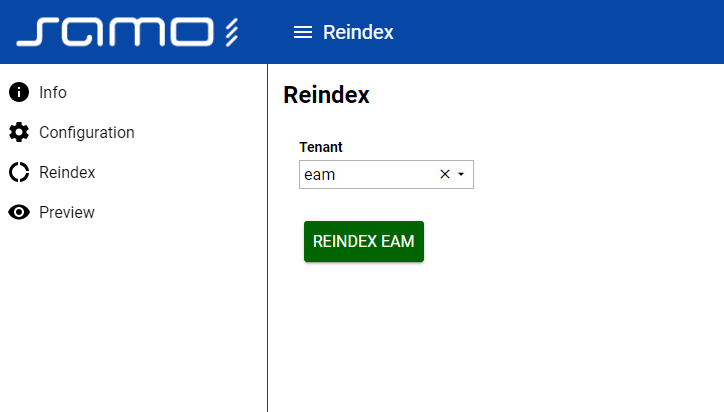
When samo-tai-server is running you have to log in to its console and start reindexing. The port of your tai server (and console) is defined by tai_server_http_port in the .env file along with the tai_service_version.
Gateway proxy set up
In order to make the communication between samo-tai-form or taiSearch and samo-tai-server possible, you need to add proxy to gateway configuration. Create new file (tai.json) in your metada package /gateway/proxies/tai.json and paste following lines:
    {
        "upStreamAuthorization": {
            "type": "securityJwtToken",
            "secret": "${lids.jwt.secret}"
        },
        "locations": {
            "/tai/address**": {
                "proxyUrl": "${tai.url}/rest/address/${tenant}"
            }
        }
    }
After that you only need to add created proxy to the list of allowed proxies to your application json.
    {
        ...
          "proxies": [
            "lids",
            "lids-new",
            "user-service",
            "tai"
        ],
        ...
    }
Client usage and configuration
Once all of these prerequisites are satisfied you can use samo-tai-form module in editation form in client metadata.
        "module": {
            "type": "component:entity-modules/tai/samo-tai-form",
            "tenant": "eam",
            "formFields": [
                {
                    "id": "city",
                    "label": "{tr:modelAttributes.taiCity}",
                    "attrs": {
                        "at_boOprBase_cl_taiCity": {
                            "id": "ca_taiCity_id",
                            "value": "ca_taiCity_description"
                        }
                    }
                },
                {
                    "id": "cityPart",
                    "label": "{tr:modelAttributes.taiCityPart}",
                    "attrs": {
                        "at_boOprBase_cl_taiCityPart": {
                            "id": "ca_taiCityPart_id",
                            "value": "ca_taiCityPart_description"
                        }
                    }
                },
                {
                    "id": "street",
                    "label": "{tr:modelAttributes.taiStreet}",
                    "attrs": {
                        "at_boOprBase_cl_taiStreet": {
                            "id": "ca_taiStreet_id",
                            "value": "ca_taiStreet_description"
                        }
                    }
                },
                {
                    "id": "point",
                    "label": "{tr:modelAttributes.taiAddrPoint}",
                    "attrs": {
                        "at_boOprBase_cl_taiHouseNoAdd": {
                            "id": "ca_taiAddrPoint_id",
                            "value": "ca_taiAddrPoint_description"
                        }
                    }
                }
            ]
        }
Or you can implement taiSearch in samo-map.