Documents Management System
Level: Advanced
Keywords: documents, file manager, folders, files
The result: File manager, browse of folders and files
A document management system (DMS) is a system used to receive, track, manage and store documents and reduce paper. It is capable of keeping a record of the various versions created and modified by different users (history tracking) and also enables locking the file to prevent other users from editing it.
In SAMO Application we have our own implementation of DMS, see the Figures below.
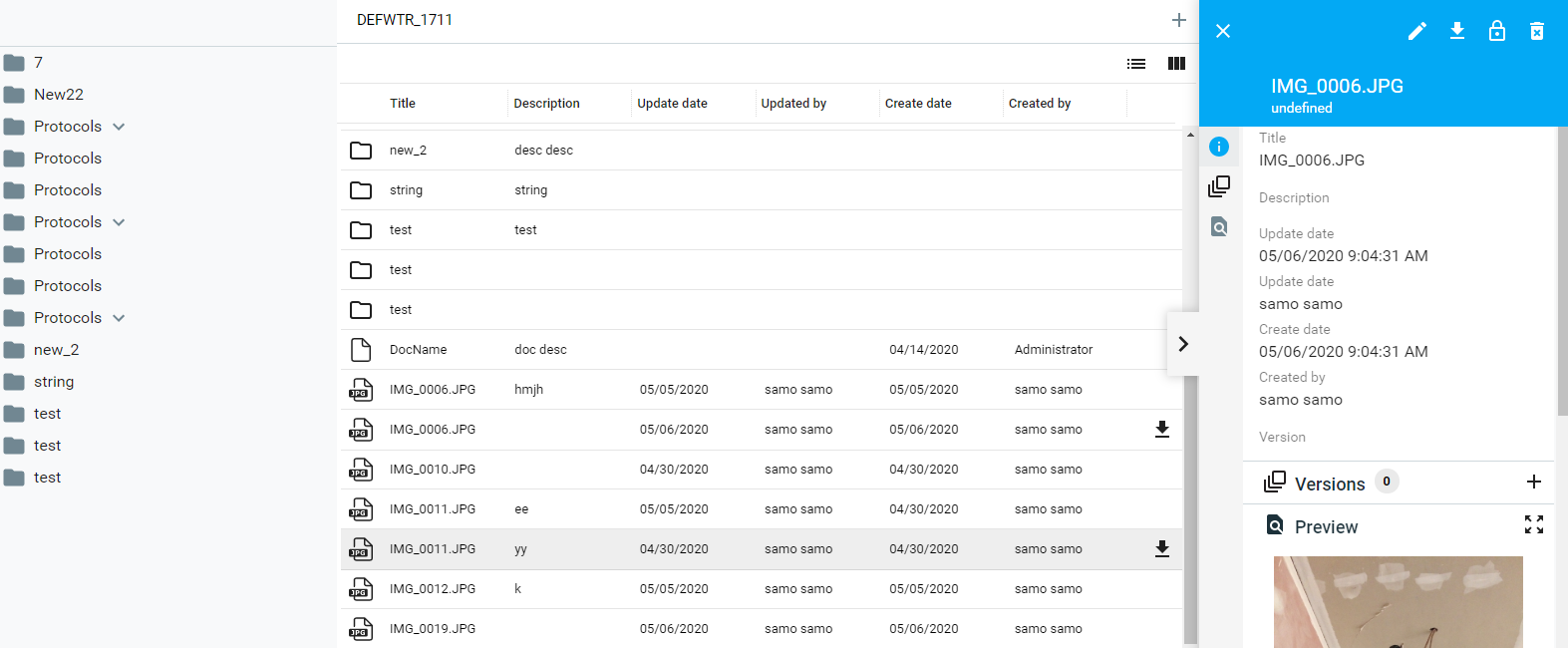
Fig. 1: Browse of documents for all features and instances in the project
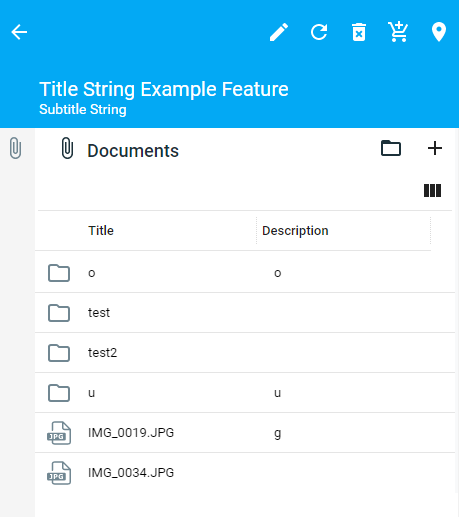
Fig. 2: A detail section with overview of documents related to the specific feature instance
Configuration
Common configuration is described in the SAMO Platform Core - Implementation Guide chapter.
Next chapted describes only Dynamic App Configuration for Documents.
Dynamic-App Documents Configuration
There are two possibilities how to access the DMS in SAMO Dynamic App client. You can have a page with overview of all documents for all features and instances in your project, or you can have a detail section with overview of documents related to the specific feature instance. These two views are linked via "Open Documents Browse" option which can be configured for the detail section.
Detail of the document is build automatically, but there are possibilities to override its attributes by overrideProperties configuration property. It consists of three sections: informations (attributes), versions and preview.
A) Section of documents in the entity detail
Define module to display documents from entity detail. To the definition of entity detail add following configuration.
    {
        "detail" : {
            "default" : {
                "sections" : [
                    ...
                    {
                        "icon" : "samo-default-icons:attach",
                        "module" : {
                            "type" : "component:entity-modules/documents/samo-entity-documents"
                        }
                    }
                ]
            }
        }
    }
All configuration options are available in Dynamic-App Module Catalog.
B) Section of documents in the entity detail with a link to common browse
First, define common page with browse of folders and documents. In the folder ..shared/pages set up documents.json with following configuration. Then include the documents page in the list of shared pages in the part.json of your corresponding application part. This will enable opening documents browse from every document detail section. The root folder of the browse will correspond to the folder of the feature, from which detail the browse is opened.
    {
        "title": "{tr:document.documents}",
        "closeMenu": true,
        "module": {
            "type": "component:entity-modules/documents/samo-documents-browse",
            "security": {
                "loggedIn": true
            }
        }
    }
Second, define a module to display documents from entity detail and enable the "Open Documents Browse" option.
    {
        "detail" : {
            "default" : {
                "sections" : [
                    ...
                    {
                        "icon" : "samo-default-icons:attach",
                        "module" : {
                            "type" : "component:entity-modules/documents/samo-entity-documents",
                            "documentsBrowse" : {
                                "enabled" : true,
                                "newTab" : true
                            },
                        }
                    }
                ]
            }
        }
    }
All configuration options are available in Dynamic-App Module Catalog.
C) Custom browse for specific entities
If you want to override the default Browse of documents, you need to create another page (with similar configuration as in B)) in chosen application part. Then in the chosen entity detail, you need to override the default navigation. You can also filter attachment types similar as in case of samo-entity-attachments module.
    {
        "detail" : {
            "default" : {
                "sections" : [
                    ...
                    {
                        "icon" : "samo-default-icons:attach",
                        "module" : {
                            "type" : "component:entity-modules/documents/samo-entity-documents",
                            "documentsBrowse" : {
                                "enabled" : true,
                                "part" : "assets",
                                "page" : "asset-documents"
                            },
                            "upload" : {
                                "attachmentTypes" : ["att_database"]
                            }
                        }
                    }
                ]
            }
        }
    }
Troubleshooting
1. User-unfriendly entity folders naming (Type + ID instead of code)
If featureInfo is missing in LIDS model configuration, name of entity folder would be composed from LIDS feature type and ID, which would not be understood by users. The following example shows DMS on Fault details showing documents attached to subordinate WorkOrder:
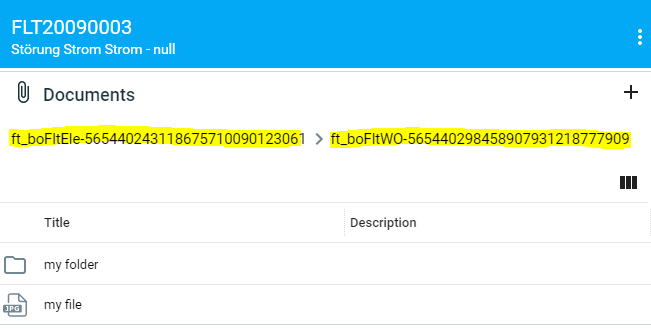
Fig. 3: User unfriendly feature type and ID is used in folder names because featureInfo is not defined
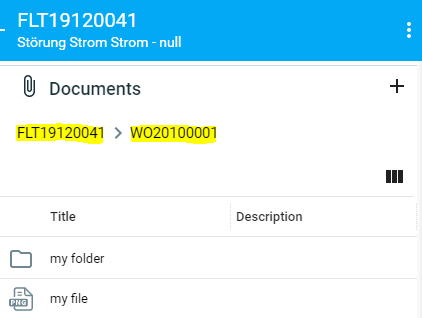
Fig. 4: Fault code and work order code are set as featureInfo and used in user friendly folder names
How to fix
-
Set featureInfo for all entities which are configured for DMS (inheritance applies).
Attribute at_boFltBase_code defined as featureInfo for ft_boFltBase entity (parent of ft_boFltEle, ft_boFltGas, ft_boFltOther, ft_boFltWtr)<ber:featureType abstract="true" id="ft_boFltBase" name="Fault base" parentId="ft_boOprBase"><ber:featureAttributeArray>..</ber:featureAttributeArray><ber:featureInfo refId="at_boFltBase_code"/><ber:formArray>..</ber:formArray></ber:featureType> -
Derive new featureInfo from console Ultra Light LIDS 8 Client.
Configuration of parameters with which the 'Feature Info Derive Service' is called<?xml version="1.0" encoding="utf-8"?><soap:Envelopexmlns:soap="http://schemas.xmlsoap.org/soap/envelope/"xmlns:tns="http://www.berit.com/wsdl/FeatureInfoDeriveService"xmlns:xsi="http://www.w3.org/2001/XMLSchema-instance"xmlns:xsd="http://www.w3.org/2001/XMLSchema"><soap:Body><tns:deriveFeatureInfos><arrayOfString_1><value xsi:type="xsd:string">ft_boFltEle</value><value xsi:type="xsd:string">ft_boFltGas</value><value xsi:type="xsd:string">ft_boFltOther</value><value xsi:type="xsd:string">ft_boFltWtr</value></arrayOfString_1></tns:deriveFeatureInfos></soap:Body></soap:Envelope>