Business intents
Level: Advanced
Keywords: business intent, entity action, run action from entity
The result: Possibility to run action from selected business entity using icon button
Any possible SAMO entity action (get features and codelists, update features, change state, etc.), or even more basic operations (operations with numbers, dates transformation, cycling, etc.) can be executed by workflow state change, triggers, or handled by business intents. On the client side, business intents are visible through intent buttons, which serve for the action execution. The business logic is defined in action (similar as in the case of workflow definition). These actions often require user input, which is handled via Action forms.
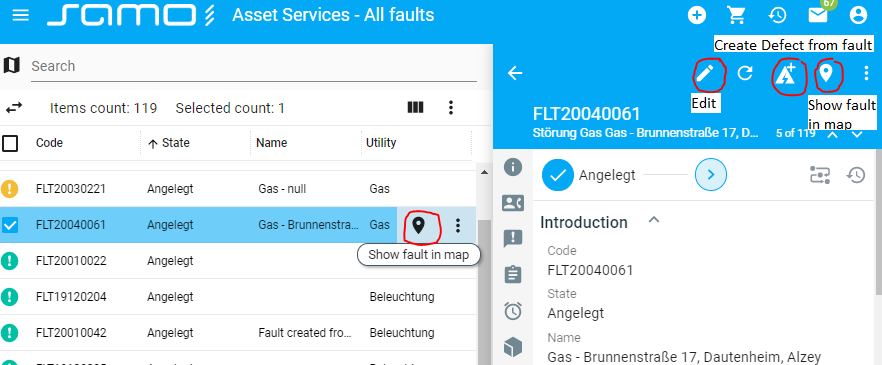
There are predefined intents in SAMO available for all entities. For example, edit (for editing selected entity), add-to-entity-cart (like in an eshop - add entity to shopping cart for later use), show-in-map (if entity has defined geometry, it's position can be shown in map), and others - see below. For these intents, only button definition needs to be implemented. Business action behaviour is defined by default. (Intent action form definition, Business action definition, Business action content chapters are not related).
Except for predefined generic intents, own single purpose intents (for example Create Defect from fault) can be implemented (all chapters Intent action form definition, Business action definition, Business action behaviour are related).
Intent button definition
 :::
:::
Fig. 1: Example of intent buttons
The client part of the intent definition (the button) is stored in intents folder:
dynamic-app
│
└───samo-demo\configuration
    │
    └───metadata
        │
        └───intents
            │
            └───createDefect.json
            └───showInMap.json
Predefined intents
This chapter is for displaying button of predefined intents only. If you want to continue with creating your own intent, skip this chapter and go to Intent button definition / Own intents.
Localization in map
Intent for locating entities in current samo-browse with defined map
    {
        "entitiesGroup": "faults",
        "icon": "maps:place",
        "title": "{tr:map.showFaultInMap}",
        "type": "show-in-map"
    }
Add to entity cart
Intent for adding entities to entity cart
    {
        "entitiesGroup": "all",
        "icon": "icons:add-shopping-cart",
        "title": "Add to cart",
        "type": "add-to-entity-cart"
    }
Navigate
Intent for navigating to specified application part and page
    {
        "icon": "icons:flag",
        "iconMenuVisible": "never",
        "title": "Show detail",
        "entitiesGroup": "assets",
        "defaultIntent": true,
        "singleEntity": true,
        "type": "navigate",
        "part": "assets",
        "page": "lightning-assets",
        "arguments": {
            "detail": "{join:#fullIds, }",
            "search": "{join:#ids, }"
        }
    }
Edit
Intent for editing selected entity
    {
        "entitiesGroup": "tickets",
        "icon": "edit",
        "title": "Edit",
        "type": "edit",
        "context": "mobileTickets",
        "security": {
            "hasAnyRole": [
            "USER"
            ]
        }
    }
URI link
Intent which starts URI in new window
    {
        "entitiesGroup": "all",
        "icon": "icons:open-in-new",
        "title": "{tr:OpenInLIDSExplorer}",
        "iconMenuVisible": "never",
        "visibility": {},
        "type": "uri-link",
        "href": "lids://form?typeid={get:#type}&propertyid={get:#type}/@fid&value={get:#id}"
    }
Take over entity
Intent for creating new feature instance while taking over properties of existing one
    {
        "icon": "icons:flag",
        "iconMenuVisible": "never",
        "title": "{tr:createConsumption}",
        "entitiesGroup": "material_claim",
        "singleEntity": true,
        "entityType": "material_claim",
        "detailContext": "createConsumptionClaim",
        "type": "takeover-entity",
        "visiblity": {
            "dataContextPermittedOperations": [
                "update"
            ]
        },
        "takeoverDataContext": {
            "type": "allExcept",
            "properties": [
                "stock2",
                "company",
                "claimRefund"
            ],
            "overrideProperties": {
                "claimType": "Verbrauch",
                "claimObjt": 5711
            }
        }
    }
Generate print report
Intent for generating print report for selected entities
    {
        "entitiesGroup": "water-assets",
        "icon": "icons:print",
        "title": "Generate report",
        "type": "report",
        "reportId": "jrp"
    }
Own intents
Following example is manually defined single purpose intent button, which creates Defect (one entity) from selected Fault (different entity) and navigates to the newly created entity. Intent button is visible only on detail of faults in state 1 = created and only for users with CREATE_DEFECT permission.
    {
        "entitiesGroup": "faults",
        "icon": "ewr-icons:defect-create",
        "title": "{tr:business.createDefect}",
        "display": [
            "detail"
        ],
        "type": "business-action",
        "actionType": "instance",
        "actionId": "createDefectFromFault",
        "noResultDetail": true,
        "navigateAfterFinish": {
            "part": "assetOperations",
            "page": "defects-all",
            "arguments": {
                "detail": "{get:#responseBody.fullId}"
            }
        },
        "security": {
            "type" : "roles",
            "hasAnyRole" : ["CREATE_DEFECT"]
        },
        "visibility":{
            "hidden" : "{isNotEqual:#entity.at_boFault_cl_boFaultState.ca_boFaultState_id, 1}"
        }
    }
It is important to decide wheather the intent actionType is of static (for entity type) or instance (performing on each instance of entity) type and from where the intent button will be visible (display parameter): detail (in entity detail), item (single selection in browse list and map), multi (selection of more entities in browse list and map), etc. All configuration options can be found in Business Server Configuration documentation.
Intent Action form definition
Some intents require user input, which is handled through Action forms. Inserted data are further processed, when the action is executed.
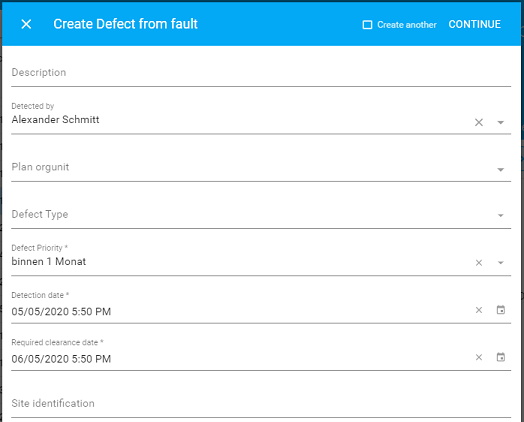
Fig. 2: Example of intent input form
    {
        "detailMethod": "business",
        "action": "<$import:./detail/faultActionDetails.json>"
    }
    {
        "actions" : {
            "createDefectFromFault": {
                "title": "{tr:business.createDefect}",
                "sections": [
                    {
                        "module": {
                            "type": "component:entity-modules/form/samo-entity-properties-form",
                            "entityType": "ft_boDefect",
                            "scope": "requestBody.defect",
                            "propertyGroupId": "fmd_boDefect_detail",
                            "insertContext": "defect",
                            "insertDataContext": {
                                "at_boDefect_sourceId": "{get:#type}/{get:#id}",
                                "at_boDefect_sourceCode": "{get:#at_boFltBase_code}"
                            },
                            "overrideProperties": {
                                "at_boDefect_fr_boDetectedBy":{
                                    "searchDefaultValue": {
                                        "type": "matchPhrase",
                                        "field": "at_boEmployee_userIdProperty",
                                        "query": "{user:#id}"
                                    }
                                }
                            }
                        }
                    }
                ]
            }
        }
    }
Business action definition
Actions are defined in lids-business-service\entities\ft_entityName.json (entityName corresponds to feature ID in LIDS model.)
All configuration options can be found in Business Server Configuration documentation.
    {
        "securityMethodOwner": "application:EAM",
        "abstract": false,
        "actions": {
            "createDefectFromFault": {
                "title": "{tr:business.createDefect}",
                "security": {
                    "type": "ownerMethod"
                },
                "steps": [
                    {
                    "type": "script",
                    "source": "{@packageRoot(samo-eam-aoper)}/scripts/createDefectFromFault.js"
                    }
                ],
                "includeStates": [
                    "created"
                ]
            }
        }
    }
It is possible to show/hide intent button based on some complex condition. This check can be inserted to action as includeCondition property and requires includeStates property to be configured in action definition and button has to be configured for single instance only ("actionType": "instance" and "display": "detail") in intent button definition.
Business action content
Scripts are defined in lids-business-service\scripts\
Logging and debug functions can be used to tune the application script and find errors.
    var features;
    api.logging().prepareLog(context).message(scriptFileName).addVariable("features:", features).logDebug();
    api.debug().prepareOutput().withDelimiter().message(scriptFileName).addVariable("features count:", features.count()).addValue(features).print();
Depending if Intent (input/Action) form was shown (don't have to be), there are different ways of getting detail of processed entity:
- Intent form not shown:
var processedEntity = context.entity;
- Intent form shown:
var processedEntity = api.request().prepareCreateJSONRequestReader(context).create().getRequestBodyAsObject();
Most commonly used functions to work with entities will be:
- api.features().prepareGetFeature() to get data from feature (based on Feature ID)
    // Example returns all details of defect 1082953004335269810851085
    var feature = api.features().prepareGetFeature(context)
        .entityType("ft_boDefect")
        .entityId("1082953004335269810851085")
        .get();
- api.features().prepareGetRelatedFeatures() to get all features related to feature (based on Feature ID)
    // Example returns all assets connected to defect 1082953004335269810851085 via association as_defect_asset
    var relatedFeatues = api.features().prepareGetRelatedFeatures(context)
        .entityType("ft_boDefect")
        .entityId("1082953004335269810851085")
        .addRelation("as_defect_asset")
        .get();
All available functions are listed in Business server Scripting API.
Following example loads data inserted by user to Action form, and the detail of entity, from which intent was invoked. The result of action is a created new entity with data from the entity detail and Action form. Then the script updates state of the original entity to cancelled and sets value of cancel description attribute to "Fault reclassified to defect" and finally returns ID of newly created defect, so the application can navigate to the new entity.
    function action(context) {
        // Get input form data (inserted by user)
        var clientData = api.request().prepareCreateJSONRequestReader(context).create().getRequestBodyAsObject();
        api.logging().prepareLog(context).message(scriptFileName).addVariable("clientData", clientData).logDebug();

        // Get data of entity from which intent action was executed
        var fault = context.entity;
        api.debug().prepareOutput().withDelimiter().message(scriptFileName).addVariable("fault", fault).print();

        var defectBody = clientData.defect;
        // Configure some properties of newly created entity
        defectBody.at_boDefect_cl_boDefectSource = {"ca_boDefectSource_id": "2"};
        defectBody.at_boDefect_sourceId = fault.type + "/" + fault.id;
        defectBody.at_boDefect_sourceCode = fault.at_boFault_code;

        // Create new entity (Defect) with data inserted by user plus some hardcoded properties from script
        var newDefect = api.features()
            .prepareCreateFeature(context)
            .entityType("ft_boDefect")
            .createBody(defectBody)
            .create();
        api.debug().prepareOutput().withDelimiter().message(scriptFileName).addVariable("newDefect", newDefect).print();

        // Update entity from which intent was executed
        if (fault.at_boFault_cl_boFaultState.ca_boFaultState_id == 1) {
            // Update FLT Cancel Description
            var cancelDesc = api.resources().prepareGetLocalizedString(context).addArgument("arg1", newDefect.at_boDefect_code).resourceId("business.defectCreated").get();
            api.features()
                .prepareUpdateFeature(context)
                .entityRef(fault)
                .updateBody({at_boOprBase_cancelDesc: cancelDesc})
                .update();
            // Change state of entity from which intent was executed
            api.business()
                .prepareChangeEntityState(context)
                .entityRef(fault)
                .state("cancelled")
                .ifNotAlreadyInState(true)
                .noSecurity(true)
                .change();
        }
        // Return type and ID of newly created entity so client could navigate to this new entity
        return api.result().prepareCreateActionResult(context)
            .result({ fullId: newDefect.type + "/" + newDefect.id })
            .create();
    }
Following example checks if there are any Faults to which certain FaultReport could be assigned. This check is used as includeCondition to distinguish whether intent button assignFaultsToFaultReport should be shown or hidden. It first loads detail of entity from which intent would be executed (frp = FaultReport). Then it creates query for searching different entities (ElectricFault for ElectricFaultReport, GasFault for GasFaultReport, etc.) which have certain parameters (utility, territory, address) corresponding to FRP parameters and are in states created, dispatch, or finished (state ID up to 5). If any faults fulfilling those conditions are found, script returns TRUE and intent button will be shown, otherwise script returns FALSE and intent button will be hidden.
    // Check if there are any FLT to which FRP could be assigned
    // (Intent button will be shown or hidden depending on returned result)
    function condition(context) {
        api.debug().prepareOutput().withDelimiter().message(scriptFileName).addValue("START").print();

        var frp = context.entity;
        api.debug().prepareOutput().withDelimiter().message(scriptFileName).addVariable("frp", frp).print();

        // Fault must be of same type, in state up to finished, and matching territory, utility, taiDisplayAddress2 (= City, CityPart, Street)
        var possibleFaults = api.features()
                                .prepareQueryFeatures(context)
                                .prepareAddQuery()
                                    .addEntityType(frp.type.replace("ft_boFrp", "ft_boFlt"))
                                    .prepareCreateFilter()
                                        .prepareAddAnd()
                                            .prepareAddEquals()
                                                .property("at_boOprBase_cl_boTerritory")
                                                .value(frp.at_boFrpBase_cl_boTerritory.ca_boDispTerritory_id.toString())
                                                .add()
                                            .prepareAddEquals()
                                                .property("at_boOprBase_cl_boUtility")
                                                .value(frp.at_boFrpBase_cl_boUtility.ca_boUtility_id.toString())
                                                .add()
                                            .prepareAddEquals()
                                                .property("at_boFltBase_taiDisplayAddress2")
                                                .value(frp.at_boFrpBase_taiDisplayAddress2)
                                                .add()
                                            .prepareAddLessThanOrEquals()
                                                .property("at_boFltBase_cl_boFltState")
                                                .value("5")
                                                .add()
                                            .add()
                                        .create()
                                    .add()
                                .count();
        api.debug().prepareOutput().withDelimiter().message(scriptFileName).addVariable("possibleFaults.count()", possibleFaults).print();

        var isFault = false;
        if (possibleFaults > 0)
            isFault = true;

        api.debug().prepareOutput().withDelimiter().message(scriptFileName).addVariable("isFault", isFault).print();
        return api.result().prepareCreateConditionResult(context).result(isFault).create();
    }
Business action behaviour
Page under maintanece