Overview and basic configuration
Level: Intermediate
Keywords: business, workflow, configurationPreset, state, step, condition
The result: entity workflow configuration
Workflow represents a life-cycle of some business object. It consists of workflow, conditions, steps and actions.
In the client application, the execution of individual workflow steps is available through the samo-entity-workflow web module in the entity detail. Some steps of the workflow however can be executed automatically and don’t require user action.
How to define workflow?
Entity workflow can be defined either through the configuration of business metadata (state transitions), or using Scripting API.
Client metadata
In order to enable workflow on chosen entity, firstly we need to set the detailMethod configuration parameter to business in the corresponding entity configuration. We also need to add workflow section to the entity detail if we want the user to control the workflow from the client. This configuration is still part of the client configuration. However, we need to configure also the business server part.
Business metadata
Just as with client configurations of the entities, for business configurations associated with an entity we can configure an ancestor for common properties, and then the configurations for individual entities.
Entity configuration
First we need to establish the configuration file (e.g. abstractBo.json or ft_boDefect.json) in folder lids-business-server\entities in the respective application part (e.g. …\applicationPackage\lids-business-server\entities\ in corresponding application package). It is important that the json file is named after the entity feature type name from the LIDS model e.g. ft_boProject.json (same as for the client part of the entity configuration), except from abstract ancestor configurations.
Afterwards you can view them in a new LIDS Administration Console - in SAMO Business Extenstion part
The example below describes the case, when we want to use some ancestor for common properties, which we than extend.
{
    "abstract" : true,
    "securityMethodOwner" : "application:DEMO"
}
{
    "extends" : "abstractBo"
}
Please note that in case inheritance is used, the abstract entity must be in the alphabetical order before the final entity. Or, the abstract entity must be higher in the folder structure.
    lids-as
    └───business-service
        └───entities
            └───types
                └───ft_boDefect.json
                └───ft_boProject.json
            └───abstractBo.json
States
Entity states are stored in a related codelist, which must be referenced in business entity metadata.
    {
        "stateAttributes": {
            "stateAttribute": "at_base_samo_object__c_state",
            "stateCodeProperty": "c_state__code",
            "stateTitleProperty": "c_state__description"
        }
    }
Workflow configuration
Next, the Workflow configuration ( Software / Application server / Business server / Configuration / Workflow) is very simple to configure. It defines specific order and hierarchy of the actions according to the specific steps (entity states).
The workflow must have one entrypoint and each state definition must have an array for target states. We can also define a condition for transition to state, which can be specific or common for all transitions.
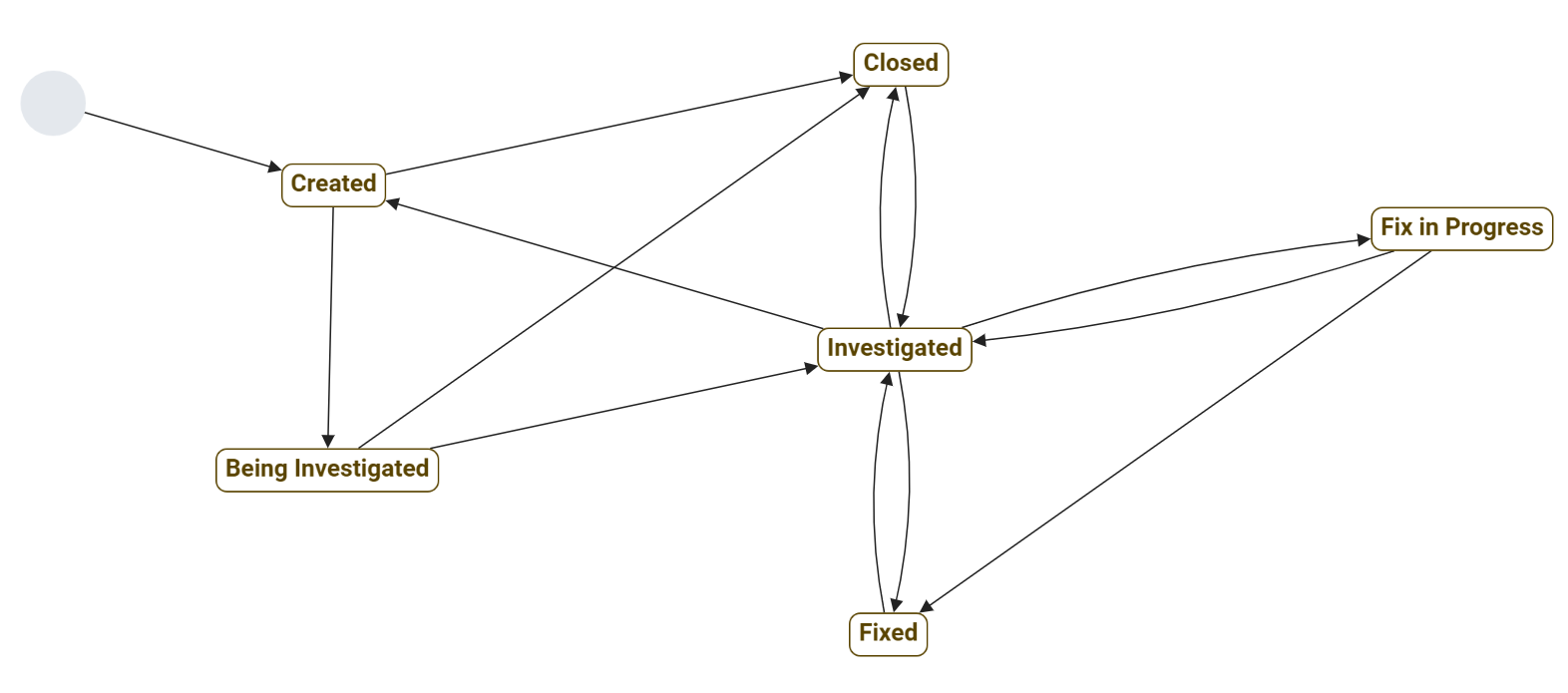
Fig. 1: Workflow diagram example
    {
        "workflow": {
            "entrypoint": "created",
            "initAction": "init",
            "states": {
                "created": {
                    "transitions": [
                        "beingInvestigated",
                        "closed"
                    ]
                },
                "beingInvestigated": {
                    "transitions": [
                        "investigated",
                        "closed"
                    ]
                },
                "investigated": {
                    "transitions": [
                        "created",
                        "fixed",
                        "fixInProgress",
                        "closed"
                    ]
                },
                "fixed": {
                    "transitions": [
                        "investigated"
                    ]
                },
                "fixInProgress": {
                    "transitions": [
                        "fixed",
                        "investigated"
                    ]
                },
                "closed": {
                    "transitions": [
                        "investigated"
                    ],
                    "conditions": [
                        "descriptionIsNotNull"
                    ]
                }
            }
        }
    }
Further, specific conditions, step and actions that are used for transition between steps must be defined.
A common mistake is when the state does not have defined any transitions. The error message is: No 'transitions' are defined for 'null' workflow state.. The array transitions must be therefore created, but may contain empty array (no target state).
    {
        "closed": {
            "transitions": []
        }
    }
Steps
Steps correspond to the states that the entity may acquire. Steps can be of two main types transition or script. Transition step only simply changes the entity state, if the defined conditions are met. If the step is of type script, custom business action written in JavaScript can be used.
State Transition steps
Typically, a transition step is used.
    {
        "type": "transition",
        "state": "closed",
        "ifNotAlreadyInState": true  /* optional */
    }
The flag ifNotAlreadyInState is optinal and allows state loop transition. Default value is false. If the entity is already in the closed state, it is not an error that it goes back to the closed state.
Script (and other) steps
All step types can be found in Business Server Configuration Documentation in Lighthouse. For example the Send message, Send email, Start entity process, Create task, Fire event, Transaction or Log step.
A commonly used script step enables custom definition of business logic using JavaScript and ScriptingAPI, the configuration in business metadata only contains script reference and possibly arguments, which serve for action input.
    {
      "steps": [ {
          "type"    : "script",
          "source"  : "{@packageRoot(samo-demo)}/scripts/defects/setDateAttributeToNow.js",
          "arguments": {
            "attributeName" : "at_defBoDefect_detection_date"
          }
        }
      ]
    }
In the JavaScript file itself, we have arguments available as context.arguments, environment variables as context.variables, instance of entity as context.entity (context.entityType, context.entityId) and script file name for logging as scriptFileName.
Actions
Workflow actions are being run with entity state change. Action consists of steps, where you define the business logic (e.g. what happens after the state change). In order for the action to be executed, the specified conditions must be met.
We distinguish two basic types of actions: actions on the entity instance and static actions as described in the documentation. For workflow, we are interested in actions on the entity instance.
The step definition can be included directly in the definition of the action, or only referenced.
    {
        "actions": {
            "updateDateDetect": {
                "title" : "Set date detect to now",
                "access" : [ "instance", "external" ],
                "security" : {
                    "type" : "ownerMethod"
                },
                "steps": [{
                    "type"    : "script",
                    "source"  : "{@packageRoot(samo-demo)}/scripts/defects/setDateAttributeToNow.js",
                    "arguments": {
                        "attribute" : "at_defBoDefect__detection_date"
                    }
                }],
                "includeStates" : ["*"],
                "excludeStates" : ["closed"]
            }
        }
    }
    {
        "steps": {
            "notifyStateChange": {
                "type": ...
            }
        },
        "actions": {
            "stateUpdated": {
                "access" : [ "static", "internal" ],
                "security": {
                    "hasAnyRole": [
                        "DEFECTS-EDIT"
                    ],
                    "type": "roles"
                },
                "steps": [
                    "notifyStateChange"
                ]
            }
        }
    }
Access
For the action itself, the access modificator is used to define how to access the action. It is used both for offering actions and for subsequent control during calls. This guarantees safety. Options are:
- based on entity
- instance
- static
- based on the initiator
- trigger
- processesCore
- internalApi
- internal
- external
- restApi
Typical combination is [ "instance" , "external" ] or [ "static", "trigger" ].
Security
The security configuration is used to secure the call of the action. It allows or denies the user to invoke the action. The name of modificator is security and there are several types:
-
by
ownerMethod: Access to the action is evaluated on the lids-security level. -
by
roles: With the configuration attributehasAnyRole(which is an array type) we define a list of roles that have access to the action.
State conditions
If we want the action to be offered to use as a workflowAction (that is, a button is generated on the client side in the workflow section), we must define transitions.
    {
        "transitions": [
            {
                "from" : "created",
                "to"   : "beingInvestigated"
            }
        ]
    }

Fig. 2: Workflow actions example
The situation is different in the case of events for intents. State definitions using includeStates and exludeStates are used here. Instead of enumerating all states, we can use the wildcard * and disable several states with exludeStates.
    {
        "includeStates": [ "*" ],
        "exludeStates": [ "CLOSED" ]
    }
Conditions
We have two types of conditions. Conditions of type includeConditions are evaluated when the action is offered, and conditions of type conditions, which are evaluated when the action is invoked. In this way, we achieve a clear workflow. Teh condition can be included directly in the action definition, or only referenced.
    {
        "conditions": {
            "executionDateIsNotHoliday": {
                "type": "script",
                "source": "{@packageRoot(samo-demo)}/scripts/dateIsNotHoliday.js",
                "arguments": {
                    "dateAttributeName": "at_defBoDefect__execution_date"
                }
            },
            "authenticatedUserMustBeOperator": "..."
        },
        "actions": {
            "someActionName": {
                "title": "actionName",
                ...
                "condition": [
                    "authenticatedUserMustBeOperator",
                    "executionDateIsNotHoliday"
                ],
                "includeConditions": [
                    {
                        "type": "property",
                        "operator": "notnull",
                        "property": "at_defBoDefect__detection_date"
                    }
                ]
            }
        }
    }
Special conditions are statelessConditions that define what conditions must be met throughout the whole lifecycle of the entity.
    {
        "statelessConditions" : [
            "titleIsSet"
        ],
        "conditions": {
            "titleIsSet": {
                "type": "property",
                "property": "at_defBoDefect__name",
                "operator": "notempty",
                "message": "Title is not set."
            }
        },
        "actions": {
            ...
        }
    }
More detailed definition of Conditions can be found in Business Server Configuration.
Presets
Presets are used to make the workflow configuration easier. They will use the definition of workflow reference to generate conditions or steps automatically based on defined transitions.
If you define a configuration preset with workflowSteps, you can use simplified notation when switching states as moveToClosed.
The second notation workflowConditions is to simplify the writing of conditions for states as isCreatedOrReady.
    "configurationPresets": [
        "workflowConditions",
        "workflowSteps",
        "workflowStepsNoSecurity"
    ]
    "actions": {
        "close": {
            "title": "Close",
            "conditions": [
                "isCreatedOrReady"
            ],
            "steps": [
                "moveToClose"
            ],
            "transitions": [
                {
                    "from": "created",
                    "to": "closed"
                },
                {
                    "from": "ready",
                    "to": "closed"
                }
            ]
        }
    }