Edit Entity attributes during state change
Level: Intermediate
Keywords: business action, edit feature, state change, workflow
The result: definition of intent and input form for editing entity using business action
How to edit an entity attributes as a part of an entity state change?
This example describes the case when editing of some attributes of existing entity instance is required as a part of an entity state change. Specified action form is activated after clicking the button serving the change of state located in the detail workflow section.
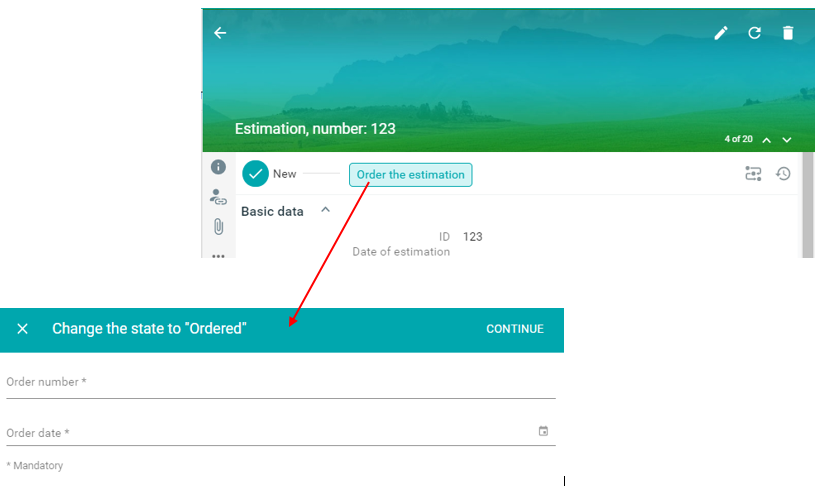
Fig. 1. The button from workflow section runs action form
Registration of the relevant business action
The bussiness action (for changing a state within the workflow) must be defined in given entity (feature type) business metadata. The name of action must be the same as name of action form.
    {
        "actions": {
            "moveToOrdered": {
            "title": "Order the estimation",
            "steps": [
                {
                "type": "transition",
                "state": "ORDERED"
                }
            ],
            "transitions": [
                {
                "from": "NEW",
                "to": "ORDERED"
                }
            ]
            }
    }
Creating of action form
In this case key-value-form module is used for arranging data items within the action form which is used for filling attributes values necessary for the change of state of given entity. The name of Action form context is the same as name of business action.
    {
        {
            "moveToOrdered" : {
                "title": "Change the state to \"Ordered\"",
                "sections": [
                {
                    "module" : {
                    "type": "component:dynamic-app/modules/forms/key-value-form",
                    "elements" : [
                        {
                            "label" : "Order number",
                            "property" : "at_estimation_orderNumber",
                            "type": "text",
                            "validation": {
                                "minLength": 1,
                                "maxLength": 30,
                                "errorMessage": "Enter a string between 1 and 30 characters",
                                "required": true,
                                "validateOnChange": true
                            }
                        },
                        {
                            "label" : "Order date",
                            "property" : "at_estimation_orderDate",
                            "type": "date",
                            "validation": {
                                "type": "date",
                                "min" : -2208992400000,
                                "max" : 4102385775000,
                                "required": true,
                                "validateOnChange": true
                            }
                        }
                    ]
                    }
                }
                ]
            }
        }
    }