Call LPS action by trigger
Level: Expert
Keywords: business, trigger, event, LPS, processes, attachment
The result: creating entity and map is generated using LPS
This example describes complex work with the trigger, action and LPS (LIDS Publishing Server) call. It all takes place on the BS (Business server) side. An action is called when the entity is created. In the action using LPS, we will create a document with a map. Next, we will attach this document as an attachment to the entity. The generation of documents using LPS is asynchronous, so we must use the processes as well.
Structure
    lids-as
    └───business-service
        └───entities
            └───ft_boRequest.json
        └───connectors
            └───lidsWfsForLps.json
            └───lps.json
        └───processes
            └───requests
                └───requestGenerateDocument.json
                └───requestGenerateDocument.bpmn
        └───scripts
            └───startLIDSDataDownload.js
            └───checkLIDSDataDownloadState.js
            └───finishLIDSDataDownload.js
            └───LIDSDataDownloadCommon.js
            └───startProcessGenerateDocumentsLps.js
Workflow and trigger definition
    {
        "variables" : {         /* Variables specific only for this entityType */
            "lidsWfsConnectorId": "lidsWfsForLps",
            "lpsConnectorId": "lps",
            "lpsName": "Map",
            "lpsNameCodeAttribute": "at_reqRequest__id",
            "lpsDownloads"  : [
                {
                    "id"                  : "pdfMap",
                    "type"                : "exportByElement",
                    "attachmentFileName"  : "Map.pdf",
                    "statementAttType"    : "att_reqStatementMapES",
                    "plotSettingIdDependOnAttributePaperFormat": {
                        "A2" : "6186951511364378",
                        "A3" : "6188051022992154",
                        "A4" : "5842801760073420"
                    },
                    "outputFormat"        : "RASTER-PDF",
                    "plotParameters"      : {
                        "DPI"                         : "300",
                        "Compression"                 : "None",
                        "Quality"                     : "100",
                        "StopOnFirstError"            : "true"
                    },
                    "plotTaskParameters"  : {
                        "Scale"                       : "1000",
                        "IncludeOverviewPage"         : "true",
                        "EnlargementDefinitionType"   : "absolute",
                        "EnlargementDefinitionValue"  : "50",
                        "Angle"                       : "0",
                        "FtidFidCollection"           : "entityType:entityId"
                    }
                }
            ],

            "plotParameters" : {
                "REQUEST_NUMEBR" : {
                    "value" : [
                        { "attribute" : "at_reqRequest__code" }
                    ]
                },
                "EXECUTION_DATE" : {
                    "value" : [
                        { "attribute" : "at_reqRequest__execution_date", "attributeType" : "date" }
                    ]
                },
                "COPYRIGHT" : {
                    "value" : [
                        { "text" : "Copyright, Asseco 2020" }
                    ]
                }
            }
        },

        "actions": {
            "generateDocumentsLps": {
                "access"    : [ "instance", "internal" ],
                "conditions": [ "isCreated" ],
                "steps" : [
                    "generateDocumentsLps"
                ]
            },

            "startProcessing" : {
                "access"     : [ "instance", "internal" ],
                "conditions" : [ "isCreated" ],
                "steps" : [
                    "moveToGenerating"
                ]
            },

            "startLIDSDataDownload" : {
                "access"     : [ "instance", "internal" ],
                "conditions" : [ "isGenerating" ],
                "steps" : [
                    "startLIDSDataDownload"
                ]
            },

            "checkLIDSDataDownloadState" : {
                "access"     : [ "instance", "internal" ],
                "conditions" : [ "isGenerating" ],
                "steps" : [
                    "checkLIDSDataDownloadState"
                ]
            },

            "finishLIDSDataDownload" : {
                "access"     : [ "instance", "internal" ],
                "conditions" : [ "isGenerating" ],
                "steps" : [
                    "finishLIDSDataDownload",
                    "moveToFinished"
                ]
            },

            "onError" : {
                "access": [ "instance", "internal" ],
                "steps" : [
                    "sendErrorNotification",
                    "moveToError"
                ]
            }
        },

        "workflow": {
            "entrypoint": "created",
            "states": {
                "created": {
                    "transitions": [
                        "generating"
                    ]
                },
                "generating": {
                    "transitions": [
                        "error",
                        "finished"
                    ]
                },
                "error": {
                    "transitions": [
                        "generating"
                    ]
                },
                "finished": {
                    "transitions": [
                    ]
                }
            }
        },

        "triggers": {
            "generateLpsOnActionTrigger": {
                "type": "event",
                "eventType": "entityCreatedComposite",
                "actions": [
                    "generateDocumentsLps"
                ]
            }
        }
    }
Trigger
Triggers are described in section Business Metadata / Triggers. Here we will use the type entityCreatedComposite and we will respond to the creation of the whole entity. The trigger invokes an action that starts the process. This process is already running asynchronously and the creation of the entity will not be affected retroactively.
Process definition
Processes is one big topic, but in simplicity is the prescription of how to call individual actions. The definition can be modeled using BPMN (Business Process Model and Notation) and the Camunda Modeler tool. As a result, the definition must be written in JSON format.
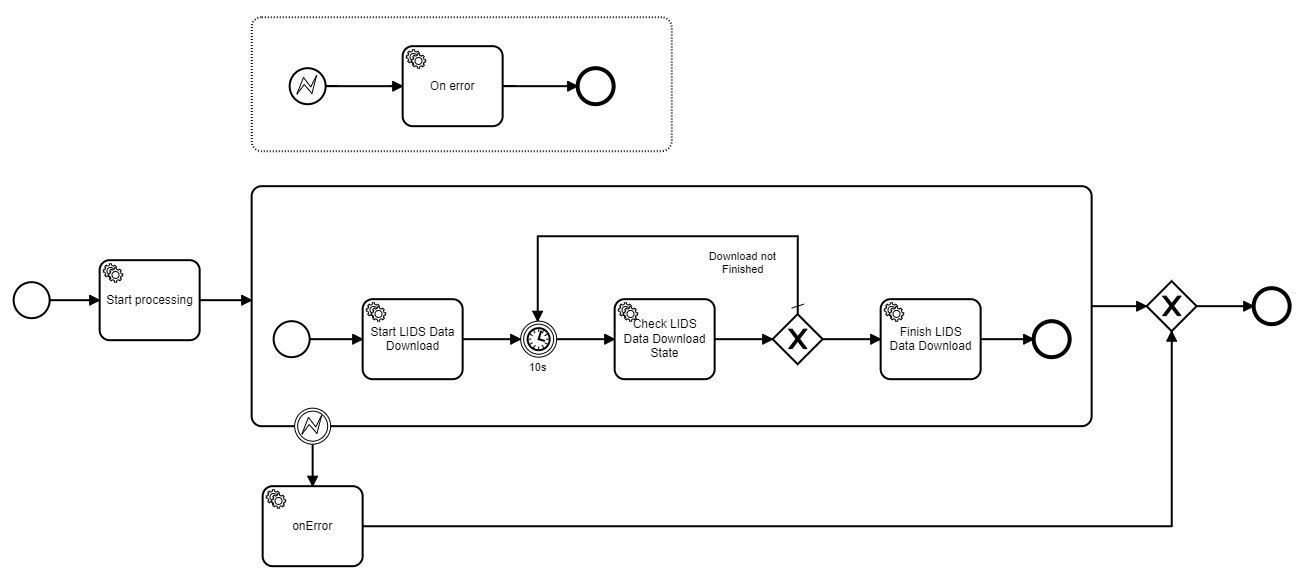
Fig. 1: Example of process definition
The final source file you can read in requestGenerateDocument.json.
Scripts step
The API that LPS calls needs to have defined connectors for communication. Here are the addresses and login information. All variables should be defined in env files.
Create exportable plot layout task group
This example describes how to call a service to create a taskGroup.
        var resultApi = api.lps().prepareCreateExportByElementTaskGroup(context)
            .lpsConnectorId("lps")
            .name("Map_R_12345665")
            .lidsWfsConnectorId("lidsWfsForLps")
            .enabled(true)
            .outputFormat("RASTER-PDF")
            .addParameter("DPI", "300")
            .addParameter("Compression", "none")
            .prepareAddTaskItem()
                .name("Map_R-12345665")
                .settingId("6186951511364378")
                .addParameter("Scale", "1000")
                .addParameter("SpatialCondition", api.geometry().prepareConvertGeometry(context).entityRef(request).convert().getGeometryAsLineString())
                .addParameter("FtidFidCollection", "ft_boRequest:2614543461531543531")
                .add()
            .create();

        var taskGroupId = resultApi.getTaskGroupId();

        resultApi.enable();

        var publicationId = resultApi.execute();
Check state of task group
Method prepareGetExportByElementTaskGroup in Scripting API return state Publishing, Completed or Failed. We need the status Completed, the task is already done and we can download the resulting file.
        api.lps()
            .prepareGetExportByElementTaskGroup(context)
            .lpsConnectorId("lps")
            .publicationId(publicationId)
            .getState();
Download map and attach document
The file will be downloaded at the same time as the connection to the feature.
        var newAttachment = api.features().attachments()
            .prepareAddLpsAttachment(context)
            .lpsConnectorId("lps")
            .publicationId(publicationId)
            .entityRef(request)
            .attachmentType("att_reqStatementMapES")
            .fileName("Map_A3_R-12345665")
            .soapActionName("http://asseco-ce.com/IPublishingWebService_v2/GetOutputFiles")  // it's needed only for v2
            .attach();