Implementation Tools
Level: Beginner
Keywords: VS Code extensions, Localtron, Package-cli, Postman, Translation tool, EA2LIDS model.xml generator, LIDS tools
The result: overview of implementation tools, installation and user guides
VS Code extensions
VS Code is a recommended metadata editor to be used for SAMO implementation. One of the reasons is that it has a lot of native extensions, recommended are for example: Git History, Git Graph, Git Lens, XML Tools, Sort JSON objects, Trailing Spaces… They can be downloaded and installed from the Extensions tab.
Custom extensions - SAMO VS Code
Additionally, Visual Studio Code enables also creation of custom extensions. A SAMO VS Code extension was developed, which contains a set of tools to make the implementation process of SAMO applications easier. For installation download latest version and follow the Installation steps below:
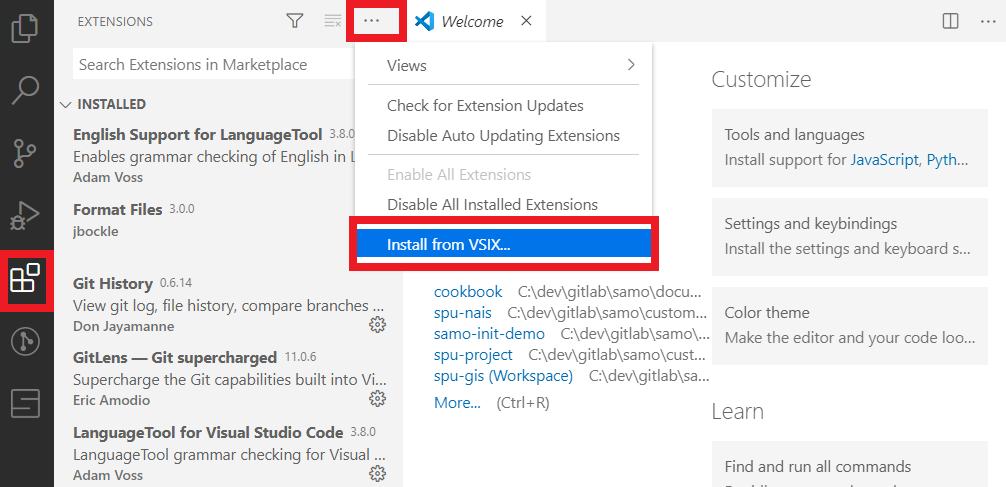
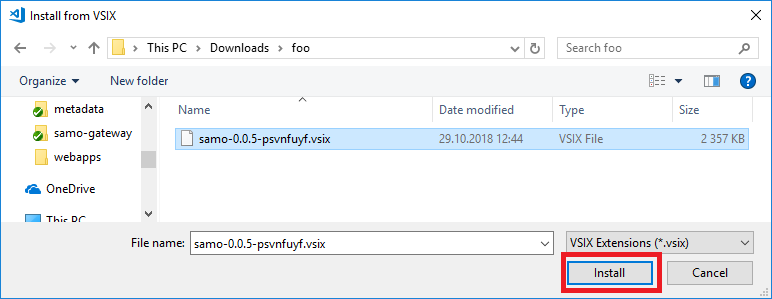

The successful installation can be verified by presence of "S" icon in left tollbar in VS Code window.
After installation, the functionality of SAMO VS Code is available from the command line on pressing CTRL + SHIFT + P, search for commands beginning with SAMO:.
If you are upgrading your SAMO extension (and not installing it anew), please make sure you uninstall the old version first.
SAMO VS Code consits of:
- Dynamic-App metadata validator, which:
- automatically validates the metadata structure,
- shows explanation of configuration attributes on mouseover,
- provides suggestions of possible conifugration parameters on pressing CTRL + SPACEBAR,
- different versions of Dynamic-App can be selected on pressing CTRL + SHIFT + P and running
Change versions of packageand selectingSAMO Dynamic App. If you run this command for the first time, you need to perform login (using LDAP credentials).
Localtron
An EXTREMELY simple command-line tool, which enables downloading the correct version of software components for running local implementation environment. Settings of this tool are specific for each project and are stored in the localtron.json file in your env project directory.
For Installation see Software Prerequisites.
User Guide
By running localtron run command (in commandline from your env project directory, e.g. C:\dev\gitlab\samo\customers\asseco-ce\samo-demo-project\environments\demo-dev), everything will be downloaded automatically and your local environment will start up.
Localtron has several options available for running only specific software components (e.g. localtron run –p gateway), or for updating versions of software components (localtron run -u). All options are available in help (localtron help).
Settings - localtron.json
Localtron.json file needs to exist under your env project directory. This file is usually created with the project initialization, and later only software component versions are updated in the artifacts object. Defined profiles can be used with localtron run command as -p option in order to run only chosen software components locally. If you don't use the -p option, defaultProfile is used.
    {
    "name": "DEMO DEV",
    "render_secrets": true,
    "properties": {
        "environment_properties": "${cwd}/environment.properties;${cwd}/local.properties",
        "packages_root": "${cwd}/configuration/packages",
        "data_root": "${cwd}/data",
        "data_source_ref": "property:dataSource"
    },
    "components": {
        "gateway": {
            "runner": "java",
            "debugPort": 2041,
            "jar": "${tomcat_runner_jar}",
            "javaOpts": "-Xms512m -Xmx2048m -XX:MaxNewSize=250m --add-opens=java.base/java.lang=ALL-UNNAMED --add-opens=java.base/java.util=ALL-UNNAMED --add-opens=java.base/java.io=ALL-UNNAMED --add-opens=java.base/java.lang.reflect=ALL-UNNAMED --add-opens=java.base/jdk.internal=ALL-UNNAMED --add-opens=java.management/javax.management=ALL-UNNAMED --add-opens=java.management/javax.management.openmbean=ALL-UNNAMED --add-opens=java.naming/com.sun.jndi.ldap=ALL-UNNAMED --add-opens=java.rmi/sun.rmi.transport=ALL-UNNAMED --add-opens=java.xml.crypto/org.jcp.xml.dsig.internal.dom=ALL-UNNAMED",
            "arguments": [
                "--server.port=${gateway_http_port}",
                "--server.properties=${environment_properties}",
                "--server.datasource=${data_source_ref}",
                "--server.artifact=${samo_gateway_war}",
                "--server.libs=${ojdbc_jar}",
                "--samo_data_root=${data_root}",
                "--samo_packages_root=${packages_root}",
                "--samo_env_configuration=${environment_properties}",
                {
                    "if": "component:user-service",
                    "arguments": [
                        "--userService.url=http://localhost:${user_service_http_port}"
                    ]
                },
                {
                    "if": "component:lids",
                    "arguments": [
                        "--lids.url=http://localhost:${lids_http_port}/as"
                    ]
                }
            ]
        },
        "user-service": {
            "runner": "java",
            "jar": "${tomcat_runner_jar}",
            "debugPort": 2042,
            "arguments": [
                "--server.port=${user_service_http_port}",
                "--server.properties=${environment_properties}",
                "--server.datasource=${data_source_ref}",
                "--server.artifact=${user_service_war}",
                "--server.libs=${ojdbc_jar}",
                "--samo_data_root=${data_root}",
                "--samo_packages_root=${packages_root}",
                "--samo_env_configuration=${environment_properties}"
            ]
        },
        "lids": {
            "runner": "java",
            "jar": "${lids_tomcat_runner_jar}",
            "debugPort": 2043,
            "javaOpts": "-Xms512m -Xmx2048m -XX:MaxNewSize=250m --add-opens=java.base/java.lang=ALL-UNNAMED --add-opens=java.base/java.util=ALL-UNNAMED --add-opens=java.base/java.io=ALL-UNNAMED --add-opens=java.base/java.lang.reflect=ALL-UNNAMED --add-opens=java.base/jdk.internal=ALL-UNNAMED --add-opens=java.management/javax.management=ALL-UNNAMED --add-opens=java.management/javax.management.openmbean=ALL-UNNAMED --add-opens=java.naming/com.sun.jndi.ldap=ALL-UNNAMED --add-opens=java.rmi/sun.rmi.transport=ALL-UNNAMED --add-opens=java.xml.crypto/org.jcp.xml.dsig.internal.dom=ALL-UNNAMED --add-exports=java.desktop/sun.awt.image=ALL-UNNAMED",
            "arguments": [
                "--server.port=${lids_http_port}",
                "--server.properties=${environment_properties}",
                "--server.datasource=${data_source_ref}",
                "--server.artifact=${lids_ear}",
                "--server.artifactsFilter=lids-as.war,browser.war",
                "--server.libs=${ojdbc_jar}",
                "--server.libs=${jai_core_jar}",
                "--server.libs=${jai_codec_jar}",
                "--server.libs=${jai_imageio_jar}",
                "--samo_data_root=${data_root}",
                "--samo_packages_root=${packages_root}",
                "--samo_env_configuration=${environment_properties}"
            ]
        }
    },
    "profiles": {
        "all": {
            "components": [
                "gateway",
                "user-service",
                "lids"
            ]
        },
        "lids": {
            "components": [
                "lids"
            ]
        },
        "gateway": {
            "components": [
                "gateway"
            ]
        },
        "userService": {
            "components": [
                "user-service"
            ]
        },
        "lidsAndGateway": {
            "components": [
                "gateway",
                "lids"
            ]
        }
    },
    "defaultProfile": "lidsAndGateway",
    "artifacts": {
        "tomcat_runner_jar": {
            "type": "maven",
            "groupId": "com.asseco.samo",
            "artifactId": "samo-embedded-tomcat-runner",
            "packaging": "jar",
            "version": "2.3.0-t9.0.100"
        },
        "samo_gateway_war": {
            "type": "maven",
            "groupId": "com.asseco.samo",
            "artifactId": "samo-gateway",
            "packaging": "war",
            "version": "${gateway_localtron_version}"
        },
        "user_service_war": {
            "type": "maven",
            "groupId": "com.asseco.samo",
            "artifactId": "samo-user-service",
            "packaging": "war",
            "version": "latest"
        },
        "lids_tomcat_runner_jar": {
            "type": "maven",
            "groupId": "com.asseco.samo",
            "artifactId": "samo-embedded-tomcat-runner",
            "packaging": "jar",
            "version": "2.3.0-t9.0.100"
        },
        "lids_ear": {
            "type": "maven",
            "groupId": "com.berit.lids",
            "artifactId": "lids-ear",
            "packaging": "ear",
            "classifier": "JSE",
            /* Latest vertion */
            "version": "${lids_localtron_version}"
            /* Need snapshot? http://brno-mvn/maven/com.berit.snapshot/com/berit/lids/lids-ear/ */
            // "version": "7.7.5-165001.DEV-SNAPSHOT",
            // "snapshotNo": "54",
            // "snapshotTimestamp": "20201109.172322"
        },
        "ojdbc_jar": {
            "type": "maven",
            "groupId": "com.oracle.jdbc",
            "artifactId": "ojdbc8",
            "packaging": "jar",
            "repositoryUrl": "https://maven.xwiki.org/externals/",
            "version": "12.2.0.1"
        },
        "jai_core_jar": {
            "type": "maven",
            "groupId": "javax.media",
            "artifactId": "jai-core",
            "packaging": "jar",
            "repositoryUrl": "https://repository.jboss.org/nexus/content/repositories/thirdparty-releases/",
            "version": "1.1.3"
        },
        "jai_codec_jar": {
            "type": "maven",
            "groupId": "javax.media",
            "artifactId": "jai_codec",
            "packaging": "jar",
            "repositoryUrl": "https://nexus.geomatys.com/repository/geotoolkit/",
            "version": "1.1.3"
        },
        "jai_imageio_jar": {
            "type": "maven",
            "groupId": "javax.media",
            "artifactId": "jai_imageio",
            "packaging": "jar",
            "repositoryUrl": "https://nexus.geomatys.com/repository/geotoolkit/",
            "version": "1.1.1"
        }
    }
}
Package-cli
- one of the SAMO-CLI tools
- command line tool
- used for installation of local environments for packaged applications
- used for releasing packages
- used for uploading packages to packages repository
- all possible commands are available if you run:
pkg help - second level of help is available if you run:
pkg <chosen command> -h
For Installation see Software Prerequisites.
SAMO Artifacts tool
- one of the SAMO-CLI tools
- command line tool
- used for downloading SAMO artefacts
For Installation see Software Prerequisites.
Postman
- we usually use it for implementation of business server logic (e. g. business actions, triggers...)
- can catch and send custom REST and SOAP requests
Translation tool
- simple command line tool for managing SAMO translate strings
-
finds and lists missing or corrupted translations through all packages
-
access on Gitlab is currently given on request
EA2LIDS - model.xml generator
- this tool generates LIDS model directly from Enterprise Architect with just one click
- access on Gitlab is currently given on request
Samo-showcase-module
- a SAMO web module developed to provide a place where you can test and tune your configuration and see the outcome change simultaneously (without the need to press F5)
- currently available in SAMO Demo Project
- for more information see Samo-showcase-module
LIDS Implementation Tools
Various LIDS Implementation Tools and other small helpers developed and shared by other implementators are available from SAMO Portal.