Entity Coloring
Level: Beginner
Keywords: color, state color, priority color, colored stripe in Browse
The result: entity coloring based on attribute (e.g. state, priority) in Browse
Dynamic-App provides various possibilities to tune the interface of SAMO Application. Among others, there is an option to define Entity coloring (different color for each entity instance based on some attribute value). Following chapters will describe, how to implement different types of this coloring.
How to implement colored stripe in Browse?
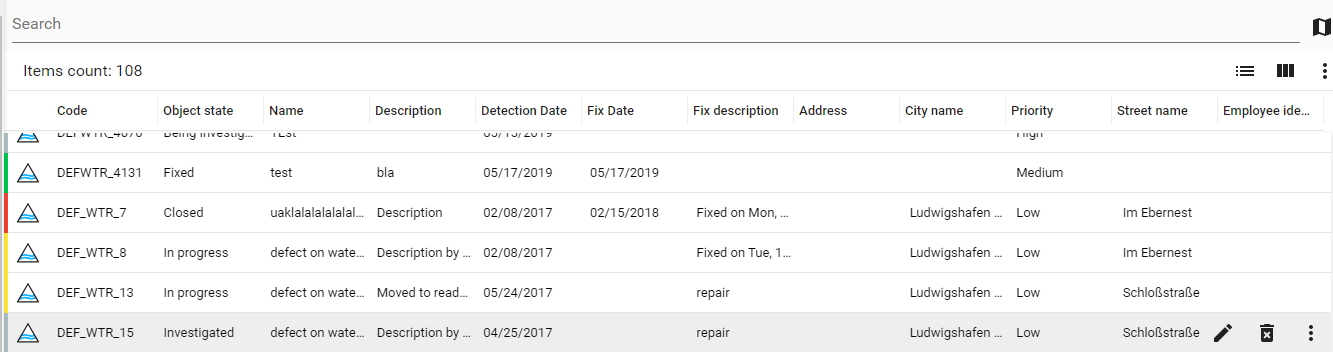
For implementing colored stripe in your browse, you need to define the coloring section in your entity metadata file (e.g. ft_defDefectWater.json). You need to define the property, based on which the coloring should be applied and pairs of property values and colors (you can use "hex" or "rgb" format).
When you define this coloring, it will be used in all browses containing your entity. In order to turn this coloring off, you need to define (in your browse configuration) disableColoring: true.
    {
        "coloring": {
            "property": "at_defBoDefect_c_state.ca_state_id",
            "mapping": {
                "type": "static",
                "values": {
                    "2": "#b0bec5",
                    "9": "#f44336",
                    "10": "#00c853",
                    "11": "#00c853",
                    "104": "#ffeb3b",
                    "115": "#b0bec5"
                }
            }
        }
    }
How to implement label (a.k.a. colored bubble)?
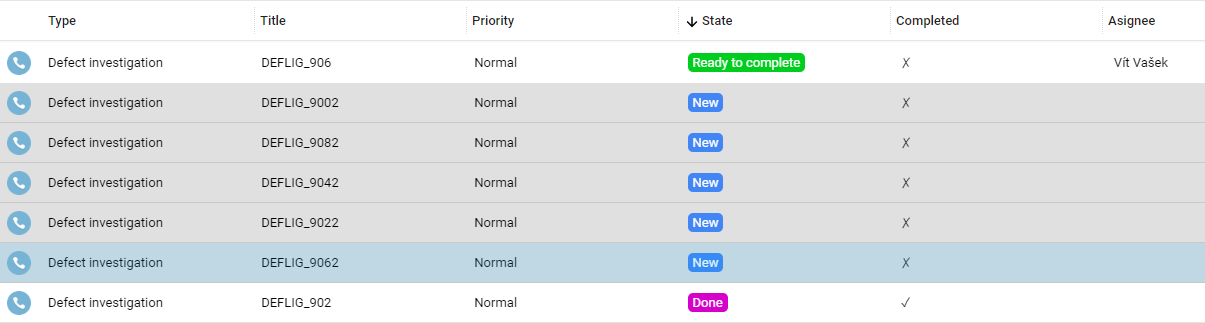
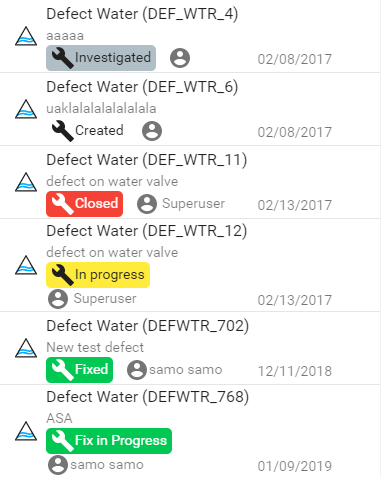
Labels can be implemented in two ways. Using definition in workflow (only for states) and using template string.
Workflow states
If you want to implement label, apearing in SAMO Browse and Detail, for workflow states, you need to add symbology bgColor and fgColor to your workflow definition for each state.
    {
        "workflow": {
            "entrypoint" : "new",
            "states": {
                "new" :
                    {
                    "title" : "New",
                    "symbology" : {
                        "bgColor" : "#4285f4",
                        "fgColor" : "#FFFFFF"
                    },
                "transitions" : [
                    "ready"
                    ]
                }
                ...
            }
        }
    }
Other attributes
This option is for now possible only for the browse view type list3 or entity modules (e.g. samo-entity-properties-detail). For implementing this option, you need to define the color using template string {entityColor:}. This template string uses entity colores defined in the coloring object, see the Colored Stripe example.
For Browse view type list3 include the string in the additionalInfo configuration parameter.
    {
        "additionalInfo": {
            "left": [
                "{label:{entityColor:},{icon:build}{get:#at_defBoDefect_c_state.ca_state_description}}",
                "{icon:account-circle}{get:#createdBy.firstName} {get:#createdBy.lastName}"
            ],
            "right": ["{getDate:#createDate}"]
        }
    }
For other places include the string in overrideProperties configuration parameter.
    {
        "overrideProperties":
            "at_defBoDefect_c_state": {
                value: "{label:{entityColor:},{get:#at_defBoDefect_c_state.ca_state_description}}"
            }
    }