New SAMO Entity
Level: Beginner
Keywords: entity metadata, title, subtitle, icon
The result: defined SAMO entity metadata, changed look of the entity in the application
How to define new Entity in SAMO metadata?
Usually, if you want to use predefined feature from LIDS model also in the SAMO application, you need to define it in SAMO metadata (except the case, where you want to use the default configuration). Additionaly, you can override existing LIDS configuration and add a new one. The possibility of inheriting configuration is also possible.
Create file in the folder structure
First, you need to create a json file with the name corresponding to the feature type id under the entities metadata folder (directly, or under some custom subfolder), see example below.
dynamic-app
│
└───samo-demo\configuration\metadata
    │
    └───entities
        │
        └───features
            │
            └───water-assets
                └───details
                │   └───...
                └───ft_waterPipe.json
Override existing LIDS configuration
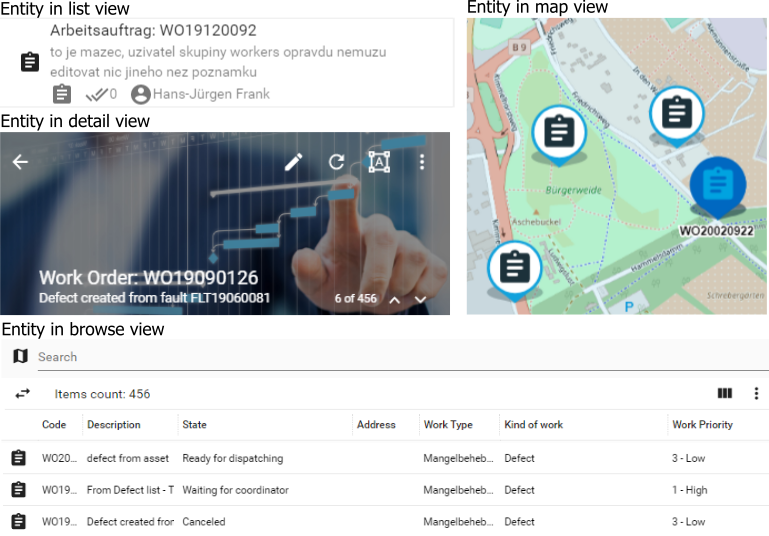
In the entity metadata you can configure several things (see Dynamic-App Module Catalog), for example how will the entity look like, when show in list (see titleString, subTitleString, additionalInfo properties), browse (mainIcon, coloring properties) or map (overrideSymbology, mapIcon properties). For configuring the text shown in the application (e.g. title or subtitle in this case), the template strings are often used.
    {
        "extends" : "ft_boWorkRealiz",
        "titleString" : "{tr:workOrders.title}: {get:#at_boWorkRealiz_code}",
        "subTitleString" : "{get:#at_boWorkRealiz_description}",
        "descriptionString" : "{get:#at_boWorkRealiz_note}",
        "additionalInfo" : {
            "left" : [
                "{icon:assignment}{get:#at_boWorkOrder_workItemCount}",
                "{icon:done-all}{get:#at_boWorkOrder_progress}",
                "{icon:account-circle}{get:#at_boWorkRealiz_fr_boRespEmp.at_boIntParty_name}"
            ],
            "right" : [
                "{getDate:#at_boWorkRealiz_propStartDate}"
            ]
        },
        "detail" : "<$import:./detail/WODetail.json>",
        "edit" : "<$import:./detail/WOEditDetail.json>",
        "action" : "<$import:./detail/WOTaskActionDetail.json>",
        "defaultPropertyGroup" : "WObrowsePropertyGroup",
        "defaultDetailPropertyGroup" : "WOdetailPropertyGroup",
        "mainIcon" : "ewr-icons:workorder",
        "mapIcon" : "ewr-icons:pin-workorder-4",
        "titleImage" : "entities/project_dark.jpg",
        "overrideSymbology" : {
            "masterGraphics" : {
            "type" : "Point",
            "iconCrossOrigin" : "use-credentials",
            "iconAnchor" : [
                32,
                64
            ],
            "iconAnchorXUnits" : "pixels",
            "iconAnchorYUnits" : "pixels",
            "iconSrc" : "ewr-icons:pin-workorder-4",
            "fillColor"   : "rgba(0,163,224,0.2)",
            "strokeColor" : "rgba(0,163,224,0.6)"
            }
        },
        "selectSymbology" : {
            "masterGraphics" : {
                "symbolizer" : {
                    "iconSrc" : "ewr-icons:pin-workorder-4",
                    "fillColor"   : "rgba(0,163,224,0.5)",
                    "strokeColor" : "rgba(0,163,224,0.8)",
                    "label" : {
                        "fillColor" : "rgb(0, 0, 0)",
                        "strokeColor" : "rgb(255, 255, 255)",
                        "strokeWidth" : 3,
                        "symbolHeight" : "12px",
                        "fontWeight" : "bold",
                        "fontFamily" : "Arial",
                        "offsetY" : 11,
                        "value" : "{get:#at_boWorkRealiz_code}"
                    }
                }
            }
        }
    }
The default configuration
When configuring entity in SAMO client metadata often the heredity principles are applied. We can extend configuration of parent entity in child entity. However, "extend": "default" configuration is highly overused due to misconceptions.
Entity configuration stored in the default.json was designed to be used as a default configuration for all entities, which should only overtake configuration from LIDS metadata. If this file is present in the project, no further configuration is needed for LIDS entities and they are all displayed and behave according to the default configuration.
As soon as a file with the name of specific featureType is created, the default configuration is no longer taken into account. Instead, the configuration present in the specific featureType entity configuration file is used.
Dynamic-App supports multiple default jsons. This way you can prepare several different configurations for multiple features grouped by their names. For example default-ft_g_was.json configuration will be used for all featureTypes beginning with ft_g_was string.
This means, that the "extend": "default" configuration should not be used at all, as it does not make sense. It is better to create some root.json file with the basic entity configuration and use "extend": "root" in all other entity configuration files.
    {
        "service" : "samo-features",
        "lidsEntity" : true,
        "overrideSymbology" : false,
        "fulltextFields": ["all"],
        "attributeProperties" : true
    }
``` json
    {
        "extends" : "root",
        "detail" : {
            "default" : {
                "sections": [
                    {
                        "title": "Info",
                        "icon": "samo-default-icons:info",
                        "module": {
                            "type": "component:entity-modules/detail/samo-entity-properties-detail"
                        }
                    }
                ]
            }
        },

        "edit" : {
            "default": {
                "sections": [
                    {
                        "title": "Info",
                        "icon": "samo-default-icons:info",
                        "module": {
                            "type": "component:entity-modules/form/samo-entity-properties-form"
                        }
                    }
                ]
            }
        }
    }
Defining entity group
We can create so called entity groups (sets of entity IDs), which are used when we need to make a joint sum or listing across different entities. There are two possibilities how to define entity group. In LIDS metadata or in SAMO client metadata.
In SAMO client metadata
To define entity group in SAMO client metadata you need to create a .json file with the name corresponding to the group id under the groups folder in samo-entities, see the example below.
dynamic-app
│
└───samo-demo\configuration\metadata
    │
    └───groups
        └───example-group.json
The JSON structure of definition of entity group is following:
    {
        "label": "Example group",
        "entities": [
            "ft_example"
        ]
    }
In LIDS metadata
To define group in LIDS metadata you need just to tag your feature type with a group element.
    <ber:featureType id="ft_example" name="Example featuretype" parentId="ft_5000002" abstract="false">
        <ber:groupsArray>
            <ber:group id="example-group"/>
        </ber:groupsArray>
        ...
    </ber:featureType>