Entity property groups
Level: Beginner
Keywords: defaultPropertyGroup, defaultDetailPropertyGroup, propertyGroupId, property groups, LIDS forms
The result: defined SAMO property groups / LIDS forms, show only selected entity properties
Property Group is an ordered set of characteristics used to display object instance information
Every entity can have defined multiple property groups (sets of entity properties), which are used to display different entity properties in different places (and in different actions). For example in Browse of all instances we want to show only certain properties, in Entity Detail we want to show almost all properties, and again different set of properties will be used in Edit Form, and finaly only minimum set of properties will be shown in related entities sections.
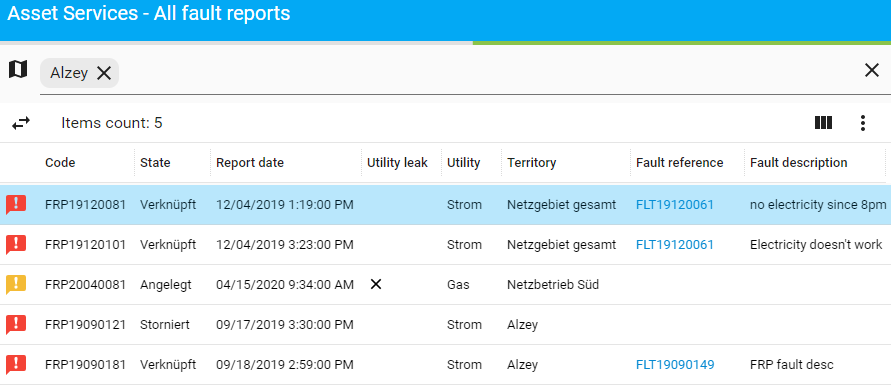
Fig. 1: Property group example: entityBrowse - some properties
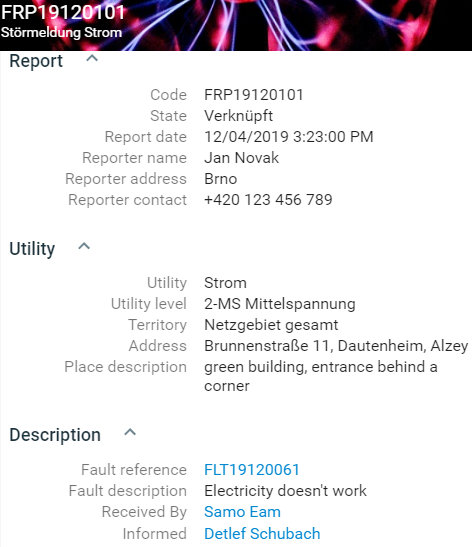
Fig. 2: Property group example: entityDetail - all properties
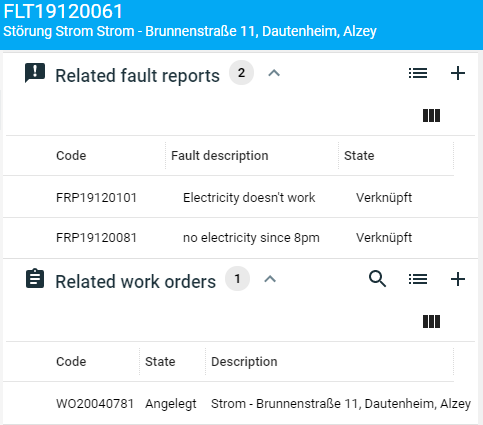
Fig. 3: Property group example: entityRelated - very few (code, state, description) properties only
How to define property groups?
Property groups can be defined either in SAMO client metadata, or in LIDS model (called forms).
Both options allow property name overriding and therefore handling multilanguage displaying (translation of property name to various languages). In SAMO client metadata property name can be changed by setting new title using translation string, in LIDS forms by configuring labels.
In SAMO client metadata
To define property group in SAMO client metadata you need to create a .json file with the name corresponding to the group id under the propertyGroups folder in samo-entities, see the example below.
C:\dev\gitlab\samo\customers\asseco-ce\samo-demo-configuration\packages\samo-demo\dynamic-app\samo-demo\configuration\metadata\propertyGroups
dynamic-app
│
└───samo-demo\configuration
    │
    └───metadata
        │
        └───propertyGroups
            │
            └───entityDetail.json
            └───entityRelated.json
The JSON structure of property group definition is for example following:
    {
        "properties": [
            "entity_code",
            "entity_state",
            "entity_reportDate",
            "entity_utilityLeak",
            "entity_utility",
            "entity_territory",
            "entity_faultReference",
            "entity_faultDescription"
        ]
    }
    {
        "properties": [
            "entity_code",
            "entity_description",
            "entity_state"
        ],
        "override": {
            "entity_description": {
                "title": "Related entity description"
            },
            "entity_state": {
                "title": "{tr:state}"
            }
        }
    }
In LIDS metadata
Properties (Forms) can be defined for each feature type directly in LIDS model. Entity properties can be groupped and titled with caption labels. Detail configuration options can be found in LIDS Implementation Guide - Forms.
    <ber:featureType id="ft_example" name="Example featuretype" parentId="ft_5000002" abstract="false">
        <ber:featureAttributeArray>
        ...
        </ber:featureAttributeArray>
        <ber:formArray>
            <ber:form id="entityDetail" name="entity detail and edit">
                <ber:fieldGroup>
                    <ber:caption label="Report" collapsible="expanded"/>
                    <ber:field refId="entity_code" label="Code" readOnly="true"/>
                    <ber:field refId="entity_state" label="State" readOnly="true"/>
                    <ber:field refId="entity_reportDate" label="Report date" readOnly="false"/>
                </ber:fieldGroup>
                <ber:fieldGroup>
                    <ber:caption label="{tr:utility}" collapsible="collapsed"/>
                    <ber:field refId="entity_utility" label="{tr:utility}" readOnly="false"/>
                    <ber:field refId="entity_utilityLevel" label="{tr:utilLevel}" readOnly="false"/>
                    <ber:field refId="entity_territory" label="{tr:territory}" readOnly="false" length="20"/>
                    <ber:field refId="entity_Address" label="{tr:taiDispAddress}" readOnly="false" length="100"/>
                </ber:fieldGroup>
            </ber:form>
            <ber:form id="entityBrowse" name="entity browse">
                <ber:field refId="entity_code" readOnly="true"/>
                <ber:field refId="entity_state" readOnly="true"/>
                <ber:field refId="entity_reportDate" readOnly="true"/>
                <ber:field refId="entity_utilityLeak" readOnly="true"/>
                <ber:field refId="entity_utility" readOnly="true"/>
                <ber:field refId="entity_territory" readOnly="true"/>
                <ber:field refId="entity_faultReference" readOnly="false"/>
                <ber:field refId="entity_faultDescription" readOnly="false"/>
            </ber:form>
            <ber:form id="entityRelated" name="entity related">
                <ber:field refId="entity_code" readOnly="true"/>
                <ber:field refId="entity_faultDescription" readOnly="true"/>
                <ber:field refId="entity_state" readOnly="true"/>
            </ber:form>
            <ber:assignedForms>
                <ber:assignedForm usage="default" refId="entityBrowse"/>
                <ber:assignedForm usage="insertSemantics" refId="entityDetail"/>
                <ber:assignedForm usage="updateSemantics" refId="entityDetail"/>
            </ber:assignedForms>
        </ber:formArray>
    </ber:featureType>
Using property groups
Defined property groups can be set as default in the feature definition, or overridden for particular reason in samo-browse, samo-entity-properties-form, related-entity-list, assigned-entity-list and actions using the propertyGroupId configuration parameter:
    {
        "extends" : "parentFeature",
        "defaultPropertyGroup": "entityBrowse",
        "defaultDetailPropertyGroup": "entityDetail",
        "detail": {
            "default": {
                "sections": [
                    {
                        "module": {
                            "type": "component:entity-modules/lists/related-entity-list",
                            "entity": ["relatedFeatureName"],
                            "propertyGroupId": "entityRelated"
                        }
                    }
                ]
            }
        },
        "edit" : {
            "default": {
                "sections": [
                    {
                        "module": {
                            "type": "component:entity-modules/form/samo-entity-properties-form",
                            "entityType": "featureName",
                            "propertyGroupId": "entityEdit"
                        }
                    }
                ]
            }
        },
        "action": {
            "dispatch": {
                "sections": [
                    {
                        "module": {
                            "type": "component:entity-modules/form/samo-entity-properties-form",
                            "entityType": "featureName",
                            "propertyGroupId": "entityDetail"
                        }
                    }
                ]
            }
        }
    }
    {
        "module": {
            "type": "component:entity-modules/browse/samo-browse",
            "entitiesGroup": "entityGroupName",
            "propertyGroupId": "entityBrowse",
        }
    }