Overview of Dashboard Modules
Level: Catalog
Keywords: dashboard, dashboard layout
The result: help you to decide, which layout of dashboard to choose
This chapter lists all page modules that can be used for dashboard. Dashboard page is typically a page with more navigation or overview modules. It should give to the user a complete view over specific application part. There can be many types of widgets navigating to the pages, chart widgets with current counts and states and some other modules.
Samo-dashboard
This is the most basic dashboard module for displaying more widgets together. It can be splitted to left and right sides. Typically on the left there are navigation and chart widgets and on the right side there can be widget containing Objects of interests, Messages or other important navigation which should remain on the top of the page event on narrower screens.
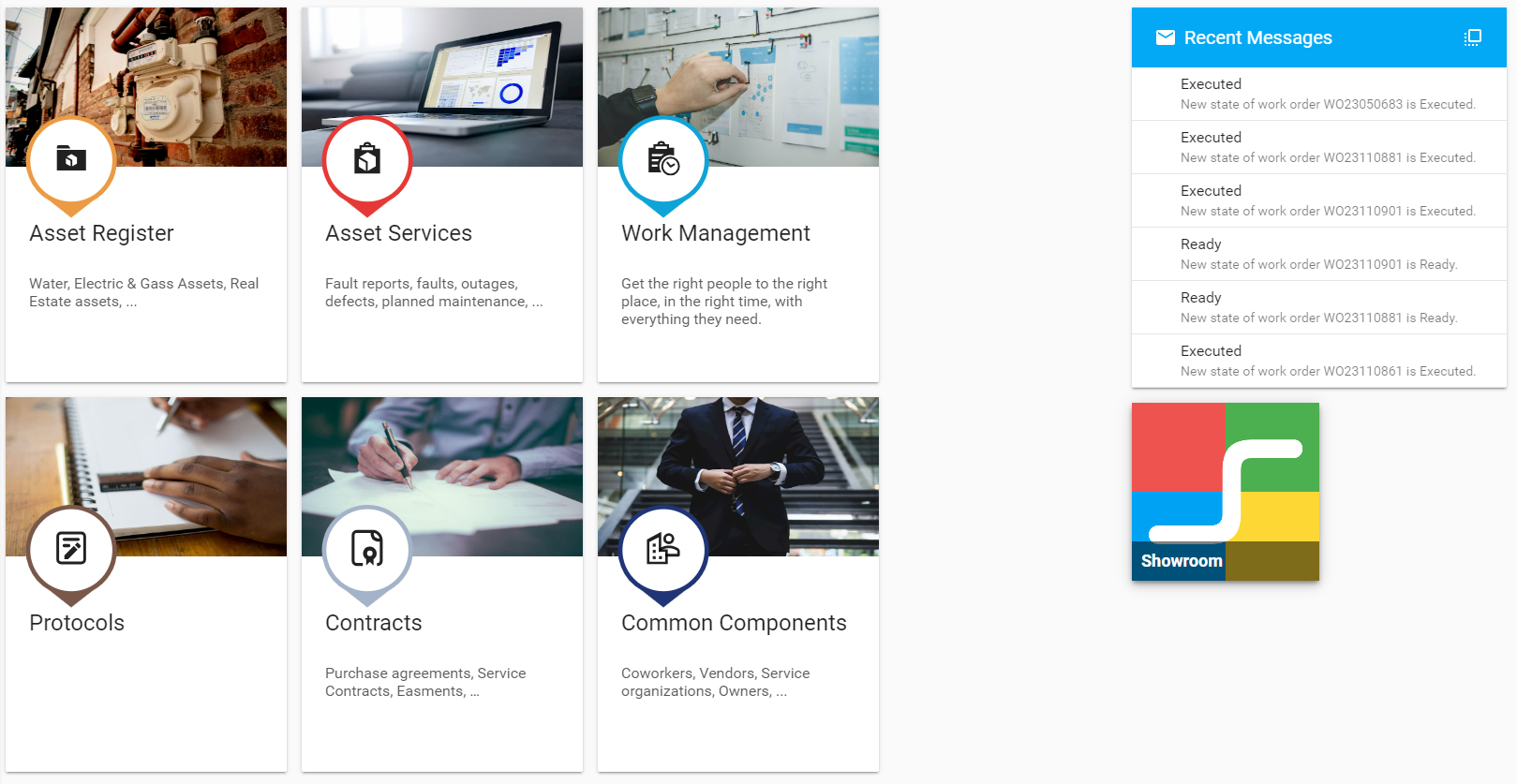
    {
      "title": "{tr:dashboard.dashboard}",
      "module": {
        "type": "component:dashboard-modules/samo-dashboard",
        "id": "cockpit-dashboard",
        "security": {
          "loggedIn": true
        },
        "widgets": {
          "left": [
            {
              "module": {
                "type": "component:entity-modules/dashboard/samo-entity-count-shortcut-big",
                "title": "{tr:lht-assets.assets}",
                "description": "{tr:lht-assets.description}",
                "icon": "samo-icons-image:assistant-photo",
                "image": "images/dashboard/construction_v1.jpg",
                "part": "assets",
                "entitiesGroup": "water-assets",
                "color": "#ff5722"
              }
            }
          ],
          "right": [
            {
              "module": {
                "id": "recent-messages",
                "type": "component:user-modules/messages/dashboard/samo-user-messages-widget",
                "messagesCount": "3",
                "viewAllPage": "messages"
              }
            },
            {
              "module": {
                "type": "component:dashboard-modules/samo-asseco-news-module",
                "title": "SAMO DEMO guide",
                "image": "images/user-guide.jpg",
                "url": "/resources/lht/wfms-pilot/common/SAMODEMO_UserGuide.pdf"
              }
            }
          ]
        }
      }
    }
Samo-category-dashboard
This is a module which divide a dashboard horizontally (not vertically as samo-dashboard). It allows to create more categories to group some related widgets togehter.
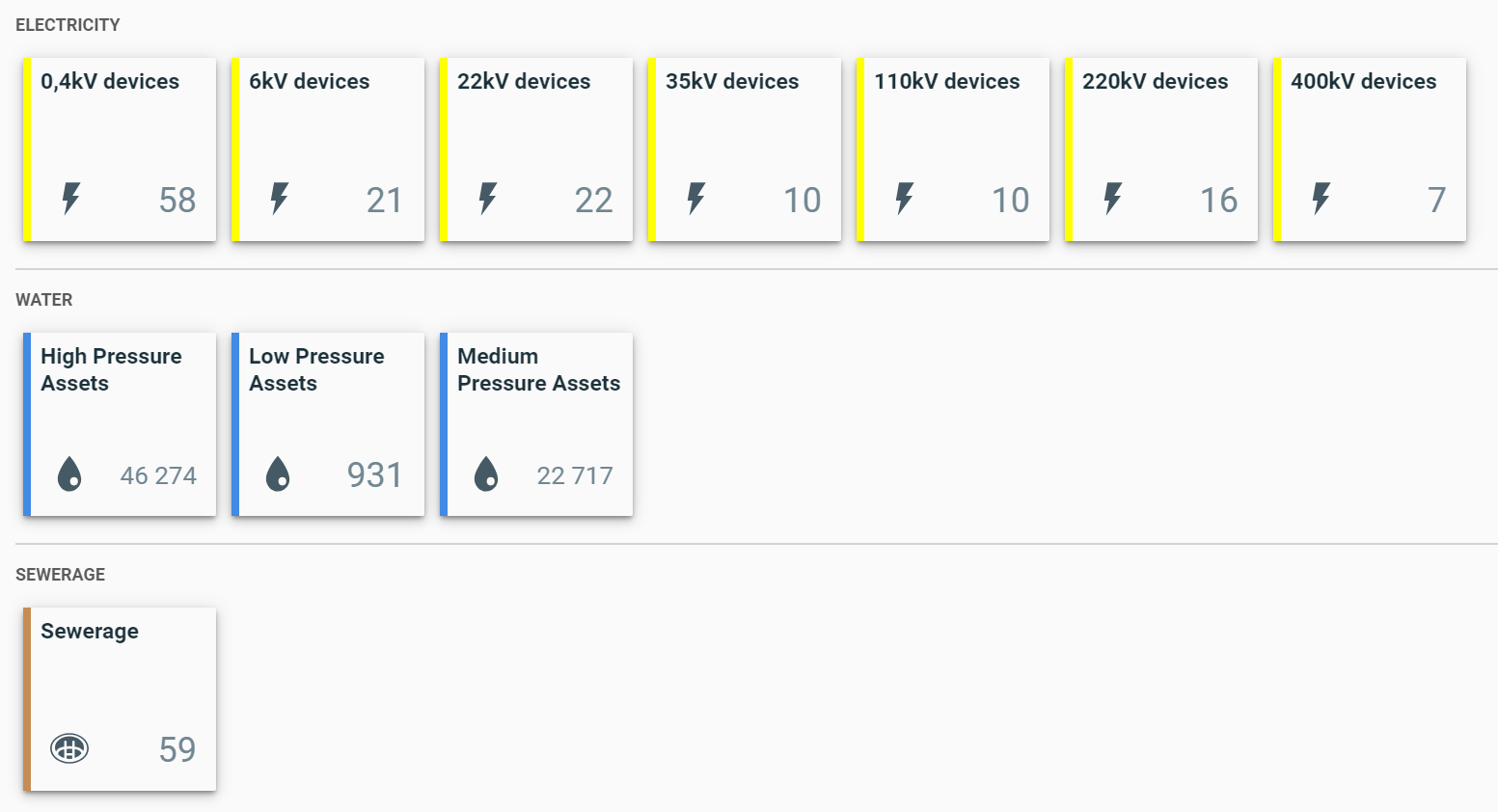
    {
      "id": "realEstate-dashboard",
      "type": "component:dashboard-modules/samo-category-dashboard",
      "security": {
        "loggedIn": true
      },
      "categories": [
        {
          "title": "{tr:realEstate.buildings}",
          "widgets": [
            {
              "module": {
                "type": "component:entity-modules/dashboard/samo-entity-count-shortcut",
                "title": "{tr:realEstate.building.all}",
                "description": "{tr:realEstate.building.description}",
                "icon": "resource:entities/building.png",
                "part": "real-estate",
                "page": "buildings",
                "entitiesGroup": "buildings",
                "query": {
                  "type": "matchAll"
                },
                "color": "#ff9800"
              }
            }
          ]
        },
        {
          "title": "{tr:realEstate.lots}",
          "widgets": [
            {
              "module": {
                "type": "component:entity-modules/dashboard/samo-entity-count-shortcut",
                "title": "{tr:realEstate.lots}",
                "description": "{tr:realEstate.lot.description}",
                "icon": "resource:entities/CityPart.png",
                "part": "real-estate",
                "page": "lots",
                "entitiesGroup": "lots",
                "query": {
                  "type": "matchAll"
                },
                "color": "#bf360c"
              }
            },
            {
              "module": {
                "type": "component:entity-modules/dashboard/samo-entity-count-shortcut",
                "title": "{tr:realEstate.lots-boundaries}",
                "description": "{tr:realEstate.lot.boundary-description}",
                "icon": "resource:entities/CityPart.png",
                "part": "real-estate",
                "page": "lots-boundaries",
                "entitiesGroup": "lots-boundaries",
                "query": {
                  "type": "matchAll"
                },
                "color": "#ff5722"
              }
            }
          ]
        }
      ]
    }