Attribute prefilling
Level: Intermediate
Keywords: attribute prefilling, business action, Edit detail
The result: attribute prefilling in the Edit detail
Attribute prefilling using business actions
One of the most complex options to prefill the value of a form is to prefill them using a business action. This chapter will show how is it possible to dynamically prefill the form when changing the selected input field.
Example 1
What it should do?
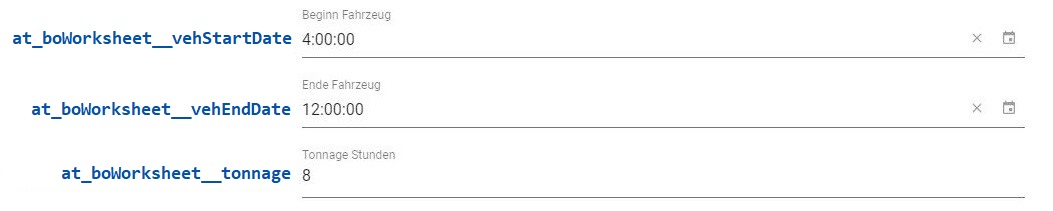
We have three attributes: at_boWorksheet__vehStartDate, at_boWorksheet__vehEndDate and at_boWorksheet__tonnage:
- If both the
at_boWorksheet__vehStartDateand theat_boWorksheet__vehEndDateattributes are filled, theat_boWorksheet__tonnageattribute is prefilled with the difference ofat_boWorksheet__vehEndDateandat_boWorksheet__vehStartDateusing theprefillTonnagebusiness action. - If the
at_boWorksheet__vehStartDateor theat_boWorksheet__vehEndDateattribute is not filled, theat_boWorksheet__tonnageattribute should remain empty.
How to implement it?
The attributes at_boWorksheet__vehStartDate and at_boWorksheet__vehEndDate are defined in the file worksheetEditDetails.json
-
Both attributes have
dynamicOnChangeproperty specified, which causes the call of business actionprefillTonnagewhen the value of the attribute changes. -
The input parameters (
startDateandendDate) are defined in therequestBodyproperty.worksheetEditDetails.json - configuration example{"at_boWorksheet__vehStartDate": {"dynamic": true,"dynamicNotUpdateFilled": true,"dynamicClearOnChange": "at_boWorksheet__startService","value": "{get:#at_boWorksheet__startService}","disabled": "{isEqual:#at_boWorksheet__startService,}","type": "time","dynamicOnChange": [{"type": "modifyDataContext","actions": [{"type": "action","path": "","entityType": "ft_boWorksheet","actionId": "prefillTonnage","requestBody": {"startDate": "{get:#at_boWorksheet__vehStartDate}","endDate": "{get:#at_boWorksheet__vehEndDate}"}}]}]},"at_boWorksheet__vehEndDate": {"dynamic": true,"dynamicNotUpdateFilled": true,"dynamicClearOnChange": "at_boWorksheet__startService","value": "{get:#at_boWorksheet__startService}","disabled": "{isEqual:#at_boWorksheet__startService,}","type": "time","validation": {"dynamicMin": "at_boWorksheet__vehStartDate","validateOnChange": true,"type": "date"},"dynamicOnChange": [{"type": "modifyDataContext","actions": [{"type": "action","path": "","entityType": "ft_boWorksheet","actionId": "prefillTonnage","requestBody": {"startDate": "{get:#at_boWorksheet__vehStartDate}","endDate": "{get:#at_boWorksheet__vehEndDate}"}}]}]}}
The business action prefillTonnage is defined in the ft_boWorksheet entity business metadata.
    {
      "actions": {
          "prefillTonnage": {
              "steps": [{
                  "type": "script",
                  "source": "scripts/steps/tickets/prefillTonnage.js"
              }]
          }
      }
    }
The output of the action must be the object with the calculated value of attribute at_boWorksheet__tonnage. The at_boWorksheet__tonnage attribute calculation is defined in prefilleTonnage.js.
    function action(context) {

        var clientData = api.request()
            .prepareCreateJSONRequestReader(context)
            .create()
            .getRequestBodyAsObject();

        var responseBody = {

        }

        var startDate = parseInt(clientData.startDate);
        var endDate = parseInt(clientData.endDate);  //parseInt parses a string and returns an integer.

        if(!isNaN(startDate) && !isNaN(endDate)){  //"Not-a-Number" indicates that a value is not a legal number.

            var diffDate = endDate - startDate ;

            var tonnage = Math.floor(diffDate / 3600000 * 10) / 10;  //Math.floor() returns the largest integer less than or equal to a given number.

            var responseBody = {

                at_boWorksheet__tonnage: tonnage  //The at_boWorksheet__tonnage attribute is prefilled using the BS action.

            }

        } else {
            responseBody = {
                              //Don't want to fill anything.
            }
        }
    }