Layout of modules
Level: Catalog
Keywords: layout, grid, rows, columns, steps, collapse module
The result: modules' layout possibilities
Samo-collapsible-module
In details, it is possible to collapse modules by the collapsed: true/false configuration property. The modules, which do not have this option (e.g. Samo-position-edit module) can be wrapped in the Samo-collapsible-module, which enables this functionallity.
Section-group-module
This module provides the option to group multiple sections together. Aftewrards they will have common title, icon, collapsible behavior, security and visibilty.
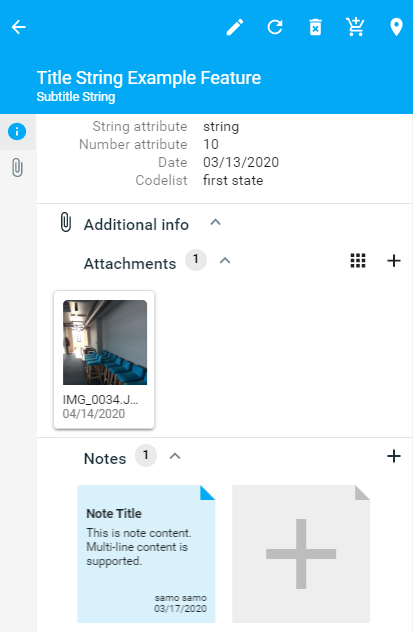
    {
        "detail" :
        {
            "default" : {
                "sections" : [
                    {
                        "icon" : "samo-default-icons:info",
                        "module" : {
                            "type" : "component:entity-modules/detail/samo-entity-properties-detail",
                            "propertyGroupId" : "fmd_example"
                        }
                    },
                    {
                        "icon" : "samo-default-icons:attach",
                        "module" : {
                            "type" : "component:dynamic-app/modules/common/section-group-module",
                            "title" : "Additional info",
                            "sections" : [
                                {
                                    "module" : {
                                        "type" : "component:entity-modules/attachments/samo-entity-attachments"
                                    }
                                },
                                {
                                    "module" : {
                                        "title" : "Notes",
                                        "type" : "component:entity-modules/notes/samo-notes",
                                        "titleProperty" : "at_exampleNote__title",
                                        "contentProperty" : "at_exampleNote__note",
                                        "entity" : "ft_exampleNote",
                                        "relation" : "as_example_exampleNote",
                                        "role" : "rt_exampleNote"
                                    }
                                }
                            ]
                        }
                    }
                ]
            }
        }
    }
Samo-stepper-module
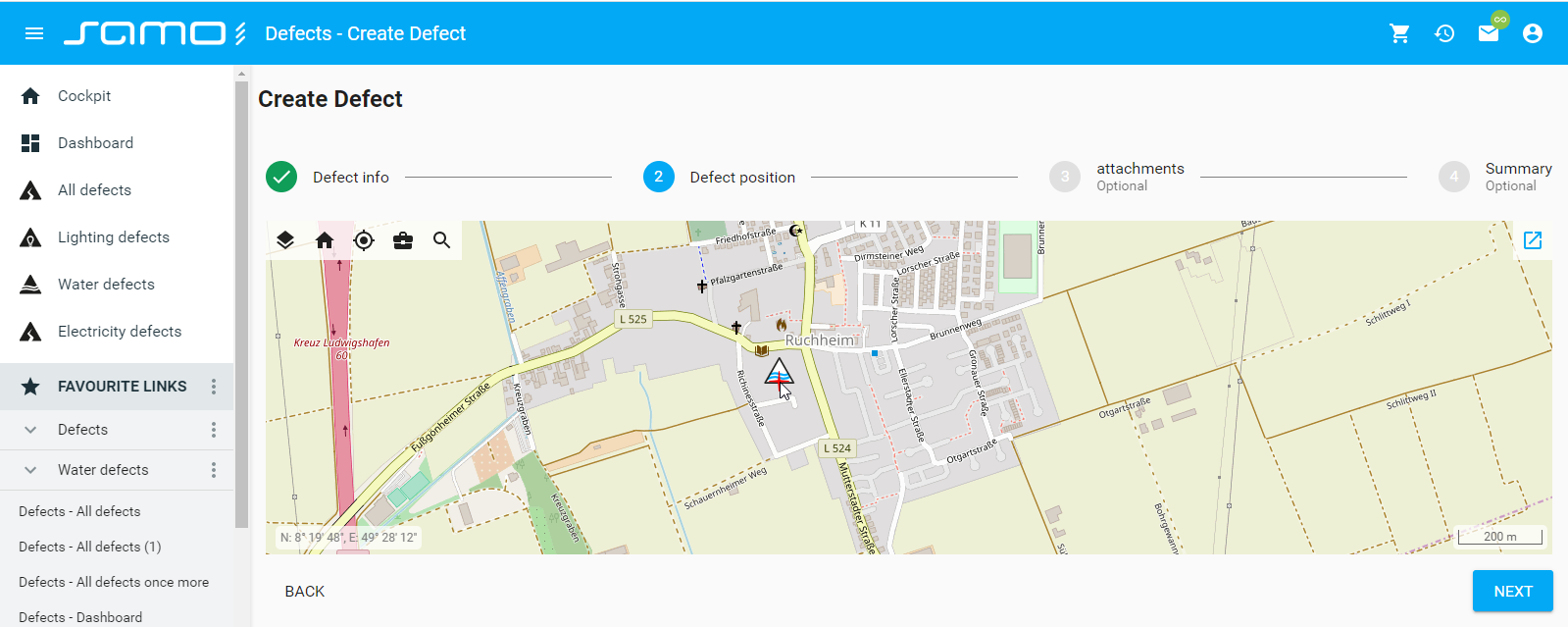
This module provides the functionality of multiple step dialog, which can be used for more complex forms. For each step it is possible to define, if it's mandatory or optional. A top bar showing form filling process is generated automatically. This module serves as an envelope for other modules, meaning the filling content of the form must be defined using other modules, see Overview of Form Modules.
There are currently two ways of integrating Samo-stepper-module in SAMO Applications. One is by using this moule for Edit or Action form and other is to include it directly on a page. If you want to include the module directly on the page, additionally you need to use Samo-entity-action-form-wrapper.
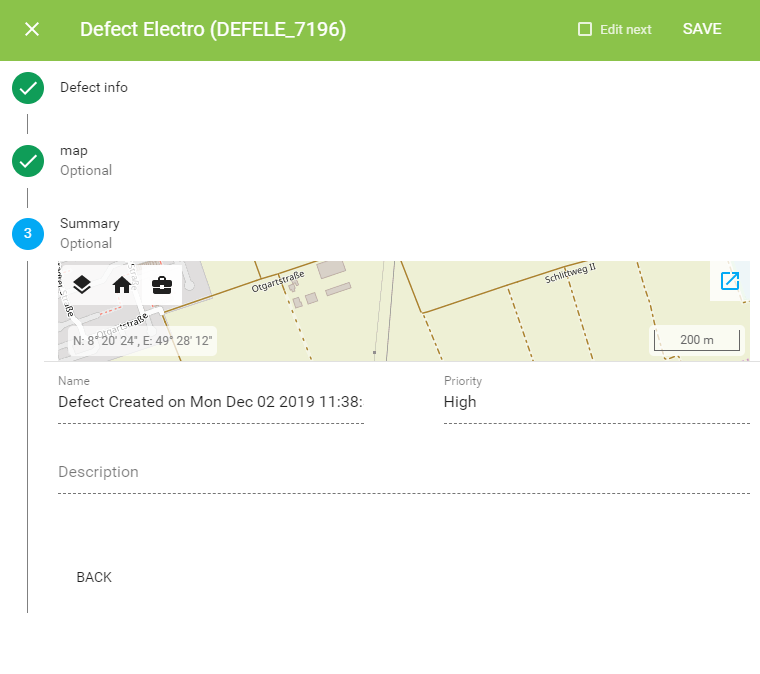
    {
        "edit": {
            "default": {
                "sections": [
                    {
                    "module": {
                        "type": "component:dynamic-app/modules/forms/samo-stepper-module",
                        "steps": [
                        {
                            "title": "Defect info",
                            "subtitle": "",
                            "optional": false,
                            "sections": [
                            {
                                "module": {
                                "type": "component:entity-modules/form/samo-entity-properties-form",
                                "hideProperties": [
                                    "at_boSamo__code",
                                    "at_defBoDefect__c_state"
                                ]
                                }
                            }
                            ]
                        },
                        {
                            "title": "map",
                            "subtitle": "Optional",
                            "optional": true,
                            "sections": [
                            {
                                "module": {
                                "type": "component:map-modules/form/samo-position-edit",
                                "map": {
                                    "extends": "default",
                                    "context": "defects",
                                    "enabledLayers": [
                                        "baseTMS",
                                        "baseOSM",
                                        "lightningAssetsWms",
                                        "searchResults"
                                    ]
                                },
                                "drawType": "Point"
                                }
                            }
                            ]
                        },
                        {
                            "title": "Summary",
                            "subtitle": "Optional",
                            "optional": false,
                            "sections": [
                            {
                                "module": {
                                "type": "component:map-modules/form/samo-position-edit",
                                "height": 100,
                                "map": {
                                    "extends": "default",
                                    "readOnly": "true",
                                    "searchAddress": null,
                                    "geolocation": null,
                                    "context": "defects",
                                    "enabledLayers": [
                                        "baseTMS",
                                        "baseOSM"
                                    ]
                                },
                                "drawType": "Point"
                                }
                            },
                            {
                                "module": {
                                "type": "component:dynamic-app/modules/forms/key-value-grid-form",
                                "rows": [
                                    {
                                    "elements": [
                                        {
                                            "label": "Name",
                                            "type": "text",
                                            "property": "at_defBoDefect__name",
                                            "width": 6,
                                            "disabled": true
                                        },
                                        {
                                            "width": 1,
                                            "type": "spacer"
                                        },
                                        {
                                            "label": "Priority",
                                            "type": "text",
                                            "property": "at_defBoDefect__c_priority.ca_priority__description",
                                            "width": 6,
                                            "disabled": true,
                                            "minWidth": 180
                                        }
                                    ]
                                    },
                                    {
                                        "elements": [
                                            {
                                                "label": "Description",
                                                "type": "text",
                                                "property": "at_defBoDefect__description",
                                                "disabled": true
                                            }
                                        ]
                                    }
                                ]
                                }
                            }
                            ]
                        }
                        ]
                    }
                    }
                ]
            }
        }
    }
As you can see, the configuration for the stepper dialog can be pretty long. For even more complex forms, it is recommended to configure each step in separate file and include them in stepper-module like this: "steps": "<$importArrayRecursive:./stepsFolder>". Your step file names should contain number prefix, otherwise, they will be loaded in alphabetical order.
Samo-entity-action-form-wrapper
This module is used for pages, to be able to handle input for business action. Usually they are used together with Samo-stepper-module to integrate the stepper dialog on the whole page.
Naturally, the action for processing the form input needs to be defined and referenced using submit.action.actionId configuration parameter.
    {
        "module": {
            "type": "component:entity-modules/components/samo-entity-action-form-wrapper",
            "title": "Create Defect",
            "submit": {
                "action": {
                    "type": "entityAction",
                    "entityType": "ft_defDefectWater",
                    "actionId": "createRelatedEntity"
                },
                "onSuccess": [
                    {
                        "type": "notification",
                        "message": "{tr:requests.thirdPartyRequest.successMsg}"
                    },
                    {
                        "type": "event",
                        "event": "stepper-submit"
                    },
                    {
                        "type": "navigate",
                        "part": "defects",
                        "page": "defects-all",
                        "arguments": {
                            "center": true
                        }
                    }
                ],
                "onError": [
                    {
                        "type": "notification",
                        "message": "{tr:defects.errorMsg}"
                    }
                ]
            },
            "module": {
                "type": "component:dynamic-app/modules/forms/samo-stepper-module"
            ...
            }
        }
    }