Displayable Attributes
Displayable attributes (DA) are auxiliary graphic texts attached to graphic features. They are derived from other feature data, either semantic attributes or graphic representation. The derivation rule is part of the displayable attribute definition. They use the framework of graphic tags. It means that their graphics (geometry + symbology) is defined in a standard way in model.xml and thematization.xml as described before. On the other hand, the special definitions for active manipulation with displayable attributes have the special metadata part in option.xml.
In the following examples, there is a procedure of defining the displayable attribute:
-
it is necessary to define the graphic type class
-
graphic type is defined with the reference to the graphic type class
-
graphic tag of particular feature type is defined referring graphic type
-
the displayable attribute itself is defined in option.xml referencing to model.xml.
Example: Definition of graphic type class.
    <ber:graphicTypeClassArray>
      <ber:graphicTypeClass id="DA" name="Displayable attribute">
        <ber:description>Displayable attributes, graphic tag</ber:description>
      </ber:graphicTypeClass>
    …
    </ber:graphicTypeClassArray>
Only one common graphic type class for all displayable attributes of a project is defined.
Id has to be “DA”, name and description are up to the project designer.
Example: Definition of graphic type.
    <ber:graphicType id="gtda_5012102" name="DA labelline frame-outline">
      <ber:class refId="DA"/>
      <ber:collectionGraphicType>
        <ber:symbology>
          <ber:commonSymbolizer>
            <ber:rgbColor>#1C32FF</ber:rgbColor>
          </ber:commonSymbolizer>
        </ber:symbology>
        <ber:graphicTypeComponentArray>
          <ber:graphicTypeComponent id="gtda_5012102_2" name="Label Line" roleId="labelLine">
            <ber:curveGraphicType>
              <ber:symbology>
                <ber:lineSymbolizer>
                  <se:Stroke>
                    <se:SvgParameter name="stroke-width">1</se:SvgParameter>
                  </se:Stroke>
                </ber:lineSymbolizer>
              </ber:symbology>
            </ber:curveGraphicType>
          </ber:graphicTypeComponent>
          <ber:graphicTypeComponent id="gtda_5012102_1" name="DA Text" roleId="text">
            <ber:textGraphicType>
              <ber:symbology>
                <ber:textSymbolizer>
                  <ber:fontHeight>1</ber:fontHeight>
                  <ber:mask>
                    <ber:style>outline</ber:style>
                  </ber:mask>
                </ber:textSymbolizer>
              </ber:symbology>
              <ber:defaultTextProperties>
                <ber:anchorPoint>left-top</ber:anchorPoint>
              </ber:defaultTextProperties>
            </ber:textGraphicType>
          </ber:graphicTypeComponent>
        </ber:graphicTypeComponentArray>
      </ber:collectionGraphicType>
    </ber:graphicType>
Example: Definition of graphic tag type
<ber:graphicTagTypeArray>
 <ber:graphicTagType id="gtda_mps_01" name="DA - Install date" drawPriority="-40">
    <ber:description>Main pipeline segment - install date</ber:description>
    <ber:graphics refId="gtda_5012102"/>
  <ber:graphicTagType id="gtda_mps_02" name="DA - Description" drawPriority="-50">
    <ber:description>Main pipeline segment - description</ber:description>
    <ber:graphics refId="gtda_5012102"/>
  </ber:graphicTagType>
<ber:graphicTagTypeArray>
Graphic tag type definition is part of feature type definition. More graphic tag types can be based on the same graphic type definition.
Example: Displayable attribute definition (option.xml). It defines a displayable attribute – description for main pipeline segments. Its instance can look like this:
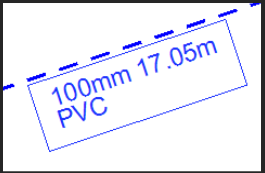
<ber:displayableAttributeArray>
  <ber:displayableAttribute id="da_5012102" name="W_DA_5012102">
    <ber:graphicTagRefArray>
      <ber:graphicTag xlink:href="model.xml# gtda_mps_01"/>
    </ber:graphicTagRefArray>
    <ber:daQuery>
      <ber:simpleQuery>
        <ber:attributeArray>
          <ber:attribute xpath="at_5012100_diameter/ca_10502"/>
          <ber:attribute xpath="at_5012002"/>
          <ber:attribute xpath="at_5012003/ca_10202"/>
        </ber:attributeArray>
        <ber:format>{0}mm {1}m\n{2}</ber:format>
      </ber:simpleQuery>
    </ber:daQuery>
    <ber:daAutoConstruction>
      <ber:position ignoreMasterRotation="true">
        <ber:distance>
          <ber:dX>-1.5</ber:dX>
          <ber:dY>-1</ber:dY>
        </ber:distance>
        <ber:lineMasterPoint lengthwise="centerPoint"
                             perpendicular="centerLine"/>
      </ber:position>
      <ber:angleFromMaster/>
      <ber:legibility>false</ber:legibility>
      <ber:labelLine/>
    </ber:daAutoConstruction>
  </ber:displayableAttribute>
  ...
</ber:displayableAttributeArray>
The displayable attribute definition contains the following information:
-
id – Unique identifier of a displayable attribute type.
-
name – Name of a displayable attribute type.
-
description – Description of a displayable attribute type.
-
graphicTagRefArray – References to graphic tag types that represent this displayable attribute type.
-
daQuery – Represents the query used for deriving displayable attribute value. Similarly to derived feature attributes, it can contain simpleQuery or geometryQuery. Furthermore, multiLineQuery can be used here; it is discussed in the following part.
-
daAutoConstruction – Optional definition of construction parameters; they are used only in case of automatic generation of displayable attributes in bulk:
-
position – The dX, dY distance from the master graphic master point can be defined. For line master graphic, the lineMasterPoint can be defined. The possible lengthwise positions are startPoint, centerPoint, endPoint; the possible perpendicular positions are centerLine and borderLine.
-
If ignoreMasterRotationattribute is set to true, the distance in the X box is determined in the direction which is given by rotation of the point/text control feature or orientation of the segment of the line control feature in the location of the reference point. The distance in the Y box is determined in a perpendicular direction.
-
rotation – The default rotation is defined in graphic type definition. Here it can be redefined for point and curve master graphics by switchingangleFromMasteroranglePlus90on. Optionallegibilityelement can disable the preserving of the legibility from bottom / right by allowing the text to be placed upside down.
-
label line – For displayable attributes with label line component defined, the construction including the label line can be set on.
You can use similar functions like in case of derived attributes, including geometric (see chapter 4.5.3).
Multiline Displayable Attributes
It is possible to join information from subordinate features (associated by 1:n relation) to one displayable attribute. In this case, it usually has more lines, so it is called multiline displayable attribute. Generally, multiline displayable attributes consist of two parts. First part defines the first line – information from master feature. The second part defines the subsequent lines of a displayable attribute. They are gathered from subordinate features. Each part contains its definition for deriving and formatting values.
As illustrated in the previous chapter, the simple displayable attribute can have more lines as well. So, the number of lines is not the main difference between simple and multiline displayable attributes.
Example: Multiline displayable attributes definition. Consists of the main identification followed by list of subordinate valves. Its instance can look like this:
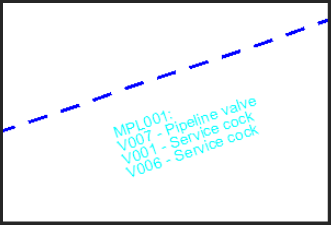
<ber:displayableAttribute id="da_5012103" name="W_DA_5012103">
  <ber:graphicTagRefArray>
    <ber:graphicTag xlink:href="model.xml#ft_5012100_gtda_5012103"/>
  </ber:graphicTagRefArray>
  <ber:daQuery>
    <!-- Define value and format of the first line -->
    <ber:simpleQuery>
      <ber:attributeArray>
        <ber:attribute xpath="at_5010007"/>
      </ber:attributeArray>
      <!-- Main identification: -->
      <ber:format>{0}: </ber:format>
    </ber:simpleQuery>
    <!-- Define values and format of subsequent lines -->
    <ber:multiLineQuery>
      <ber:attributeArray>
        <ber:attribute xpath="at_5010007"/>
        <ber:attribute xpath="at_5011101/ca_10602"/>
      </ber:attributeArray>
      <!-- Valve Identification – Valve Type -->
      <ber:format>{0} - {1}</ber:format>
      <!-- Main and valves are joined by relation sr_5012100_5011100 ->
      <ber:relationAssoc xlink:href="model.xml#sr_5012100_5011100"/>
      <!-- One subsequent feature per line -->
      <ber:lineFormat maxChars="50" maxLines="3">{0}\r\n</ber:lineFormat>
    </ber:multiLineQuery>
  </ber:daQuery>
</ber:displayableAttribute>
The multiline displayable attribute definition is similar to simple displayable attribute definition:
-
simpleQuery – The same structure as for simple displayable attribute; here it defines the first line of the displayable attribute.
-
multiLineQuery – Defines the subsequent lines of the displayable attribute; it is about subordinate features.
-
relationAssoc – Relation that connects subordinate features to master feature.
-
lineFormat – Auxiliary formatting definition. Maximal number of lines (maxLines) and characters per line (maxChars) can be specified.
Compound Displayable Attributes
Compound displayable attributes are special kind of displayable attributes. They consist of individual text components. Every text component:
-
represents one feature related to the master feature of the graphic tag
-
is a feature delegate – the delegated feature form can be opened after clicking on the graphics
-
can be of different type – the symbology can be different
The related features to be represented by compound displayable attributes can be searched by more levels. They don’t need to brelated to the master feature directly. The level of relationship can be represented by horizontal offset when aligning individual texts below each other.
Optionally, compound displayable attribute can contain:
header component which represents the master feature itself. It can include either simple or geometry query
index component used for plotting functionality in LIDS Explorer
The definition of compound displayable attributes is very similar to the standard displayable attributes.
Example: Definition of graphic type class.
      <ber:graphicTypeClass id="CompoundDA" name="Compound displayable attribute">
        <ber:description>Multicolor displayable attributes of related features</ber:description>
      </ber:graphicTypeClass>
Example: Definition of graphic type.
<ber:graphicType id="gtcda_01" name="Compound DA1">
  <ber:class refId="CompoundDA"/>
  <ber:collectionGraphicType>
    <ber:graphicTypeComponentArray>
      <ber:graphicTypeComponent id="gtcda_01_route" name="Route" roleId="DA">
        <ber:textGraphicType>
          <ber:symbology>
          </ber:symbology>
          <ber:defaultTextProperties>
            <ber:anchorPoint>left-bottom</ber:anchorPoint>
          </ber:defaultTextProperties>
        </ber:textGraphicType>
      </ber:graphicTypeComponent>
      <ber:graphicTypeComponent id="gtcda_index" name="Route" roleId="index">
        <ber:textGraphicType>
          <ber:symbology>
            <ber:textSymbolizer>
              <ber:mask>
                <ber:style>fill</ber:style>
              </ber:mask>
            </ber:textSymbolizer>
          </ber:symbology>
        </ber:textGraphicType>
      </ber:graphicTypeComponent>
      <ber:delegateGraphicTypeComponent id="gtcda_01_c1" name="Cable 1" roleId="DA">
        <ber:textGraphicType>
          <ber:symbology>
          </ber:symbology>
          <ber:defaultTextProperties>
            <ber:anchorPoint>left-bottom</ber:anchorPoint>
          </ber:defaultTextProperties>
        </ber:textGraphicType>
        <ber:featureTypeDelegate refId="ft_cable_1"/>
      </ber:delegateGraphicTypeComponent>
      <ber:delegateGraphicTypeComponent id="gtcda_01_c2" name="Cable 2" roleId="DA">
        <ber:textGraphicType>
          <ber:symbology>
          </ber:symbology>
          <ber:defaultTextProperties>
            <ber:anchorPoint>left-bottom</ber:anchorPoint>
          </ber:defaultTextProperties>
        </ber:textGraphicType>
        <ber:featureTypeDelegate refId="ft_cable_2"/>
      </ber:delegateGraphicTypeComponent>
      <ber:delegateGraphicTypeComponent id="gtcda_01_pps" name="Duct" roleId="DA">
        <ber:textGraphicType>
          <ber:symbology>
          </ber:symbology>
          <ber:defaultTextProperties>
            <ber:anchorPoint>left-bottom</ber:anchorPoint>
          </ber:defaultTextProperties>
        </ber:textGraphicType>
        <ber:featureTypeDelegate refId="ft_e_protpipe"/>
      </ber:delegateGraphicTypeComponent>
      <ber:graphicTypeComponent id="gtcda_01_ll" name="Label line" roleId="labelLine">
        <ber:curveGraphicType>
          <ber:symbology>
          </ber:symbology>
        </ber:curveGraphicType>
      </ber:graphicTypeComponent>
    </ber:graphicTypeComponentArray>
  </ber:collectionGraphicType>
</ber:graphicType>
Example: Definition of graphic tag type
<ber:graphicTagType id="gt_e_route_gtcda_01" name="DAs of ducts / cables">
  <ber:description>Displayable attributes of ducts and cables</ber:description>
  <ber:graphics refId="gtcda_01"/>
</ber:graphicTagType>
Example: Definition in option.xml
<ber:compoundDisplayableAttributeArray>
  <ber:compoundDisplayableAttribute id="da_ducts_cables" name="Route,ducts,cables">
    <ber:graphicTagRefArray>
      <ber:graphicTag xlink:href="model.xml#gt_e_route_gtcda_01"/>
    </ber:graphicTagRefArray>
    <ber:daQuery>
       <ber:simpleQuery>
          <ber:attributeArray>
              <ber:attribute xpath="at_e5121011"/>
              <ber:attribute xpath="at_e5121006/ca_31902"/>
          </ber:attributeArray>
          <ber:format>CS Name: {0}\nDiameter: {1}</ber:format>
        </ber:simpleQuery>
        <ber:headerComponent lineHeight="1.5">
          <ber:graphicTypeComponent xlink:href="model.xml#gtcda_01_route"/>
        </ber:headerComponent>
      <ber:compoundQuery>
        <ber:attributeArray>
          <ber:attribute xpath="at_5120005"/>
        </ber:attributeArray>
        <ber:format>({0})</ber:format>
        <ber:relationAssoc xlink:href="model.xml#r_route_duct"/>
        <ber:layout lineHeight="1.2" levelOffset="0.0"/>
        <ber:compoundQuery>
          <ber:attributeArray>
            <ber:attribute xpath="at_5120005"/>
          </ber:attributeArray>
          <ber:format>*{0}*</ber:format>
          <ber:relationAssoc xlink:href="model.xml#r_duct_cable"/>
          <ber:layout lineHeight="1.2" levelOffset="1.0"/>
        </ber:compoundQuery>
        <ber:compoundQuery ignoreEmptyLines="true">
          <ber:attributeArray>
            <ber:attribute xpath="at_telco_id"/>
          </ber:attributeArray>
          <ber:format>{0}</ber:format>
          <ber:relationAssoc xlink:href="model.xml#r_duct_t_cable"/>
          <ber:layout lineHeight="1.2" levelOffset="1.0"/>
        </ber:compoundQuery>
      </ber:compoundQuery>
      <ber:compoundQuery>
        <ber:attributeArray>
          <ber:attribute xpath="at_5120005"/>
        </ber:attributeArray>
        <ber:format>*{0}*</ber:format>
        <ber:relationAssoc xlink:href="model.xml#r_route_cable"/>
        <ber:layout lineHeight="1.2" levelOffset="0.0"/>
      </ber:compoundQuery>
    </ber:daQuery>
    <ber:daAutoConstruction>
      <ber:position>
        <ber:distance>
          <ber:dX>-5</ber:dX>
          <ber:dY>-0.8</ber:dY>
        </ber:distance>
        <ber:lineMasterPoint lengthwise="endPoint"/>
      </ber:position>
      <ber:angleFromMaster/>
    </ber:daAutoConstruction>
  </ber:compoundDisplayableAttribute>
</ber:compoundDisplayableAttributeArray>
- ignoreEmptyLines – optional attribute; when set to true, empty lines and all subordinate rows will be excluded