Advanced Data Checks
This document describes basic principles of LIDS advanced data checks option and necessary steps for implementing advanced data checks into LIDS project.
Advanced Data Checks Principles
-
Advanced data checks are performed by means of database procedures which are stored in database package LIDS_CHECKS. This package contains only basic set of predefined types of checks. Other new checks designed based on custom project requirements can be added to the package by implementer.
-
Checked data can be any feature type data in given LIDS project. Checked feature data may not be included in graph structures. Within advanced data checks can be checked any property of feature data (geometry, attributes values, relation rules etc.)
-
Special LIDS metadata extension and LIDS settings are used for configuration of advanced data checks as well.
-
GUI for handling advanced data check is available in LIDS Edit and LIDS Explorer clients. It allows the user to select a proper type of check and define the scope of controlled data by means of spatial condition.
Advanced Data Checks Configuration in LIDS Project
Configuration of advanced data checks in given LIDS project consists of these basic areas:
LIDS database schema:
-
Creating auxiliary tables for advanced data checks.
-
Creating / updating package LIDS_CHECKS.
-
Fill table FEATURE_TYPES with records.
LIDS settings configuration:
-
Creating LIDS settings ”folders” for advanced checks.
-
Creating LIDS settings “setdefinitions” for advanced checks.
LIDS project metadata configuration:
-
Config.xml project configuration file adjustment.
-
Creating ext-data-checks.xml extended metadata file.
LIDS database schema configuration
Creating logging table
Logging table APL_CHECKS_LOG serves for logging performed advanced checks. For creating this table, you can use script 01_CREATE_TABLE_Apl_Checks_log.sql which is a part of installation folder Extended_data_checks.
APL_CHECKS_LOG table structure:
| Column name | Data type | Column description |
|---|---|---|
| TASK_ID | NUMBER(10) | Task identifier (from APL_TASK_SEQ sequence); primary key |
| PROCEDURE_NAME | VARCHAR2(100) | Name of DB procedure which represents given check type |
| START_DATE | DATE | Date, time when given check procedure was started |
| END_DATE | DATE | Date, time when given check procedure was finished |
| ERROR_ID | NUMBER(5) | Identifier of error if procedure was finished with error |
| LOG | CLOB | Detailed logging information about procedure running |
| RESULT | CLOB | List of result (erroneous) features |
Creating feature types table
Table FEATURE_TYPES stores basic information about feature types from given project. This set of information have to be relevant to LIDS project data model and is utilized within database procedures. For creating this table, you can use script 02_CREATE_TABLE_Feature_types.sql which is a part of installation folder Extended_data_checks.
FEATURE_TYPES table structure:
| Column name | Data type | Column description |
|---|---|---|
| FEATURE_CODE | VARCHAR2(100) | Feature type identifier (FTID) |
| FEATURE_NAME | VARCHAR2(100) | Feature type name (not used in procedures) |
| SEM_TABLE | VARCHAR2(30) | Semantic table name for given feature type |
| FEA_TABLE | VARCHAR2(30) | Name of feature container table for given feature type (without F, _GR suffix, e.g. GC_WAS) |
Only feature types which are used in advanced data checks need to be recorded in this table.
Creating package LIDS_CHECKS
Package LIDS_CHECKS need to be created in LIDS data schema. For creating package, you can use scripts lids_checks_API.sql and lids_checks_BODY.sql which are a part of installation folder Extended_data_checks.
This database package contains these data check procedures after installation:
-
find_duplicate_elems_1ftid – Seeks spatially coincident elements of the same feature type.
-
find_duplicate_elems_nftid – Seeks spatially coincident elements for specified set of feature types.
-
find_overlap_elems_1ftid – Seeks spatially overlapping elements of the same feature type.
-
find_overlap_elems_nftid – Seeks spatially overlapping elements for specified set of feature types.
Filling feature types table
Table FEATURE_TYPES must contain basic information about feature types which are used in advanced check procedures (database procedures in LIDS_CHECKS package).
Example: SQL insert command.
INSERT INTO feature_types (feature_code, feature_name, sem_table, fea_table) VALUES ('ft_g_20800', 'WAS Hydraulischer Strang', 'WAS_HYD_STRANG', 'GC_WAS');
INSERT INTO feature_types (feature_code, feature_name, sem_table, fea_table) VALUES ('ft_g_20801', 'WAS Hydraulischer Knoten', 'WAS_HYD_KNOTEN', 'GC_WAS');
INSERT INTO feature_types (feature_code, feature_name, sem_table, fea_table) VALUES ('ft_g_20100', 'WAW Leitung', 'WAS_LEITUNG', 'GC_WAS');
LIDS settings configuration
Hierarchy of advanced data check types and individual checks for specified data scope is configured by means of LIDS settings which are stored in LIDS_SETTINGS table.
Creating LIDS settings for advanced checks – „folders”
Hierarchy, i.e. data check types are specified by means of settings with type „folder“. Each type of advanced data check (e.g. „Finding duplicate elements for 1 FTID“) should have defined 1 folder. It’s suitable to define 1 “root” setting folder for other folders used for particular data check types.
Example: Folders/setdefinitions hierarchy defined for advanced checks.
| Name / Hierarchy | Setting type | Description of meaning |
|---|---|---|
| LIDS Check settings | folder | Root folder for all advanced checks |
| Find_duplicate_elems_1ftid | folder | Folder for Find_duplicate_elems_1ftid check type; parent folder = “LIDS Check settings” folder |
| Water category | setDefinition | It defines 1 specific check for “Find_duplicate_elems_1ftid” check type; data content is represented by all graphic feature types in Water category |
| xxx | setDefinition | Other specific check for given check type |
| Find_duplicate_elems_ntfid | folder | Folder for Find_duplicate_elems_Ntfid check type; parent folder = “LIDS Check settings” folder |
| Water category | setDefinition | It defines 1 specific check for “Find_duplicate_elems_Ntfid” check type; data content is represented by all graphic feature types in Water category |
| xxx | setDefinition | Other specific check for given check type |
How such data checks hierarchy looks in LIDS Explorer tool GUI you can see below.
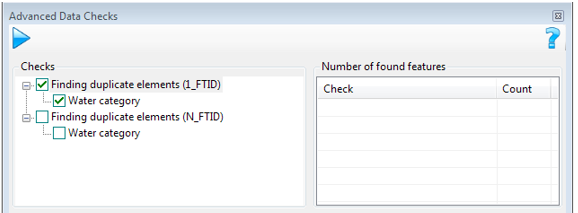
You can see on picture above two-levels list of defined advanced data checks. On the first level are displayed data check types (defined “folder” settings) and on the second level are displayed particulars data checks (defined “setDefinitions” settings for data checks).
Example: SQL insert command for definition of “folder” settings for example above.
--
-- Root folder for LIDS Advanced Data Checks
--
INSERT INTO lids_settings (id, folder_id, type, user_access, name, description, owner, create_date, storage, value) VALUES (100, -1, 'folder', 'shared', 'LIDS Check settings', 'LIDS Check settings', 0, SYSDATE, 'DB', 'ProjectFolder');
--
-- Subfolders for LIDS Advanced Data Check types
--
INSERT INTO lids_settings (id, folder_id, type, user_access, name, description, owner, create_date, storage, value) VALUES (101, 100, 'folder', 'shared', 'Check: Find_duplicate_elems_1ftid', 'Folder for check setdefinitions: find_duplicate_elems_1ftid', 0, SYSDATE, 'DB', 'ProjectFolder');
INSERT INTO lids_settings (id, folder_id, type, user_access, name, description, owner, create_date, storage, value) VALUES (102, 100, 'folder', 'shared', 'Check: Find_duplicate_elems_Nftid', 'Folder for check setdefinitions: find_duplicate_elems_Nftid', 0, SYSDATE, 'DB', 'ProjectFolder');
Creating LIDS settings for advanced checks – “setDefinitions”
Specific data checks are defined by particular setting with type „setdefinition“. This type of settings defines the scope of data for checking with using of type (feature types) and attribute condition. The „setdefinition“ setting must be assigned to some folder intended for given data check type. More specific data checks (setdefinitions) can be assigned to 1 data check folder – see previous chapter.
Example: SQL insert command for creating one “setDefinition” setting – one data check.
SET DEFINE OFF;
INSERT INTO lids_settings (id, folder_id, type, user_access, name, description, owner, create_date, storage, value) VALUES
(1001, 101, 'setdefinition', 'shared', 'Water category', 'Checked features: Water category', 0, SYSDATE, 'DB',
'<ber:setDefinition version="1.2.0" xmlns:ber=””
xmlns:ogc="http://www.opengis.net/ogc" xmlns:gml=””
xmlns:xlink="http://www.w3.org/1999/xlink">'||CHR(10)||
'<ber:featureTypes includeGraphicTags="True">'||CHR(10)||
'<ber:featureType xlink:href="model.xml#ft_g_20100" />'||CHR(10)||
'<ber:featureType xlink:href="model.xml#ft_g_20102" />'||CHR(10)||
'<ber:featureType xlink:href="model.xml#ft_g_20200" />'||CHR(10)||
'<ber:featureType xlink:href="model.xml#ft_g_20210" />'||CHR(10)||
'</ber:featureTypes>'||CHR(10)||
'<ber:semanticConditions />'||CHR(10)||
'</ber:setDefinition>' );
COMMIT;
SET DEFINR ON
Of course, LIDS settings can be created via GUI in LIDS Explorer or LIDS Edit as well.
LIDS project metadata configuration
Config.xml project configuration file adjustment
Config.xml file for given LIDS project must contain this definition in section <services><modules>.
Example: Config.xml.
<module name="DbQuery">
  <moduleClass>com.berit.lids.service.dbquery.DbQueryModule</moduleClass>
  <service name="DbQueryService" servletName="DbQueryService" title="DB Query Service”>
    <requests>
      <request name="selectQuery" postServletName="DbQueryService" />
    </requests>
  </service>
</module>
Creating ext-data-checks.xml extended metadata file
For using advanced data checks in LIDS, extended metadata ext-data-checks.xml file must be added to LIDS project metadata. After performing previous step concerning config.xml files adjustment newly created (e.g. empty) ext-data-checks.xml file must be add to {project_root_folder}\model\extensions directory. Updating of ext-data-checks.xml file can be performed then via LIDS AS Administration Console, in menu Project info and in tab Metadata extension files, under the item Extended Data Checks. The ext-data-checks.xml file contains these elements and attributes:
-
<ber:checkArray>- The list of data check types array. -
<ber:check>- This element configures 1 data check type; it has these attributes: -
id - Identifier of data check type; must be unique within whole ext-data-checks.xml file.
-
name - Name of data check type; this name is displayed in GUI in Advanced data checks tool dialog.
-
templateFolder - Specifies assignment among data check type and setting folder defined for this check type; value is composed from “id_” prefix and numeric identifier of proper LIDS setting (LIDS_SETTINGS.ID attribute value).
-
<ber:description>- Description of data check type; it’s not mandatory. -
<ber:serverCheck>- Element defines other parameters for given data check type (server check). -
service - It means a method of processing of advanced check type; it’s mandatory element with value "DbQueryService.selectQuery".
-
<ber:checkParam>.name– Must be constant value “select”. -
<ber:checkParam>.value– It specifies SQL statement for calling function representing given typen of data check; the SQL statement has this form: "select lids_checks.check_type_name ({0},{1}) from dual" where name of procedure from LIDS_CHECKS package corresponds with given data check type. -
wfs:Query – Can contain more elements (each with feature type identifier typeName) for searching more feature types by means of 1 location form.
-
ogc:Filter – Possible values are for example PropertyIsLike, PropertyIsEqualTo, PropertyIsBetween.
-
ogc:PropertyName – Attribute identifier (ft_parcel_face/at_parcel_number) or codelist attribute identifier (ft_5060000/at_5060002/ca_00903).
Rules for Adding New Procedures to LIDS_CHECKS Package
It’s possible to extend LIDS_CHECKS package of additional procedures – data checks according to custom project requirements.
Following rules must be observed:
The own data check type is represented by means of individual database function declared in API in LIDS_CHECKS package. Each new function for data check must be declared in lids_checks_API.sql file in this form – with 2 mandatory input parameters and returning CLOB value, e.g.
Example: Data check function.
FUNCTION find_duplicate_elems_nftid
(
  template_idR           IN NUMBER,
  coordinatesR           IN CLOB
) RETURN CLOB;
Input parameter „template_idR“ has NUMBER data type and identifier of „setDefinition“ setting for given data check must be passed in. Input parameter „coordinatesR“ has CLOB data type and contains specification of spatial area for data checking as a list of coordinates in the form X,Y X,Y X,Y …..
Description / purpose of function should be attached to the function declaration as well.
The same declaration of function and body of function is situated in lids_checks_BODY.sql file.
Typical parts within individual data check procedure:
-
Creating log record in APL_CHECKS_LOG table by means of create_log subprocedure.
-
Verification of existence the setDefinition setting entered in input parameter.
-
Reading of feature types for check from input setDefinition setting to list_featuresX variable.
-
Reading of spatial area from input parameter by means of get_polygon function.
-
The own application login for given data check type (temporary tables can be used due to good performance of data evaluation - fill_tmp_table subprocedure can be used for it).
-
Writing evaluated erroneous elements to output CLOB variable.
-
Final modification of log record + set result attribute with erroneous elements identifiers.
-
RETURN output CLOB variable.
Output CLOB variable contains a list of elements evaluated by data check as erroneous in this form:
-
FTID_identifier1,FID_identifier1
-
FTID_identifier2,FID_identifier2
-
FTID_identifier3,FID_identifier3
Each data check procedure should have defined with PRAGMA AUTONOMOUS_TRANSACTION; running of procedure must be finished by COMMIT statement.
Each data check procedure should have EXCEPTION block for treatment of various unspecified procedure running errors; the SQL error code can be logged to protocol by means of modify_log subprocedure.
Various auxiliary functions and subprocedures which are not directly called as data checks procedures may not be declared in API; it’s sufficient to place the only in package BODY.
Verify whether JDBC Driver is Installed on JBoss Server
Install JDBC driver
Installation of JDBC driver on JBoss server is necessary for proper working of LIDS advanced data (server) checks. The installation steps are described for driver library ojdbc7.jar (Oracle JDBC driver for Java 7) but should work for other drivers as well.
Create driver module
Go to JBoss root directory and to subdirectories \modules\system\layers\base and create subdirectories \com\oracle\db\main. This directory structure defines a module named com.oracle.db.
Put the ojdbc7.jar file in this directory.
Create a new file in the same directory named module.xml and write the following text inside. Note that the name attribute must match the directory structure and resource-root path must match the name of the driver file.
The name of the driver file.
Example: Driver module.
<?xml version="1.0" encoding="UTF-8"?>
  <module xmlns="urn:jboss:module:1.0" name="com.oracle.db">
  <resources>
    <resource-root path="ojdbc7.jar"/>
  </resources>
  <dependencies>
    <module name="javax.api"/>
    <module name="javax.transaction.api"/>
    <system export="true">
      <paths>
        <path name="com/sun/rowset"/>
        <path name="com/sun/rowset/internal"/>
        <path name="com/sun/rowset/providers"/>
      </paths>
    </system>
  </dependencies>
</module>
Register the Driver Module
-
Go to JBoss root directory and open standalone\configuration\standalone.xml.
-
Find element
<subsystem xmlns="urn:jboss:domain:datasources:X.Y">and its subelement<drivers>. -
Insert the following element inside and save the file. Note that the module name must match the module created in the previous step. Also remember the driver name we chose: OracleJDBCDriver.
Example: Registration of the driver module.
<driver name="OracleJDBCDriver" module="com.oracle.db">
  <driver-class>oracle.jdbc.driver.OracleDriver</driver-class>
  <xa-datasource-class>oracle.jdbc.xa.client.OracleXADataSource</xa-datasource-class>
</driver>
Using Advanced Data Checks in LIDS Client Applications
Advanced data checks can be used, i.e. user interface for it is available in LIDS Edit and LIDS Explorer clint. Detailed description how advanced data checks are used in LIDS Edit and LIDS Explorer clients you can find in user’s guide in the chapter Tools Menu -> Advanced data checks.