Associations
Associations are relations between features. An association is a general definition for several classes of associations. The classes of the association types are Relation, Detail association, Linear and Areal topology association.
An association type contains roles. An association type can contain one or more identified role types which contains feature types.
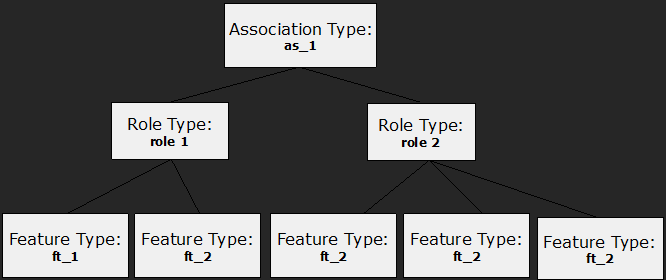
Associations can be unary (contain only one role), binary (contains two roles), ternary (contains three roles), ...
The structure of an association is defined by an Association Type. The Association Type defines the name of the type and the type of roles in the association type. The definition of roles contains references to feature types.
Relations
A Relation is binary association. Each Relation Type must contain two Role Types – Source Role and Destination Role. A relation type contains, as all element types in a project, identifier, name, description and the database name.
The definition of relation types is situated within the assocTypeArray XML collection. Role types are defined within the roleTypeArray XML collection.
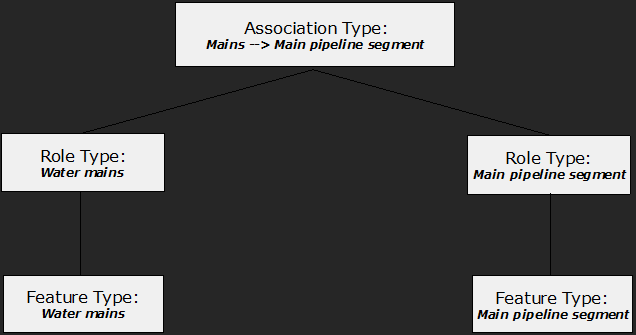
Example: Structure of role type and association type.
<ber:model>
...
<ber:roleTypeArray>
<!-- Define the source role with feature types inside -->
<ber:relationRole id="rt_mains" name="Water mains"
dbName="MAINS">
<ber:ftItem refId="ft_mains"/>
</ber:relationRole>
<!-- Define the destination role with feature types inside -->
<ber:relationRole id="rt_pipe" name="Main pipeline segment"
dbName="PIPE">
<ber:ftItem refId="ft_pipe_a"/>
<ber:ftItem refId="ft_pipe_b"/> </ber:relationRole>
</ber:roleTypeArray>
<ber:assocTypeArray>
<!-- Define the relation between Mains and Main Pipelines-->
<ber:relationAssoc id="r_mains_pipes"
name="Mains --> Main pipeline segment" dbName="R_MAINS_PIPES">
<!-- The Source role reference -->
<ber:srcRole refId="rt_mains" cardinality="1"/>
<!-- The Destination role reference -->
<ber:destRole refId="rt_pipe"/>
</ber:relationAssoc>
</ber:assocTypeArray>
</ber:model>
Role Type Definition
The role type definition can be defined by XML element relationRole. The relationRole element can be reused more times in relation associations regardless of whether it represents source or destination role.
There are some restrictions in relation association concerning using relationRole:
- relation role can include more feature types, but they have to share the same container
- relation association must not refer the same relation roles (with the same identifier).
- relation association must not contain relation roles with the same database name.
The role type definition contains the following information:
- id – Unique identifier of a role type. Maximum length is limited depending on the used database. The id is used as an alias in case of some select statements. Moreover, it can be expanded by a postfix to preserve alias uniqueness. Therefore, it’s not possible to define the strict limit in advance. It’s safe, if the length is less than 50 characters in case of databases supporting up to 63 characters identifiers
- name – Name of a role type.
- dbName – Name of a database column in a relation table.
- ftItem – List of feature types that can appear in a relation.
Interface Role
Standard relationRole definition is limited to feature types from the same container. In some cases, it’s desired to create relationship between more heterogeneous set of features in a role. Interface and interfaceRole can be used in such case.
Interface role definition doesn’t include individual feature types in the definition but refers an interface. All feature types implementing the interface are included in the role.
The interfaceRole type definition contains the following information:
- id – Unique identifier of a role type.
- name – Name of a role type.
- dbName – Name of a database column in a relation table and also name of database views providing the content of the interface. The views are generated by database synchronizing from Application server console
- interface – interface definition used to define content of the interface in terms of feature types and the attributes Example: Definition of interfaceRole.
<ber:interfaceRole id="rt_station_content" name="Station content"
    dbName="STATION_CONTENT" interface="if_station_content"/>
- Interface attribute used in featureRefAttribute can’t be implemented by defaultValue with constant. It can still be implemented by empty value
- It’s recommended for performance reasons to implement an interface attribute by the same feature attribute for all feature types in the same container
- Derived attribute using relationQuery on interface role must define interface attributes instead of feature attributes in the attributeArray
- Interface role can’t be combined with spatialRelation
- Feature types included in interfaceRole have to implement their security attributes in the interface
- Feature types included in interfaceRole can't be versioned for long transactions
Each interface role generates database views that combine data from all participating containers using UNION ALL. The more containers involved, the higher the performance cost.
From a performance perspective, it is recommended to define specific interfaces for specific relationships and to minimize the number of feature types included in each interface. A broad, all-encompassing interface reused across many relationships is generally not an optimal design choice.
Relation Type Definition
The relation association contains references to two roles – source and destination role. Example: Definition of relation association.
<ber:relationAssoc id="r_cable_sch_axis" name="Cable - Axis (Scheme)" dbName="R_SCH_CABLE_AXIS">
  <ber:srcRole refId="rt_cable_sch_s" deleteWithDestFeature="true"/>
  <ber:destRole refId="rt_e_route_sch_d" cardinality="1"/>
</ber:relationAssoc>
Attributes
- id – Unique identifier of a relation type.
- name – Name of a relation type.
- dbName – Name of a database container for the relation.
- versioned – Optional parameter. Possible values:
- false – default. No versioning is activated
- history - changes are recorded for keeping history
- longTransaction - changes are done in long transaction mode
Following limitations need to be considered when versioning relations:
- It is not permitted for versioned relations to contain feature types from non-versioned containers in any role.
- If a container is versioned for long transactions, all its relations have to be versioned for long transactions too. The containers in the other roles of such relations have to be versioned either for history or for long transactions.
- Standard relation with cardinality 1 in any role can’t be versioned for long transactions. Only unbounded (m:n) or featureRefRelations can be versioned for long transactions.
Inner elements:
- srcRole – Reference to a source role.
- destRole – Reference to a destination.
Both srcRole and destRole roles can have optional attribute cardinality and deleteWithDestFeature.
- cardinality – The possible values are 1; unbounded. The value 1 means that one feature can be at most in one relation instance. The value unbounded means that one feature can be in unlimited number of relation instances.
- deleteWithDestFeature/deleteWithSrcFeature - Attribute identifies whether or not the related feature(s) in source/destination role will be deleted during destination/source feature deletion.
Optionally, it’s possible to specify orderBy element in role definition, which defines according to which attributes the list of related features is displayed in LIDS Edit / Explorer.
Example: Definition of ordering in relation association:
<ber:relationAssoc id="r_1" name="Some name">
  <ber:srcRole refId="rt_1">
    <ber:orderBy>
      <ber:attribute refId="at_XYZ" direction="ascending" position="0"/>
      <ber:attribute refId="at_ABC" direction="ascending" position="1"/>
    </ber:orderBy>
  </ber:srcRole>
  <ber:destRole refId="rt_2"/>
</ber:relationAssoc>
Spatial relations
There can be a spatial relation defined between features. The spatial relation is based on spatial interaction of two features; it is managed automatically by system. The spatial relation is defined by interaction condition. If the condition is fulfilled, the relation is created. Then, if one of the features is moved so as the interaction condition stops to be fulfilled, the relation is automatically deleted. Spatial relation has the same structure of parameters as a common relation, in addition there are 2 parameters:
- roleFilter – It allows to choose only required feature types (especially shared semantics graphic child) to be related automatically. Optional.
- interactionType – Defines interaction condition.
There are these types of interactions conditions:
- pointToPoint – A point feature is near to another point feature; the maximal distance is defined as snapRadius.
- lineToPoint – A point feature is near to a vertex of a line feature; the maximal distance is defined as snapRadius. The parameter spatialCondition defines which line vertexes interact with the point:
- firstVertex – only first vertex
- lastVertex – only last vertex
- endVertices – any of the end vertexes
- innerVertices – any of inner vertexes
- allVertices – any of all line vertexes
- Parallel lines (lineToLine) – Represents a line-to-line spatial interaction with the given spatial condition on parallel lines. This interaction considers master-slave relationship and resolves whether the slave line meets spatial condition to the master line. The parameter spatialCondition defines whether the lines are:
- partialParallel – the whole destination line is parallel to a part of a source line. The destination line has to start / end in a vertex of source line
- fullParallel – the two lines are parallel in the whole length
- parallel – they are either fully parallel or partially parallel. Furthermore, it is irrelevant which of lines is source and which of them is destination in this case. Both directions are considered
- Intersecting lines (lineToLine)
- commonVertex – the vertexes of both lines are near to each other
- intersects – any interaction of both lines is considered
- lastToFirstVertex – the two lines have the same orientation (end vertex of first line is coincident with start vertex of second line)
- faceToPoint - The parameter spatialCondition defines following cases:
- intersects – the surface anyhow contains (either inside or on the boundary) point
- touches – the point lays on the surface boundary
- faceToLine – The parameter spatialCondition defines following cases:
- contains – the surface anyhow contains (either inside or on the boundary) the whole line
- boundaryContains – the whole line lays on the surface boundary
- touches – the line touches the surface
- intersects – the line anyhow interacts with the surface
- faceToFace - The parameter spatialCondition defines following cases:
- contains – the source surface contains the whole destination surface
- overlaps – both surfaces overlap each other – common parts form a polygon
- touches – both surfaces touch each other – common parts form a line
- intersects – both surfaces anyhow interact
Example: Defining spatial relation between main pipeline segments and valves.
<ber:model>
...
<ber:roleTypeArray>
<!-- Define the feature types in the source role -->
<ber:relationRole id="rt_5012100_s" name="Main pipeline segment"
dbName="SRC_SID_1">
<ber:ftItem refId="ft_5012100"/>
</ber:relationRole>
<!-- Define the feature types in the destination role -->
<ber:relationRole id="rt_5011100_d" name="Valve"
dbName="DEST_SID_1">
<ber:ftItem refId="ft_5011100"/>
</ber:relationRole>
</ber:roleTypeArray>
<ber:assocTypeArray>
<!-- Define the spatial relation between a Main pipeline segment
and a Valve -->
<ber:spatialRelationAssoc id="sr_5012100_5011100"
name="Main pipeline segment -> Valve"
dbName="SR_5012100_5011100" versioned="history">
<ber:srcRole refId="rt_5012100_s"/>
<ber:destRole refId="rt_5011100_d"/>
<!-- Define an interaction type -->
<ber:interactionType>
<ber:lineToPoint snapRadius="5" spatialCondition="allVertices"/>
</ber:interactionType>
</ber:spatialRelationAssoc>
</ber:assocTypeArray>
</ber:model>
Example: Use of roleFilter parameter.
<ber:spatialRelationAssoc id="sr_5012000" name="Main pipeline segment, Service pipe --> Protection pipe" dbName="SR_5012000">
<ber:srcRole refId="rt_5012100_5012200_s" cardinality="1"/>
<ber:destRole refId="rt_5012300_d"/>
<ber:interactionType>
<ber:lineToLine spatialCondition="partialParallel"/>
<ber:roleFilter refId="rt_5012300_d">
<ber:featureType refId="ft_5012300"/>
</ber:roleFilter>
</ber:interactionType>
</ber:spatialRelationAssoc>
Relation constraints
A relation definition can include set of rules defining conditions and constrains when the relation can be created:
- one relation type can include zero or more rules
- all rules must be met to be able to create the relation
- one rule can contain zero or more conditions
- more conditions are evaluated using AND operator
- one rule can contain one or more constraints
- if condition is not TRUE, the constraints are not evaluated
- if condition is TRUE, all constraints are evaluated
- if condition is not defined, the constraints are evaluated always
Syntax of both condition and constraint is the same:
<ber:condition r1.roleId="rx" r2.roleId="ry" r1.ftids="ft_1 ft_2" r2.ftids="ft_3">
  {r1.at_1} != 'AAA'
</ber:condition>
<ber:constraint r1.roleId="rx" r2.roleId="ry">{r1.at_2} = {r2.at_3} </ber:constraint>
- r1.roleId – mandatory attribute. Defines the first role a condition / constraint is applied to
- r2.roleId – optional attribute. Defines the second role a condition / constraint is applied to
- r1.ftids, r2.ftids – optional attribute. Defines feature types of the first / second role a condition / constraint is applied to. If it’s not defined, all feature types of the role are evaluated
- r1.attribute, r2.attribute – optional definition. It enables filter the features the condition / constraint is applied to
- text attributes– values are written in apostrophes
- decimal attributes – values are written without apostrophes
- codelist attributes – values are identified by primary key of the codelist
- empty value – is written as NULL
- operators – currently supported operators include: =, !=, <, >, <=, >=, IN
The index r1 and r2 is applied for one element only. In one rule definition, index r1 can be assigned to different roles in different constraints
Relation rules of spatial relations behavior is configured by rule attribute cascadeRollback:
- true – if rule is violated, it’s not possible to place features spatially interacting. This definition can’t be used for feature types captured in the light clients (e.g. LIDS Mobile). LIDS Mobile creates a feature using default values first and opens the form for specifying the attributes in the next step. In such case, the default values might violate the constraint, so the creation would not be possible at all.
- false (default) – if rule is violated, features can be created, spatial relation is not generated
Example: Rule for one role without condition – evaluated always. Feature types in role 1 must be always YELLOW, otherwise the relation can’t be created
  <ber:rule id="" name="" cascadeRollback="true">
    <ber:constraint r1.roleId="rt_1">{r1.at_color} = 'YELLOW'</ber:constraint>
  </ber:rule>
Example: Rule for one role with condition. If feature in role 1 has material GOLD, the color must be YELLOW. If the material is not GOLD, the rule is not evaluated
  <ber:rule id="" name="">
    <ber:condition r1.roleId="rt_1">{r1.at_material} = 'GOLD'</ber:condition>
    <ber:constraint r1.roleId="rt_1">{r1.at_color} = 'YELLOW'</ber:constraint>
  </ber:rule>
Example: Rule for two roles with condition. If feature in role 1 has material GOLD, the related feature on role 2 must be YELLOW.
  <ber:rule id="" name="">
    <ber:condition r1.roleId="rt_1">{r1.at_material} = 'GOLD'</ber:condition>
    <ber:constraint r1.roleId="rt_2">{r1.at_color} = 'YELLOW'</ber:constraint>
  </ber:rule>
Example: Rule defining only allowed feature types combination. If feature in role 1 has feature type 1, the feature in role 2 must be feature type 2
  <ber:rule id="" name="">
    <ber:condition r1.roleId="rt_1" r1.ftids="ft_1"/>
    <ber:constraint r1.roleId="rt_2" r1.ftids="ft_2"/>
  </ber:rule>
Example: Rule based on feature type and attribute conditions. If feature type is 1 or 2 and the material is GOLD, the related feature type has to be 3 or 4 and the color has to be YELLOW or GREEN
  <ber:rule id="" name="">
    <ber:condition r1.roleId="rt_1" r1.ftids="ft_1 ft_2">{r1.at_material} = 'GOLD'
    </ber:condition>
    <ber:constraint r1.roleId="rt_2" r1.ftids="ft_3 ft_4">{r1.at_color} IN ('YELLOW', 'GREEN')
    </ber:constraint>
  </ber:rule>
Example: Rule using more constraints. All must be met. If feature type is 1 or 2 and the material is GOLD, the color has to be YELLOW. The related feature has to have also YELLOW color
  <ber:rule id="" name="">
    <ber:condition r1.roleId="rt_1" r1.ftids="ft_1 ft_2">{r1.at_material} = 'GOLD'
    </ber:condition>
    <ber:constraint r1.roleId="rt_1">{r1.at_color} = 'YELLOW'</ber:constraint>
    <ber:constraint r1.roleId="rt_2">{r1.at_color} = 'YELLOW'</ber:constraint>
  </ber:rule>
Example: Rule based on comparing values of attributes of different roles. If material in the role 1 is not null, the color attributes of related features have to be the same
  <ber:rule id="" name="">
    <ber:condition r1.roleId="rt_1">{r1.at_material} != NULL</ber:condition>
    <ber:constraint r1.roleId="rt_1" r2.roleId="rt_2">
      {r1.at_color} = {r2.at_color}
    </ber:constraint>
  </ber:rule>
Example: defining relation rules for relations.
<ber:featureRefRelationAssoc id="r_1" name="Pipe --> Inspection">
  <ber:masterRole refId="rt_5012100_s"/>
  <ber:childRole refId="rt_inspection_d" deleteWithMasterFeature="true"/>
  <ber:relationRuleArray>
    <ber:rule id="rc_1" name="…">
      <ber:description>Inspection can’t be related to pipe with Unknown diameter</ber:description>
      <ber:condition r1.roleId="rt_inspection" r1.ftids="ft_damage ft_pig_inspection"/>
      <ber:constraint r1.roleId="rt_pipe">{r1.at_diameter} != -1</ber:constraint>
    </ber:rule>
  </ber:relationRuleArray>
</ber:featureRefRelationAssoc>
Details
A Detail is a type of binary association. The detail association contains two roles: master role and detail role. The master role (defined as XML element masterRole) defines the role of the master feature which contains the detail. The detail role (defined as XML element detailRole) contains a list of feature types that can occur in the detail association. More than one feature type can be defined in both master and detail roles.
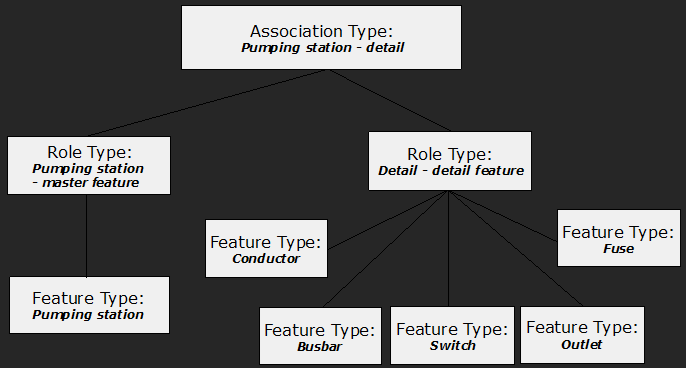
Example: Defining the detail association for the pumping station feature type.
<ber:model>
  ...
  <ber:roleTypeArray>
    <!-- Define the master role with Pumping station feature type in it -->
    <ber:masterRole id="rt_5010100_mst"
                    name="Pumping station - master feature">
      <ber:description>Pumping station - master feature</ber:description>
      <ber:ftItem refId="ft_5010100"/> <!-- The Pumping station -->
    </ber:masterRole>
    <!-- Define the detail role with many feature types in it -->
    <ber:detailRole id="rt_5090000_det" name="Detail - detail feature">
      <ber:description>Detail - detail feature</ber:description>
      <ber:ftItem refId="ft_5091000"/> <!-- The Conductor -->
      <ber:ftItem refId="ft_5092000"/> <!-- The Busbar -->
      <ber:ftItem refId="ft_5093000"/> <!-- The Switch -->
      <ber:ftItem refId="ft_5094000"/> <!-- The Fuse -->
      <ber:ftItem refId="ft_5095000"/> <!-- The Outlet -->
    </ber:detailRole>
  </ber:roleTypeArray>
  <ber:assocTypeArray>
   <!-- Define the detail association between the master element -
        Pumping station and detail elements -->
    <ber:detailAssoc id="det_5010100_1" name="Pumping station - detail">
      <ber:description>Pumping station - detail</ber:description>
      <ber:masterRole refId="rt_5010100_mst"/>
      <ber:detailRole refId="rt_5090000_det"/>
    </ber:detailAssoc>
  </ber:assocTypeArray>
</ber:model>
In case of shared semantics, the detailRoledefinition should contain the graphic feature types only. Semantic parent shouldn’t be defined in this role.
Optional attribute deleteWithMasterFeature defines, whether the features in detail content role are deleted automatically when deleting the detail association.
    <ber:detailAssoc id="det_1" name="ABC">
      <ber:description>Detail content automatically deleted</ber:description>
      <ber:masterRole refId="rt_1_mst"/>
      <ber:detailRole refId="rt_1_det" deleteWithDetail="true"/>
    </ber:detailAssoc>