Feature Types
Feature Types Introduction
Feature types and features
The absolutely essential items of LIDS metadata are Feature Types. A Feature Type can be characterized as a type of objects of the real world (features). The feature type defines the set of objects' semantic attributes, their geometry, symbology and other properties.
On the other hand, a Feature is an instance of a feature type. That means a Feature is a representation of a real-world object. Feature holds individual data information - values and geometry of an object.
Feature type definition contains following parts:
-
Name – Name of the feature type.
-
Feature type identifier – Unique feature type identifier.
-
Set of semantic attribute definitions – Set of semantic attributes – their ids, names and types.
-
Geometry type – Type of feature geometry (point, line, text, polygon, collection)
-
Symbology – Defines the symbology of all features with the same feature type.
-
Database storage (database container) – Defines the database container. The physical storage where the features are stored.
Hierarchy of feature types
Feature types are defined in a tree structure. A head of the structure must be a special feature type (Root Feature Type), which has to be abstract and requires id="ft_5000002". Its structure is following:
Attributes
-
id – Unique feature type identifier. This identifier is used whenever the feature type is referenced. The id XML attribute is always a unique identifier within all elements of LIDS model.
-
name – Name of a feature type.
-
abstract – Specifies whether the feature type is an abstract one – it means that the feature type cannot have instances (features) or not – the feature type can have instances (features).
Inner Elements
-
description – Contains a detailed description of the feature type.
-
featureAttributeArray – Contains fundamental system attributes like sid or ftid.
-
formArray – If defined, this form is used as default for all ftypes without defined form instead of using the "All attributes" form.
-
attachmentTypeArray – Reference to attached data.
Example: Root feature type.
<ber:rootFeatureType id="ft_5000002" name="Root" abstract="true">
  <ber:description>ROOT_NODE</ber:description>
  <ber:featureAttributeArray>
    <ber:systemAttribute id="id" name="Feature ID"/>
    <ber:systemAttribute id="sid" name="Semantic ID"/>
    <ber:systemAttribute id="ftid" name="Feature Type"/>
    <ber:systemAttribute id="createdBy" name="Created_by"/>
    <ber:systemAttribute id="updatedBy" name="Updated_by"/>
    <ber:systemAttribute id="createDate" name="Create_date"/>
    <ber:systemAttribute id="updateDate" name="Update_date"/>
    <ber:systemAttribute id="longTransactionId" name="Long_trans_ID"/>
    <ber:systemAttribute id="symbologyTokens" name="Symbology tokens"/>
    <ber:systemAttribute id="validFrom" name="Valid From"/>
    <ber:systemAttribute id="validTo" name="Valid To"/>
    <ber:systemAttribute id="featureInfo" name="Feature Info"/>
  </ber:featureAttributeArray>
  <!-- if this definition is applied, this form is used as default for all ftypes
       without defined form instead of using the "All attributes" form.
       So it's better not to use it
  <ber:formArray>
    <ber:form id="fml_50000" name="System attributes">
      <ber:fieldGroup>
        <ber:field refId="id" label="Feature ID" readOnly="true" length="40"/>
        <ber:field refId="sid" label="Semantic ID" readOnly="true" length="40"/>
        <ber:field refId="ftid" label="Feature Type" readOnly="true" length="80"/>
        <ber:field refId="createdBy" label="Created by" readOnly="true" length="80"/>
        <ber:field refId="updatedBy" label="Updated by" readOnly="true" length="40"/>
        <ber:field refId="createDate" label="Create date" readOnly="true" length="80"/>
        <ber:field refId="updateDate" label="Update date" readOnly="true" length="40"/>
        <ber:field refId="longTransactionId" label="Long transaction ID" readOnly="true" length="40"/>
      </ber:fieldGroup>
    </ber:form>
    <ber:assignedForms>
      <ber:assignedForm usage="locate" refId="fml_50000"/>
    </ber:assignedForms>
  </ber:formArray-->
</ber:rootFeatureType>
All other feature types are descendants (children) of root feature type. Thanks to the tree structure we can define inheritance between feature types. The child feature types inherit some information from its parent feature type.
The main information that child feature types inherit from their parents are:
-
List of semantic attributes – cannot be redefined
-
Properties of semantic attributes – they can be redefined in the child feature type
-
Type of semantic attributes - they can be redefined in the child feature type
-
Default values of semantic attributes – it can be redefined in the child feature type
-
Definition of user forms – can be redefined
-
Database storage (container) – it can be redefined in the child feature type
Semantic and graphic feature types
A feature type can have a set of semantic properties (semantic attributes). If a feature type contains any semantic property, it is called Semantic Feature Type.
The type of a geometry can be specified for a feature type. If a feature type contains geometry definition, then it is called Graphic Feature Type. The instances of a graphic feature type (features) may have a geometry.
Abstract feature type
There can be abstract feature types in the project metadata. An abstract feature type does not have any instances – can have no features. Abstract feature types are usually used for defining a common ancestor that holds information to be inherited, e.g. set of properties, database container, default values ...
It is possible to have a derived attribute from geometry in abstract feature type, which has no geometry. Abstract feature type can contain definition of geometry.
Defining Feature Types
All feature types are defined within a featureTypeArray XML collection in the project metadata file model.xml.
Example: Definition of abstract feature type called Pipeline inside the meta model.
<ber:model>
  <ber:featureTypeArray>
    ...
    <ber:featureType
       id="ft_5012000"
       name="Pipeline" parentId="ft_5010000"
       abstract="true">
      <ber:description>Abstract parent of water pipelines</ber:description>
      ...
    </ber:featureType>
    ...
  </ber:featureTypeArray>
</ber:model>
Feature type definition
The feature type definition contains a set of XML attributes and a list of inner XML elements. All these information together defines a feature type. The description of these XML attributes and elements is undermentioned.
-
id – Unique feature type identifier. This identifier is used whenever the feature type is referenced. The id XML attribute is always a unique identifier within all elements of LIDS model.
-
name – Name of a feature type.
-
parentId – Defines the parent feature type of the current feature type. The whole feature type hierarchy is built according to this attribute.
-
abstract – Specifies whether the feature type is an abstract one – it means that the feature type cannot have instances (features) or not – the feature type can have instances (features).
-
sharedSemantics– Indicates whether more graphical features of the given types share semantics of their parent. Possible values are false, true, single. The value single restricts a feature with shared semantics to only one instance of the given graphical type.
Inner elements
-
description – Contains a detailed description of the feature type. It can be quite a large text, so it is defined as a sub-element of a feature type.
-
container – Reference to a database container. This property is inherited to child feature types, but can be redefined
-
forbiddenOperations –The possible forbidden operations for feature types are [query | update | insert | delete]. The forbidden operations have higher priority than access rights and they are evaluated before them. This property is not inherited to child feature types
-
masterGraphics – see chapter 8.1.
-
graphicTagTypeArray – see chapter Graphic Tags 8.2.
-
featureAttributeArray – see chapter 4.
-
redefinedFeatureAttributeArray– see chapter 4.8.
-
boundedAttributesArray – see chapter 5.7.
-
formArray – see chapter 7.
-
interfaceDefArray – see chapter 6.
-
attachmentTypeArray – see chapter 14.
Shared Semantics
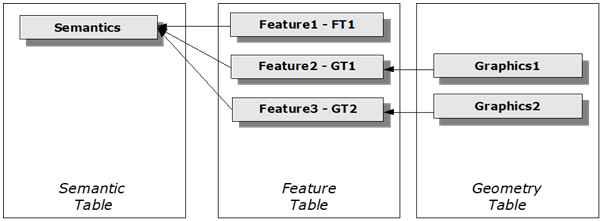
A unique property of the LIDS system is support for work with more graphic presentations of one and the same feature. That means in practice that one object can be displayed in a system several times, every time in a different context and using a different graphic presentation. It means that two features of different or similar feature types may share semantic record in the semantic table. Attribute data on the object is saved in the system only once. It is possible for example to describe an exact position of a cable and its passing through ducts in a map layer, display an electric connection in a schematic layer or document inputs/outputs to/from the network in a detail of a transformer station.
The definition requires the existence of the semantic feature type without graphics (FTS) which is superior towards all types that can create its graphic presentation (GT).
The following statements are valid for feature types defined in such a way:
-
Graphics is mandatory for every GT.
-
Feature types with shared semantics must have a common non-abstract parent feature type without geometry.
-
All children of an FTS share its semantics. Feature types with shared semantics must not have their own attributes (they have only attributes inherited from the common parent).
-
There must be no child feature types of a feature type with shared semantics.
-
GT must be mapped to the same container as FTS.
Example: Shared semantics diagram.
Example: Shared semantics in model.xml.
    <ber:featureType id="ft_501230_m" name="Protection pipe" parentId="ft_5012000" abstract="false">
      <ber:description>Protection pipe - semantic parent</ber:description>
      <ber:container refId="ct_5010004"/>
      <ber:featureAttributeArray>
        <ber:derivedAttribute id="at_5012301" name="First vertex X,Y" dbName="FIRST_XY">
          <ber:dataType>
            <ber:string maxLength="30"/>
          </ber:dataType>
          <ber:attributeQuery>
            <ber:geometryQuery>
              <ber:geometryFunction name="firstVertexX"/>
              <ber:geometryFunction name="firstVertexY"/>
              <ber:format>{0:F2},{1:F2}</ber:format>
              <ber:sharedSemanticsGraphicChild refId="ft_5012300"/>
            </ber:geometryQuery>
          </ber:attributeQuery>
        </ber:derivedAttribute>
      </ber:featureAttributeArray>
      <ber:redefinedFeatureAttributeArray>
        <ber:redefinedDerivedAttribute refId="at_5012002">
          <ber:attributeQuery>
            <ber:geometryQuery>
              <ber:geometryFunction name="length"/>
              <ber:sharedSemanticsGraphicChild refId="ft_5012300"/>
            </ber:geometryQuery>
          </ber:attributeQuery>
        </ber:redefinedDerivedAttribute>
      </ber:redefinedFeatureAttributeArray>
    </ber:featureType>
Semantic child:
  <ber:featureType id="ft_5012300" name="Protection pipe - axis" parentId="ft_501230_m" abstract="false" sharedSemantics="true">
      <ber:description>Line with borders</ber:description>
      <ber:masterGraphics nillable="false">
        <ber:curveGraphicType>
          <ber:symbology>
            <ber:lineSymbolizer>
              <se:Stroke>
                <se:SvgParameter name="stroke">#008000</se:SvgParameter>
                <se:SvgParameter name="stroke-width">2</se:SvgParameter>
              </se:Stroke>
            </ber:lineSymbolizer>
          </ber:symbology>
          <ber:dynamicSymbology xlink:href="thematization.xml#fts_5012300"/>
        </ber:curveGraphicType>
      </ber:masterGraphics>
      <ber:graphicTagTypeArray>
        <ber:graphicTagType id="ft_5012300_gtda_5060002" name="Protection pipe - border line" drawPriority="-1">
          <ber:description>Generated border lines</ber:description>
          <ber:graphics refId="gtda_5060002"/>
        </ber:graphicTagType>
      </ber:graphicTagTypeArray>
    </ber:featureType>
Use of shared semantics – buffer zones
Shared semantics can be used also for creating buffer zones around line features. For implementation in model.xml see following example. There is a parent feature type ft_railway with attributes which hold information about buffer width for some child feature types and also about count of parcels in buffer zones (count is found out by spatial relations sr_railway5_parcel and sr_railwayz1_parcel). Buffer zones themselves are defined in child feature types (ft_railway_buffer_z1, ft_railway_buffer_5). Width of buffer zone can be defined variable by attribute (at_railway_zone1) or can be fixed to certain value (ft_railway_buffer_5).
Example: Buffer zones.
<ber:featureType id="ft_railway" name="Railway" parentId="ft_geo" abstract="false">
<ber:description>Semantic parent</ber:description>
<ber:container refId="ct_geo_railway"/>
<ber:featureAttributeArray>
<ber:attribute id="at_railway_zone1" name="Zone 1 width [m]" dbName="ZONE1_WIDTH">
<ber:dataType>
<ber:decimal precision="10" scale="2"/>
</ber:dataType>
<ber:defaultValue>
<ber:value>10</ber:value>
</ber:defaultValue>
</ber:attribute>
<ber:derivedAttribute id="at_railway_countparcz1" name="Parcel count in zone 1" dbName="COUNT_PARC_Z1">
<ber:dataType>
<ber:decimal precision="5" scale="0"/>
</ber:dataType>
<ber:attributeQuery>
<ber:relationQuery>
<ber:expression>count(*)</ber:expression>
<ber:relationAssoc refId="sr_railwayz1_parcel"/>
</ber:relationQuery>
</ber:attributeQuery>
</ber:derivedAttribute>
</ber:featureType>
<ber:derivedAttribute id="at_railway_countparc5" name="Parcel count in 10m" dbName="COUNT_PARC_5">
<ber:dataType>
<ber:decimal precision="5" scale="0"/>
</ber:dataType>
<ber:attributeQuery>
<ber:relationQuery>
<ber:expression>count(*)</ber:expression>
<ber:relationAssoc refId="sr_railway5_parcel"/>
</ber:relationQuery>
</ber:attributeQuery>
</ber:derivedAttribute>
...
<ber:featureType id="ft_railway_buffer_z1" name="Railway - buffer zone 1" parentId="ft_railway" abstract="false" sharedSemantics="true">
<ber:description>Generated polygon - width according to attribute Zone 1</ber:description>
<ber:masterGraphics nillable="false">
<ber:surfaceGraphicType>
<ber:symbology>
<ber:polygonSymbolizer>
<ber:fill>
<se:SvgParameter name="fill">#FAE802</se:SvgParameter>
<se:SvgParameter name="fill-opacity">0.5</se:SvgParameter>
<ber:fillStyle>solid</ber:fillStyle>
</ber:fill>
<se:Stroke>
<se:SvgParameter name="stroke">#FAE802</se:SvgParameter>
<se:SvgParameter name="stroke-opacity">0.7</se:SvgParameter>
</se:Stroke>
</ber:polygonSymbolizer>
</ber:symbology>
</ber:surfaceGraphicType>
</ber:masterGraphics>
</ber:featureType>
...
<ber:featureType id="ft_railway_buffer_5" name="Railway - buffer 10m" parentId="ft_railway" abstract="false" sharedSemantics="true">
<ber:description>Generated polygon - diameter 10m</ber:description>
<ber:masterGraphics nillable="false">
<ber:surfaceGraphicType>
<ber:symbology>
<ber:polygonSymbolizer>
<ber:fill>
<se:SvgParameter name="fill">#FAE802</se:SvgParameter>
<se:SvgParameter name="fill-opacity">0.5</se:SvgParameter>
<ber:fillStyle>solid</ber:fillStyle>
</ber:fill>
<se:Stroke>
<se:SvgParameter name="stroke">#FAE802</se:SvgParameter>
<se:SvgParameter name="stroke-opacity">0.7</se:SvgParameter>
</se:Stroke>
</ber:polygonSymbolizer>
</ber:symbology>
</ber:surfaceGraphicType>
</ber:masterGraphics>
</ber:featureType>
...
<ber:spatialRelationAssoc id="sr_railway5_parcel" name="Railway 10m <-> Parcel" dbName="SR_RAILWAY5_PARCEL">
<ber:srcRole refId="rt_parcel_s"/>
<ber:destRole refId="rt_railway"/>
<ber:interactionType>
<ber:faceToFace spatialCondition="intersects"/>
<ber:roleFilter refId="rt_parcel_s">
<ber:featureType refId="ft_parcel_face"/>
</ber:roleFilter>
<ber:roleFilter refId="rt_railway">
<ber:featureType refId="ft_railway_buffer_5"/>
</ber:roleFilter>
</ber:interactionType>
</ber:spatialRelationAssoc>
<ber:spatialRelationAssoc id="sr_railwayz1_parcel" name="Railway zone1 <-> Parcel" dbName="SR_RAILWAYZ1_PARCEL">
<ber:srcRole refId="rt_parcel_s"/>
<ber:destRole refId="rt_railway"/>
<ber:interactionType>
<ber:faceToFace spatialCondition="intersects"/>
<ber:roleFilter refId="rt_parcel_s">
<ber:featureType refId="ft_parcel_face"/>
</ber:roleFilter>
<ber:roleFilter refId="rt_railway">
<ber:featureType refId="ft_railway_buffer_z1"/>
</ber:roleFilter>
</ber:interactionType>
</ber:spatialRelationAssoc>